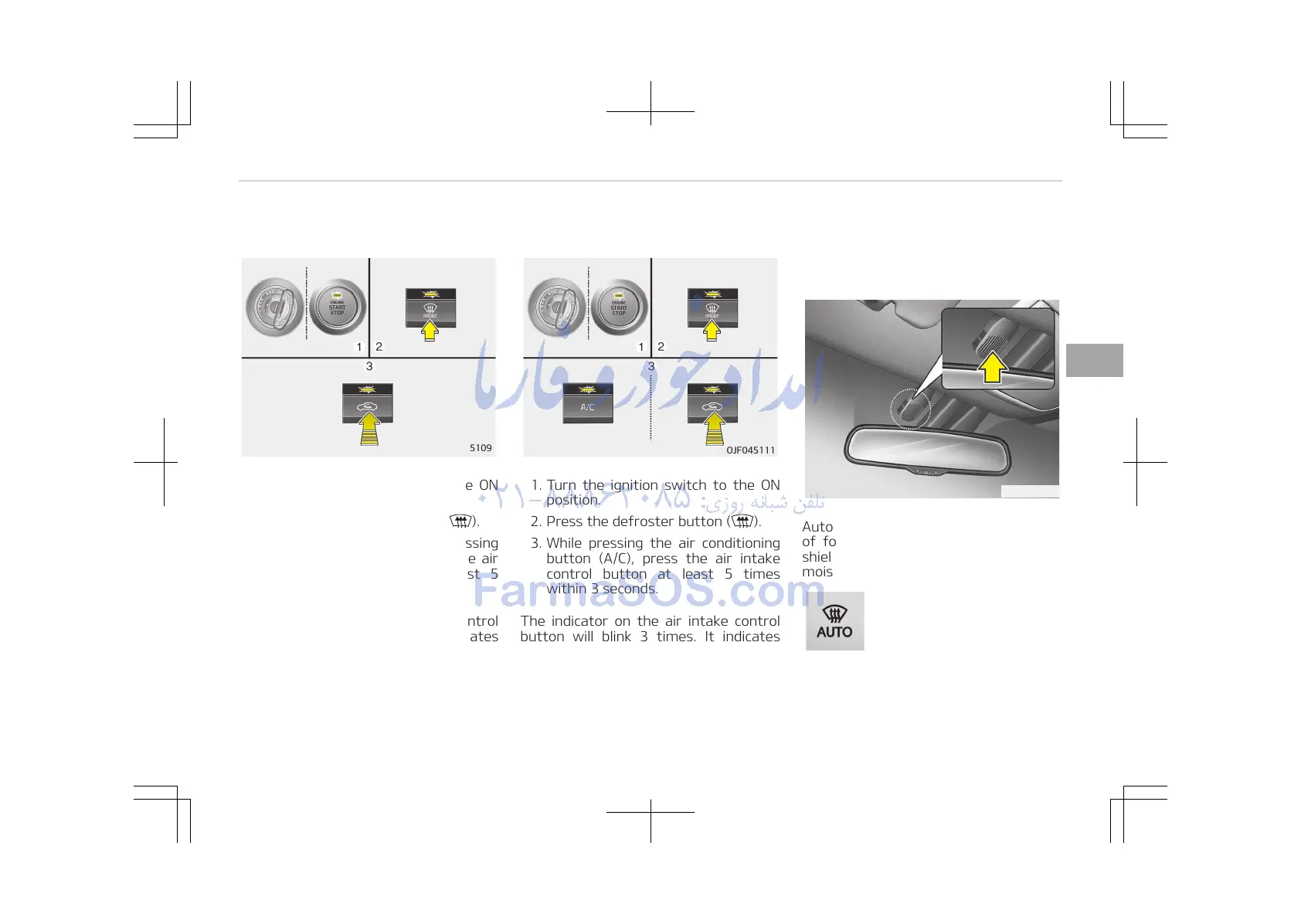
Manual climate control system
1. Turn the ignition switch to the ON
position.
2. Press the defroster button ( ).
3. Within 10 seconds after pressing
the defroster button, press the air
intake control button at least 5
times within 3 seconds.
The indicator on the air intake control
button will blink 3 times. It indicates
that the defogging logic is canceled or
returned to the programmed status.
If the battery has been discharged or
disconnected, it resets to the defog
logic status.
Automatic climate control system
1. Turn the ignition switch to the ON
position.
2. Press the defroster button ( ).
3. While pressing the air conditioning
button (A/C), press the air intake
control button at least 5 times
within 3 seconds.
The indicator on the air intake control
button will blink 3 times. It indicates
that the defogging logic is canceled or
returned to the programmed status.
If the battery has been discharged or
disconnected, it resets to the defog
logic status.
Auto defogging system (only for
automatic climate control
system, if equipped)
Auto defogging reduces the possibility
of fogging up the inside of the wind‐
shield by automatically sensing the
moisture of inside the windshield.
This indicator illuminates
when the auto defogging
system senses the moisture
of inside the windshield and
operates.
If more moisture is in the vehicle, high‐
er steps operate as follow.
4-167
4
Features of your vehicle















 To Next Page