EasyManua.ls Logo

Kia Optima 2017 - Audio (Without Touch Screen); Feature of Your Audio

Kia Optima 2017
776 pages
Print Icon
To Next Page IconTo Next Page
To Previous Page IconTo Previous Page
Loading...
AUDIO (WITHOUT TOUCH SCREEN)
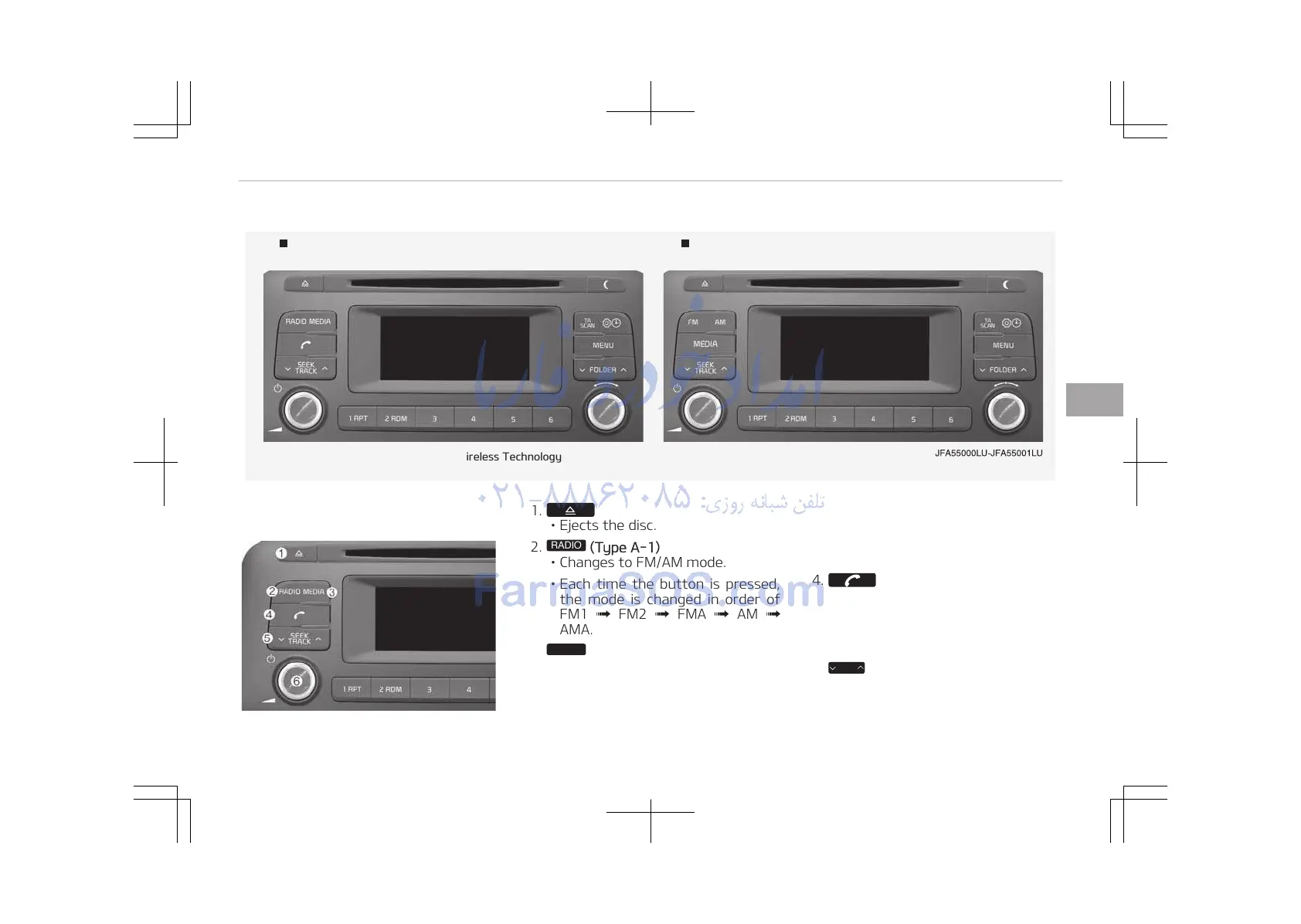
Type A-1 Type A-2
With Bluetooth
Wireless Technology
Feature of your audio
1.
Ejects the disc.
2.
RADIO
(Type A-1)
Changes to FM/AM mode.
Each time the button is pressed,
the mode is changed in order of
FM1 FM2 FMA AM
AMA.
3.
MEDIA
Changes to CD, USB (iPod
®
), AUX,
My Music
*
, BT Audio
*
mode.
*
if equipped
Each time the button is pressed,
the mode is changed in order of
CD, USB (iPod
®
), AUX, My Music
*
,
BT Audio
*
.
4.
(Type A-1)
Operates Phone Screen.
When a phone is not connected,
the connection screen is dis‐
played.
5.
SEEK
TRACK
*
if equipped
5-07
5
Audio system

Table of Contents

Other manuals for Kia Optima 2017

Related product manuals