Diagnostic information 2-27
5041-030
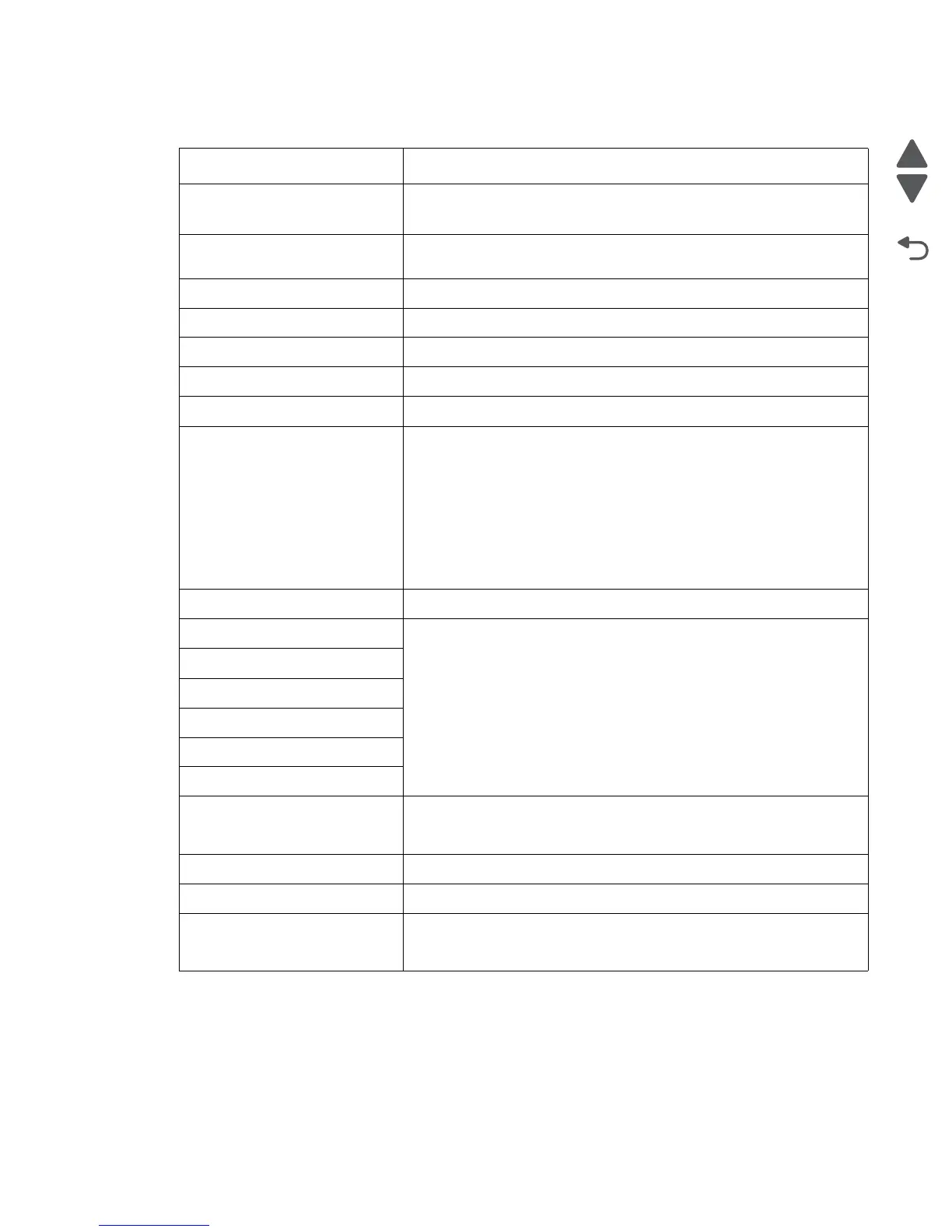
9xx error codes Action
900.xx Unrecoverable RIP
software error / illegal trap
See “Steps before starting the 9yy service checks” on page 2-40.
See “900.xx System software error” on page 2-42.
910.xx Unrecoverable engine
firmware error
Turn off printer for 10 seconds and restart. If error re-occurs, replace RIP
board.
941.01 SDRAM R/W error See “941.01 SDRAM R/W error” on page 2-44.
941.02 MDC error See “941.02 MDC error” on page 2-44.
941.03 CPU error See “941.03 CPU error” on page 2-46.
941.04 Abnormal MDC controller See “941.04 MDC controller error” on page 2-46.
941.05 Abnormal EEPROM See “941.05 EEPROM error” on page 2-46.
950.xx Service NCVRAM
Mismatch
Note: A new controller board or
operator panel has been
installed, and has not been
properly prepared for this use. Do
not install both the controller
board and the operator panel at
the same time without a POR in
between.
See “950.00–950.29—EPROM mismatch failure” on page 2-47.
952.xx Service NV Failure Perform a POR to clear the error.
953.xx Service NVRAM Failure Replace the RIP board.
954.xx Service NVRAM Failure
955.00 Service Code CRC <loc>
956.xx Service System Board
957.xx Service System Board
958.xx Service NAND Failure
959,xx Service Invalid Firmware Call the second level support to get the correct level of firmware and
update the firmware, or replace the RIP board. See “959.xx Service
invalid firmware error” on page 2-48
960.xx Service Memory Error Replace the RIP board.
961.xx Service Memory Error Replace the memory in the DIMM slot.
964.xx Service Emulation Error Disable the Download Emulation. Program the download emulation into
the firmware card again. If this does not resolve the problem, then
replace the firmware card and download the emulation again.



 To Next Page