Diagnostic information 2-63
5041-030
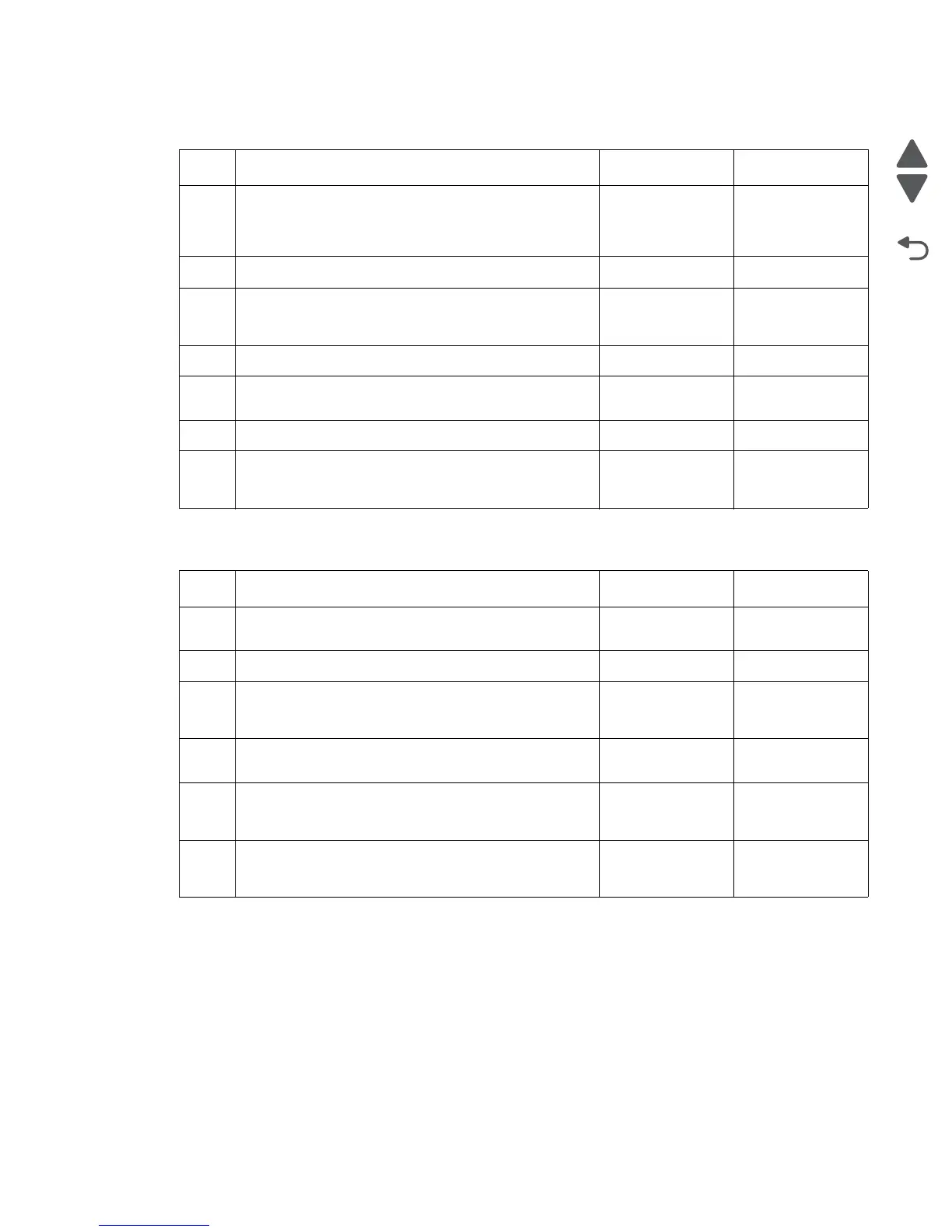
Insert tray service check
Paper skew service check
Step Action and questions Yes No
1 Remove the tray, and inspect the tray for any damaged
or broken parts that would prevent it from being
installed properly, or move around in the printer. Are
there loose or damaged parts on the tray?
Go to step 2. Go to step 3.
2
Try a different tray. Did this fix the issue? Problem solved Go to step 3.
3
Check the sensor cables for proper connection to the
sensors and engine controller board. Are they properly
connected?
Go to step 5. Go to step 4.
4
Connect the cables. Did this fix the issue? Problem solved Go to step 5.
5
Check the size sensors for proper operation. Are they
working properly?
Go to step 7. Go to step 6.
6
Replace the sensors. Did this fix the issue? Problem solved Got to step 7.
7
Replace the engine controller board. Did this fix the
issue?
Problem solved. Contact your
second level
support.
Step Action and questions Yes No
1 Are the paper guides in the paper trays and MPF tray
in there proper position?
Go to step 4. Go to step 3.
2
Adjust all the paper guides. Did this fix the problem? Problem solved. Go to step 4.
3
Check the tray to see if the paper in the tray is above
the full mark on the side guides in the tray. Is there too
much paper in the trays?
Go to step 5. Go to step 6
4
Remove the excess paper from the trays. Did this fix
the problem?
Problem solved. Go to step 6.
5
Inspect the paper feed rolls, registration rolls, and
registration roll springs. Are the registration rolls clean
and in the proper place?
Go to step 8. Go to step 7.
6
Install the paper feed maintenance kit. Did this fix the
issue?
Problem solved. Contact your
second level
support.



 To Next Page