Diagnostic information 2-59
5041-030
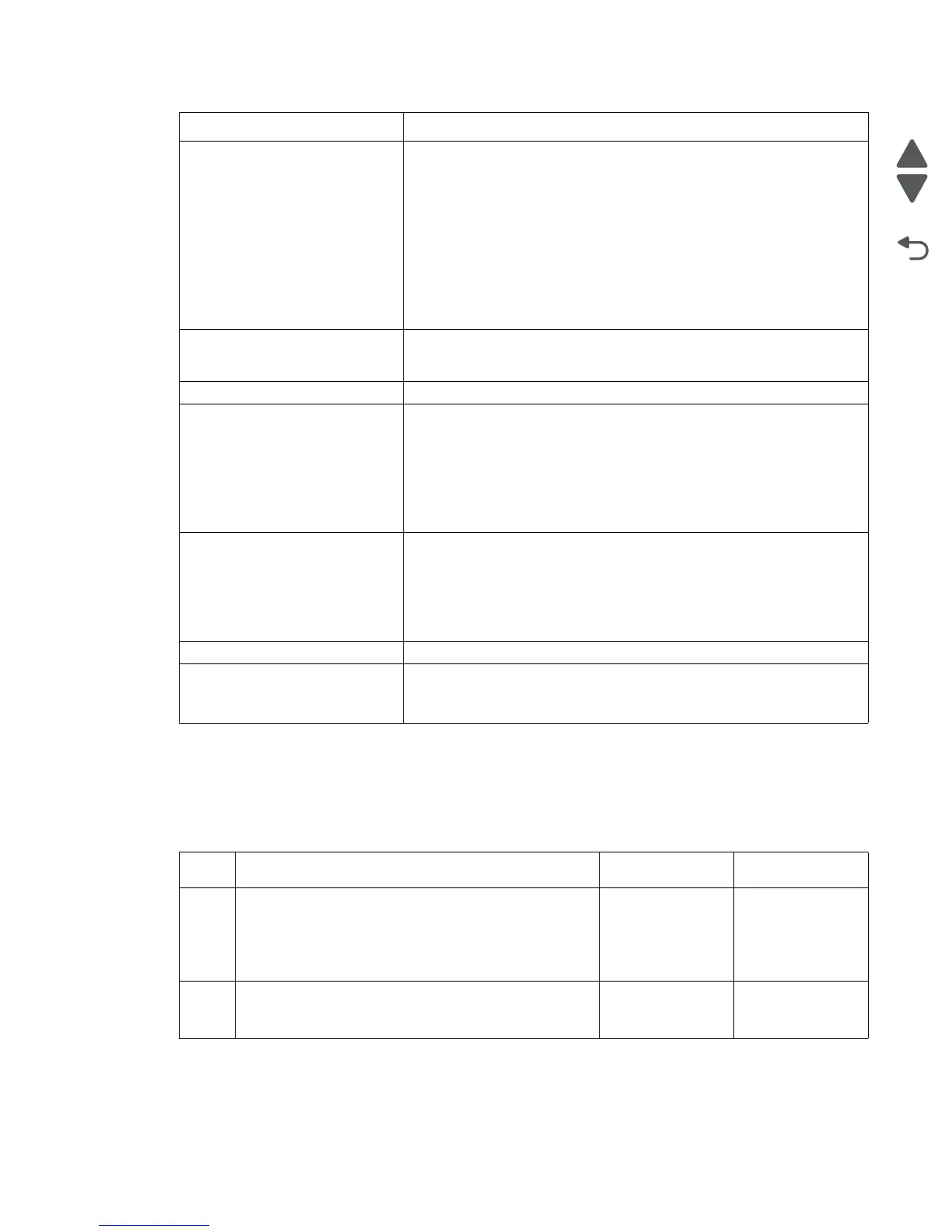
ON / OFF switch automatically switching to the Off position service check
Note: If the machine turns off a few seconds after a POR, follow the procedure below. The automatic shut
down of the printer is a safety feature implemented to avoid fire, or damage to the printer. This is a feature
of the device.
• Foggy print
• Black pages
• Blank print
• White spots
• Poor reproduction
• Incorrect color image
registration
• Dirt on back of paper
• Low image density
• White and black lines and
bands
Go to “Print quality issues” on page 2-4.
Evenly spaced marks on the
paper, or a single mark in the
same place on every page.
See “Repeating marks” on page 2-7.
Poor fusing. Go to “121.05 Fuser - fuser heater error” on page 2-32.
Toner scatter on front or back of
paper.
Check the following:
• Excessive toner buildup on the transfer belt. Clean off the toner, and
run a test print.
• Transfer belt assembly
• Transfer belt toner waste bottle
• Transfer belt separation fingers
• Fuser separation pawl
Paper will not feed from MPF. Be sure you have paper in the MPF.
Check the paper size and type. Does it match the paper setting on the
printer?
Be sure the MPF paper present sensor connector (CN16) is connected to
the CK1 daughter board. If the paper still does not feed, go to “Paper
path service checks” on page 2-19.
Waste toner bottle missing. See “Waste toner bottle missing service check” on page 2-68.
ON / OFF switch automatically
switching to the Off position.
Machine shutting down.
Go to “ON / OFF switch automatically switching to the Off position
service check” on page 2-59.
Step Action and questions Yes No
1 POR the printer a couple times. Does the printer turn
off a few seconds after the POR?
Note: When restarting the machine, you should see
the power switch physically move to the off position
when the machine turns off.
Go to step 2. Problem resolved
2
Replace the fuser, power supply, and printhead
controller board. Does this fix the problem?
Problem
resolved.
Contact your
second level
support
Symptom Action



 To Next Page