L-Gate User Manual 105 LOYTEC
Version 3.2 LOYTEC electronics GmbH
in the tool bar of the main connections window and press Add Connection…. A new
connection is added to the connection list. Rename the connection if you want to do so.
2. Click on Select Hub… to select the hub point. This opens a list of all available data
points. Select one and press OK.
3. Then click on Add Target… Similar to 2) select all target data points. You may use
multi-select to select more than one data point at a time.
Note: By default only compatible data points are displayed. Sometimes compatible data points
are available as member points (e.g., a SNVT structure member). Click on to expand
the data point and select the desired member point.
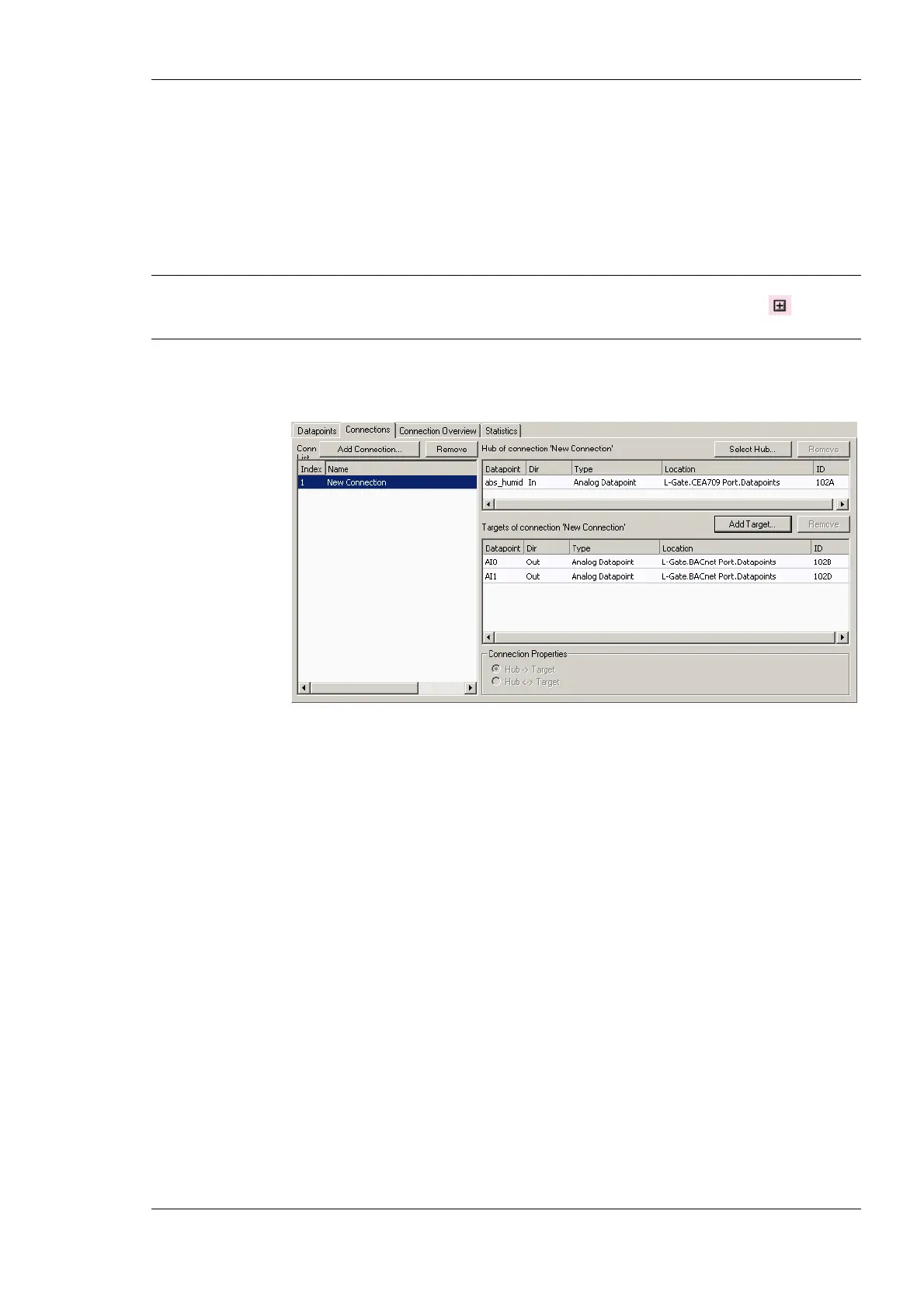
4. Now the connection display contains a hub and two target data point as shown in
Figure 92.
Figure 92: Connection dialog with hub and target points.
6.9.2 Create Connections from a CSV File
A quick way to perform batch edit on connections is to export and import connections from
the connections CSV file. Each line in the connections CSV file identifies a connection.
The first column is the connection name. The second column specifies the hub data point.
The full path to the data point must be specified using the dot ‘.’ as the folder separator.
The third and following columns specify the target data points.
To Create Connection from a CSV File
1. Select the menu Tools Æ Export Connections …
2. Select an appropriate file name and export.
3. Edit the connections CSV file. An example is shown in Figure 93.
#connection_csv_ver,1
#ConnectionName,HubDPName,TargetDPName
nvoAbs_humid1,L-Gate.CEA709 Port.abs_humid1,L-Gate.BACnet Port.AO101
nvoAbs_humid2,L-Gate.CEA709 Port.abs_humid2,L-Gate.BACnet Port.AO102
nvoAbs_humid3,L-Gate.CEA709 Port.abs_humid3,L-Gate.BACnet Port.AO103
nvoAbs_humid4,L-Gate.CEA709 Port.abs_humid4,L-Gate.BACnet Port.AO104
Figure 93: Example Connection CSV File.



 To Next Page