L-Gate User Manual 136 LOYTEC
Version 3.2 LOYTEC electronics GmbH
• Once a scheduler is in a connection, do not change its scheduled data points. Doing so
after creating may violate the connection rules and result in a non-functioning
connection.
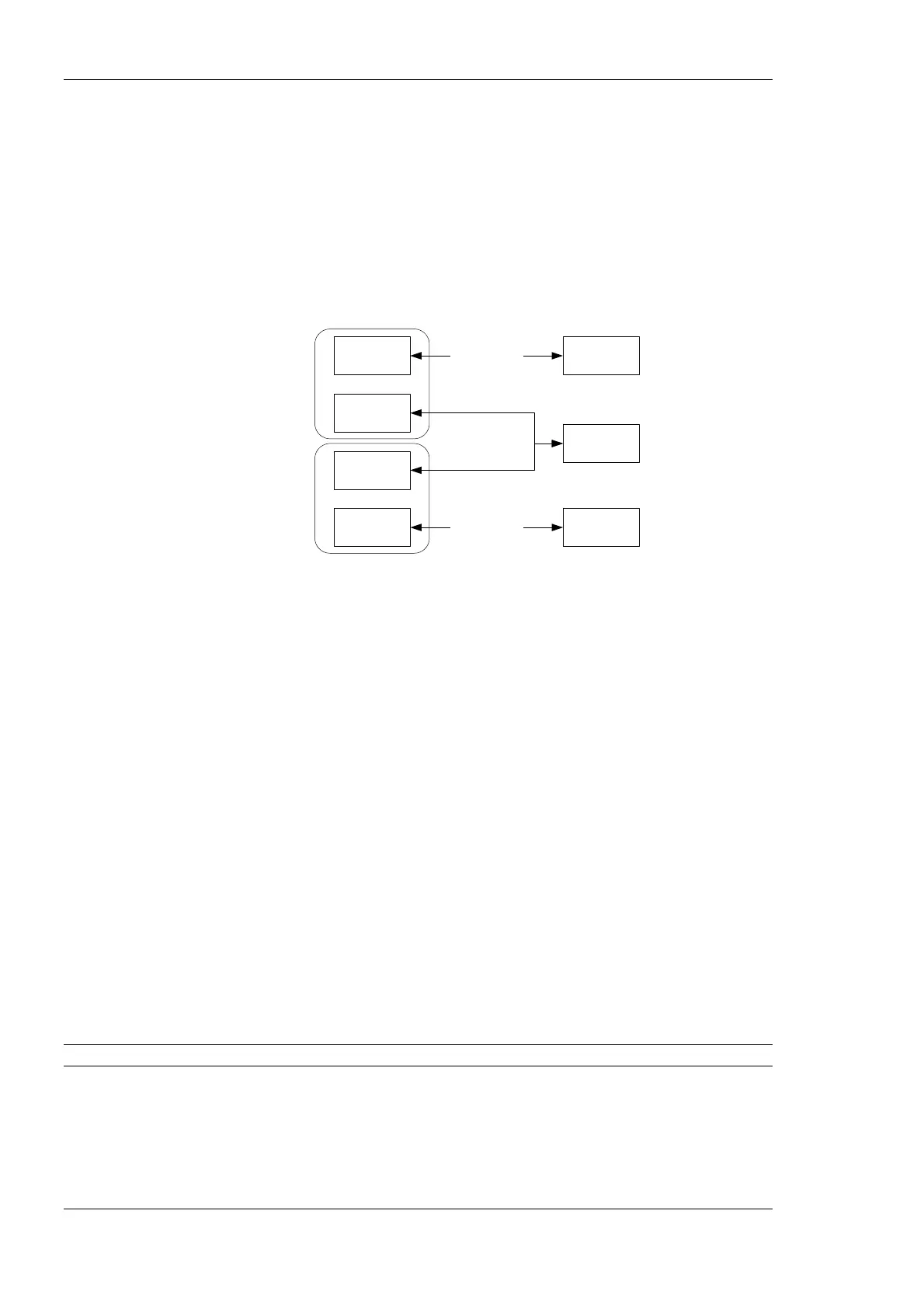
Figure 110 shows an example, how two remote CEA-709 schedulers are exposed to
BACnet schedulers. There are three connections involved. One connection sched_1_conn
is created for lon_sched_1 and bac_sched_1. A second connection sched_2_conn is created
for lon_sched_2 and bac_sched_2. Since there is only one BACnet calendar, all calendar
objects must be put into a single connection cal_conn, containing lon_cal_1, lon_cal_2,
and bac_cal.
lon_sched_1 sched_1_conn bac_sched_1
lon_sched_2
lon_cal_1
lon_cal_2
bac_sched_2
bac_cal
sched_2_conn
cal_conn
Figure 110: Example for schedule and calendar connections.
6.17.2 Map from CEA-709 to BACnet
This section describes how to expose a CEA-709 scheduler and calendar to a BACnet
operator workstation (OWS). It is assumed that the CEA-709 scheduler is either a local or a
remote scheduler on the L-Gate and schedules only one value. That CEA-709 scheduler
must be the hub.
To Expose a CEA-709 Schedule to BACnet
1. Prepare a CEA-709 schedule object to be exposed (local as in Section 6.12 or a remote
scheduler as in Section 6.15.1 from the Remote Devices folder)
2. Create a local BACnet scheduler as in Section 6.12. Do not attach data points to that
scheduler.
3. Create a new connection (see Section 6.9.1). Give it a descriptive name, e.g.
sched_conn.
4. Select the CEA-709 schedule object as the hub.
5. Select the BACnet scheduler as the target.
6. Click Save. Now a scheduler connection appears in the connections list.
Important: Once a scheduler is in a connection, do not change the scheduled data points!
7. Create a local BACnet calendar object, if not existing yet. Add the required number of
calendar patterns, i.e., the number of calendar patterns used in the CEA-709 calendar.
It is recommended to allocate a number of spare calendar patterns, too. This can be
handy, because BACnet calendars cannot dynamically add calendar patterns at run-
time, while CEA-709 calendars can. Do not specify names for the calendar patterns.



 To Next Page