L-Gate User Manual 110 LOYTEC
Version 3.2 LOYTEC electronics GmbH
To Create Server Objects Manually
1. Select the BACnet Port/Datapoints folder
2. Right-click in the data point list and select New Datapoint… in the context menu.
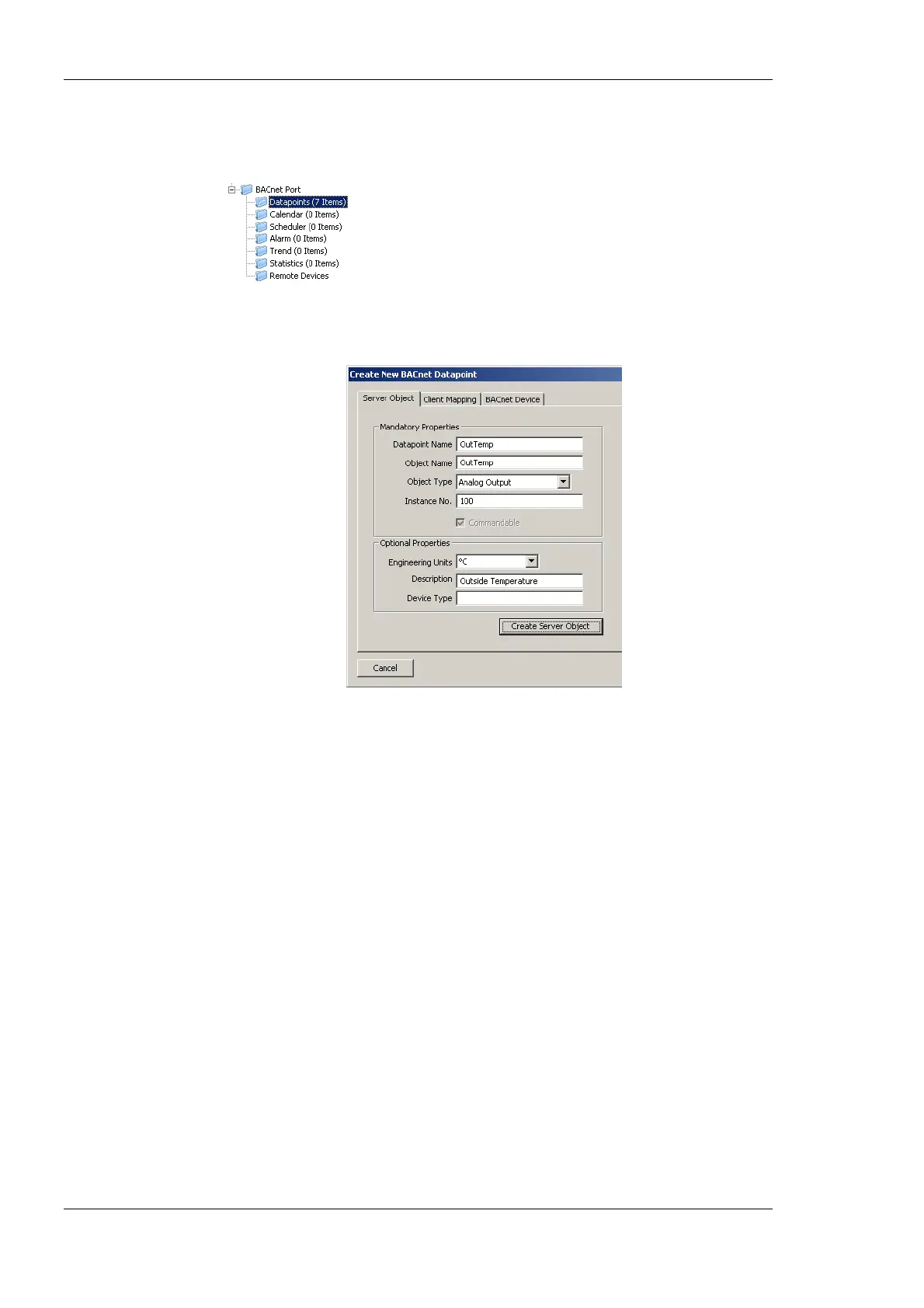
This opens the Create New BACnet Point dialog as shown in Figure 98.
Figure 98: Create a Server Object manually.
3. In the Mandatory Properties enter a Datapoint Name and an Object Type.
Optionally, update the Instance No and select the Commandable check box for value
objects, if the value object shall be commandable from the network.
4. In the Optional Properties you may select Engineering Units for analog objects. For
all object types you can enter the Description. The Device Type can be left empty.
5. Click Create Server Object. The BACnet data point is created and appears in the data
point list.
6.10.6 Map other Properties than Present_Value
When creating a BACnet server object, the Present_Value property is mapped by the
created data point. That means writing and reading on the data point reads or writes the
Present_Value. If other properties shall be accessed, they must be added to the BACnet
server object’s data point.
To Add other Properties
1. Select the BACnet server object for adding properties.
2. Right-click on the data point and select Add/Remove BACnet properties … . The
dialog appears as shown in Figure 99.



 To Next Page