L-Gate User Manual 75 LOYTEC
Version 3.2 LOYTEC electronics GmbH
• Set Defaults: This button will choose standard values for all settings. In most cases,
these settings will provide more resources than necessary.
6.3.5 BACnet Settings
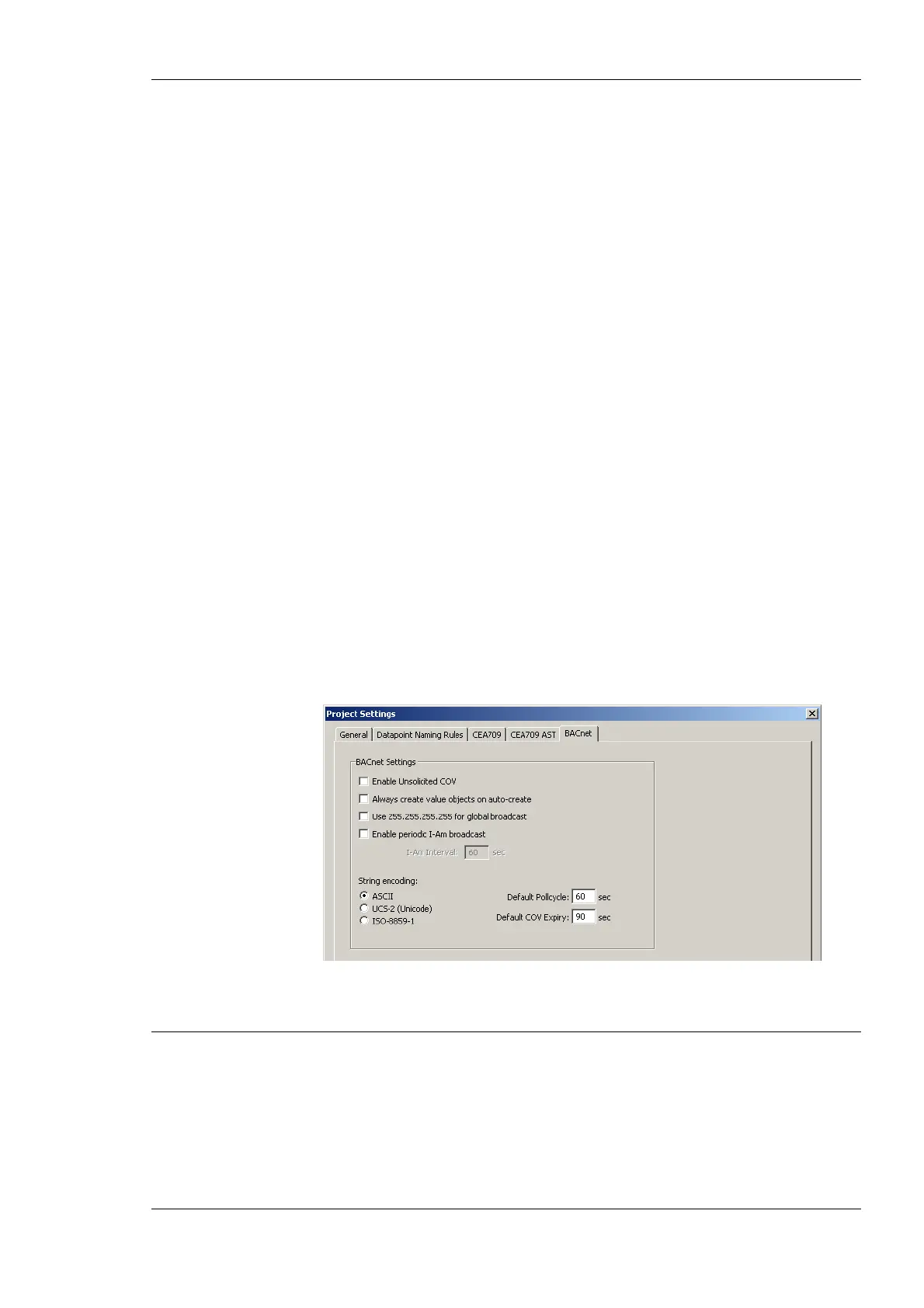
The BACnet configuration tab as shown in Figure 54 allows configuring properties of the
device’s BACnet port. The options are:
• Enable Unsolicited COV: Put a check mark on this option to enable COV-U on the
BACnet port. When active, the device sends unsolicited COV broadcast on all BACnet
objects, when their value changes in accordance to the respective COV rules.
• Always create value objects on auto-create: If activated, the auto-create BACnet
points function of the configuration software creates commandable value objects (AV,
BV, MV) instead of output objects (AO, BO, MO) and non-commandable value
objects (AV, BV, MV) instead of input objects (AI, BI, MI). This feature can be
activated if the regular input/output model is not desired.
• Use 255.255.255.255 for global broadcast: This setting overrides the standard
behavior of BACnet to send broadcasts as global IP broadcasts. This can solve
scanning problems with some BACnet devices.
• Enable periodic I-Am broadcast: This setting enables the periodic transmission of I-
Am broadcasts. Specify the interval in seconds. If disabled, the device sends an I-Am
only when starting up. This is the default behavior of BACnet devices.
• Encode all strings: This setting defines how strings in BACnet objects are encoded.
By default it is ASCII, which is compatible with most BACnet software. To support
characters of Western European languages, choose ISO-8859-1. To support Unicode
character sets (e.g., Japanese) select UCS-2.
• Default Poll cycle, Default COV Expiry: This setting defines the default values that
are used when creating new client mappings. Changing this option does not affect
already existing client mappings.
Figure 54: BACnet Project Settings.
6.4 Workflows for the L-Gate
This section discusses a number of work flows for configuring the L-Gate in different use
cases in addition to the simple use case in the quick-start scenario (see Section 2.3). The
description is intended to be high-level and is depicted in a flow diagram. The individual
steps refer to later Sections, which describe each step in more detail. In principle, the
L-Gate Configurator supports the following use cases:
• Network Management Tool based on LNS 3.x (see Section 6.4.2)



 To Next Page