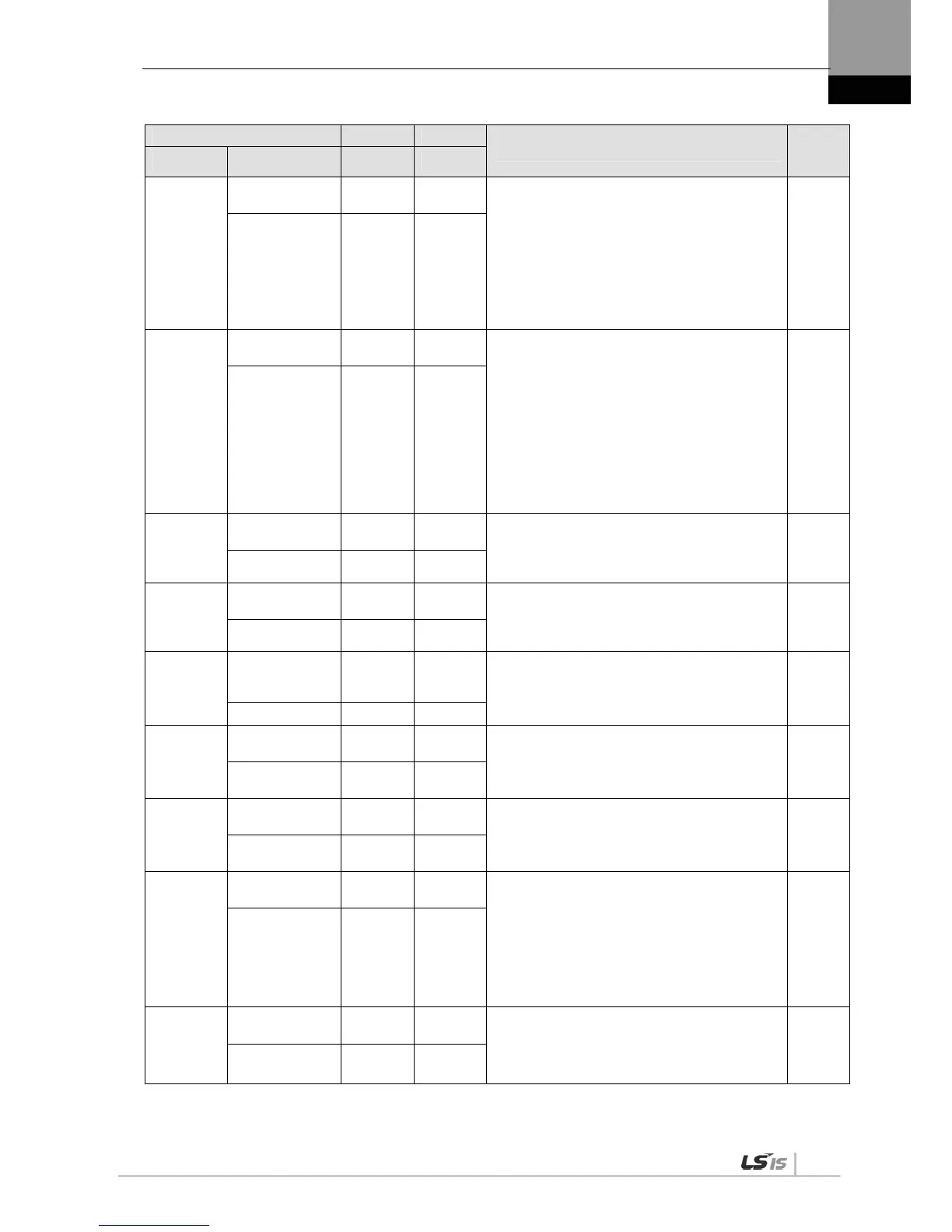
**P2-09
Input signal logic
definition 2
- 0b10001
Define CN1 connector logic for a digital input
signal.(0: Contact B, 1: Contact A)
Initial input logic definitions
[P2-09]DIGIT 1 = DI6 (CN1 #46) (Contact A)
[P2-09]DIGIT 2 = DI7 (CN1 #20) (Contact A)
[P2-09]DIGIT 3 = DI8 (CN1 #19) (Contact A)
[P2-09]DIGIT 4 = DI9 (CN1 #18) (Contact A)
[P2-09]DIGIT 5 = DIA (CN1 #48) (Contact A)
(Details: Refer to “4.1.6 External Input Signal and
Logic Definition.”)
PST
Input logic set 2 0 0b11111
**P2-10
Output signal
logic definition
- 0b10110
Define CN1 connector logic for a digital output
signal (0: Contact B, 1: Contact A)
Initial input logic definitions
[P2-10]DIGIT 1 = DO1 (CN #38/39) (Contact B)
[P2-10]DIGIT 2 = DO2 (CN #40/41) (Contact A)
[P2-10]DIGIT 3 = DO3 (CN #43) (Contact A)
[P2-10]DIGIT 4 = DO4 (CN #44) (Contact B)
[P2-10]DIGIT 5 = DO5 (CN #45) (Contact A)
(Details: Refer to “4.1.8 External Output Signal and
Logic Definition.”)
(Details: Refer to “4.4.4 Input/Output Contact
Parameter Setting.”)
PST
Output logic set
0
0b11111
P2-11
Position reached
output range
[pulse] 10
Sets remaining pulse range for position reached
output in position operation mode.
(Details: Refer to “4.4.4 Input/Output Contact
Parameter Setting.”)
P
In position range 1 65535
P2-12
Zero speed
output range
[RPM] 10
Sets speed range for zero speed output during a
stop.
(Details: Refer to “4.4.4 Input/Output Contact
Parameter Setting.”)
PST
Zero speed range 1 500
P2-13
Range of output
for speed
reached
[RPM] 10
Sets speed range for command speed reached
output.
(Details: Refer to “4.4.4 Input/Output Contact
Parameter Setting.”)
S
In speed range 1 500
P2-14
Brake output
action speed
[RPM] 100
Sets speed for turning on the brake output contact.
(Details: Refer to “4.4.4 Input/Output Contact
Parameter Setting.”)
PST
Brake output
speed
0 6000
P2-15
Brake output
delay time
[ms] 500
Sets how much time to delay until the brake output
contact turns on when the servo is off or stops.
(Details: Refer to “4.4.4 Input/Output Contact
Parameter Setting.”)
PST
Brake output
delay time
0 1000
P2-16
Position pulse
clear mode
- 1
Select operation type for position pulse clear
(PCLR) mode.
0: Operate in edge mode.
1: Operate in level mode.(Torque :
Continue)
2: Operate in level mode.(Torque : 0)
(Details: Refer to “4.4.4 Input/Output Contact
Parameter Setting.”)
P
PCLR mode 0 1
*P2-17
Analog speed
scale
[RPM] 2000
Sets speed scale when the analog speed command
is 10 [V].
(Details: Refer to “4.4.3 Analog Input/Output
Parameter Setting.”)
S
Analog speed
command scale
1 15000


 To Next Page
 Loading...