4. Parameters
4-6
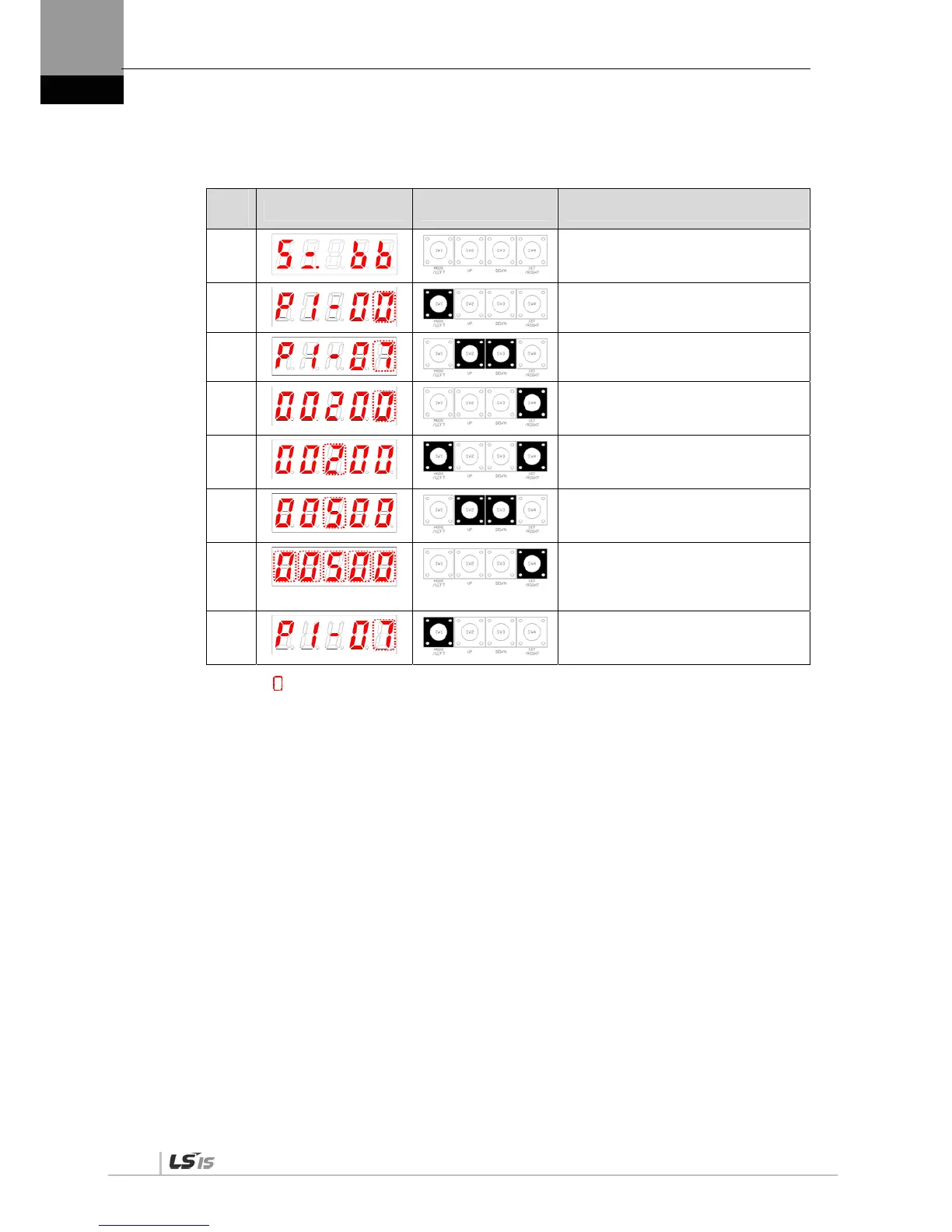
(3) Example of changing speed proportional gain 2
([P1-07]: 200 [rad/s] -> 500 [rad/s])
Ord
er
Loader Displays Keys to Use What to Do
1
Displays the speed control mode with
main power and permitted control
power.
2
Press [MODE] to move to [P1-00].
3
Press [UP] or [DOWN] to move to [P1-
07].
4
Press [SET] to enter parameter edit
mode. The parameter is displayed as
00200.
5
Press [/LEFT] or [/RIGHT] at the
blinking cursor to move to the desired
digit, DIGIT 3.
6
Press [UP] or [DOWN] at the blinking
DIGIT 3 position to change the number
to 00500.
7
Press and hold [SET] for approximately
one second. After two flickers, the
number will be saved as 00500 in the
parameter.
8
Press and hold [MODE] for
approximately one second to return to
[P1-07].
NOTE 1) “ ” indicates flickering.
If you hold down [UP] / [DOWN] at the current cursor in the parameter window, the number continues to
increase/decrease.


 To Next Page
 Loading...