LH71A / LH72
(E) 5-17
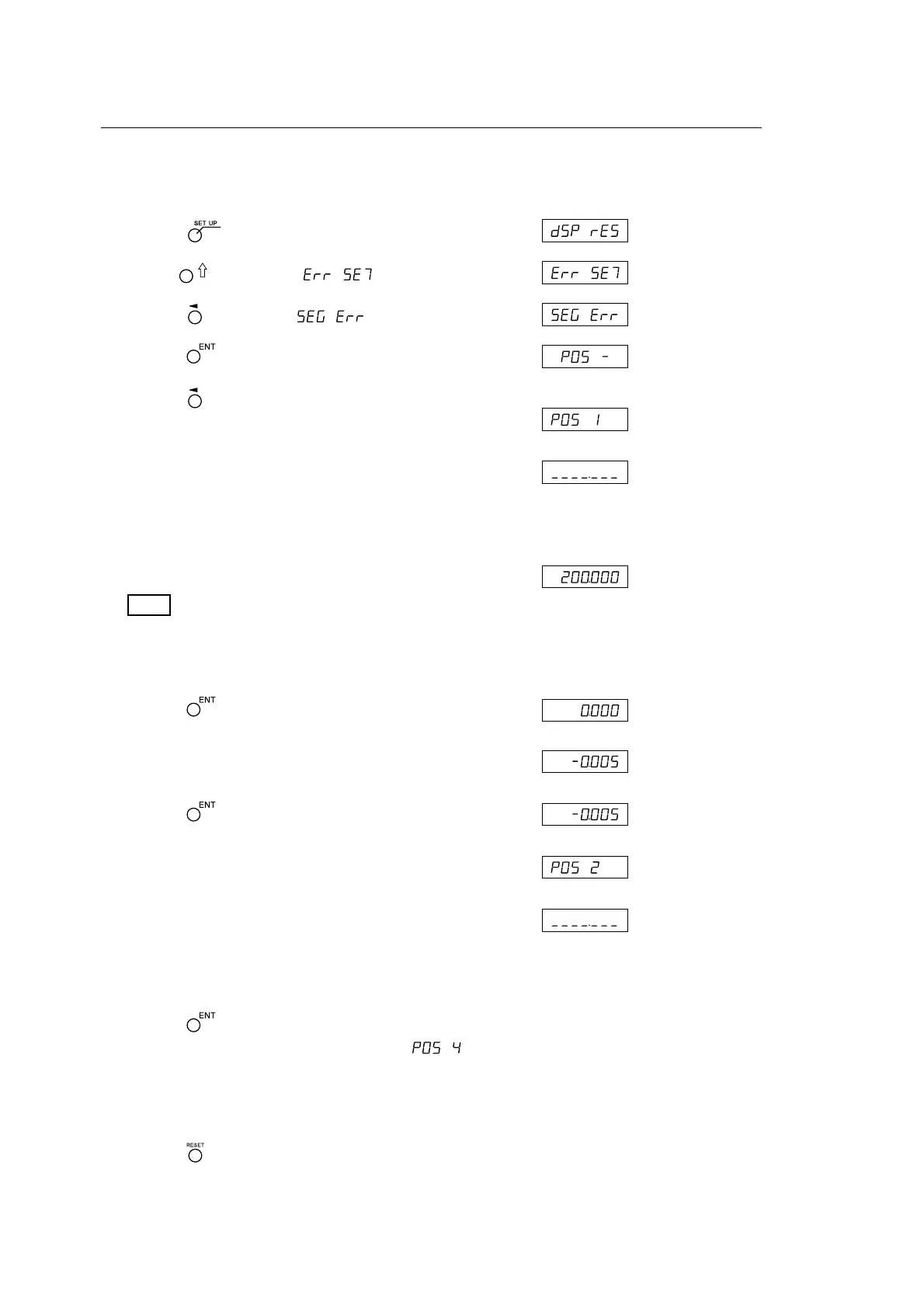
Entering the segmented error compensation value
The entry procedure when resetting the “detailed settings” (see Parts 5-2-3 and 5-3-3) is shown below.
Display
1 Press the key when the current value is displayed.
2 Use the key to display .
3 Press the key to display .
4 Press the key.
5 Press the key for the axis where the compensation
value will be input.
↓
Enter the input points and compensation amount below.
Enter the input points starting from the smallest number.
6 Use the numeric keys to enter input point 1.
Note
The reference point position of the measuring unit becomes 0.
To enter a value on the negative count side form the reference
point, enter a negative value.
7 Press the key.
8 Use the numeric keys to enter the compensation amount.
9 Press the key.
↓
↓
10
Repeat steps 6 to 9 until all the input points and
compensation amount are entered.
11
Press the key.
The number of input points are displayed as “ ”.
12
<To continue and enter other display compensation amount>
Perform the procedure starting from step 5.
<To exit>
Press the key.
The unit automatically switches to reference point acquisition mode, and so obtain the reference point
(see the next page).
(Example: L =
200.000)
(Example:
ε
x = –0.005)
5. Settings



 To Next Page