098-00720-000 Revision D1 – February, 2018 SyncServer 600 Series User’s Guide 105
Chapter 4
Navigation Windows
NTP / PTP Services Configuration Window
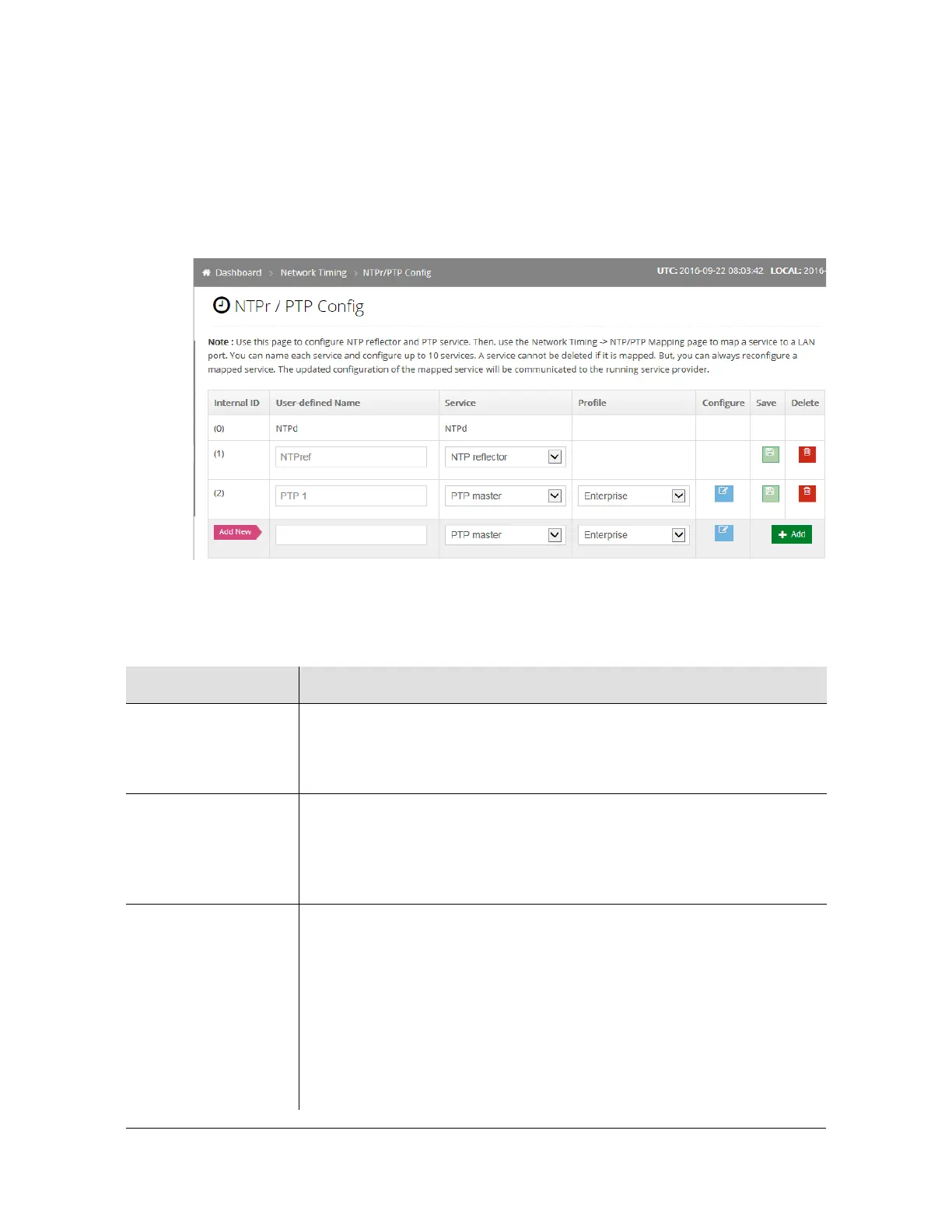
Use this window to configure NTP reflector and PTP services. See Figure 4-22.
This page can be used to configure multiple NTPr and PTP configurations.
However, only one timing service can be mapped to each port.
Figure 4-22. NTP / PTP Service Configuration Window
Table 4-8. NTP / PTP Services Configuration Parameters
Parameter / Column Description
Internal ID The S6x0 automatically assigns this number as a unique identifier to
reference this specific timing service when it appears on other forms.
The assigned values will not necessarily be consecutive.
User-defined Name Use this entry to provide a helpful name to describe the specific service.
Maximum number of characters in the name is 47.
Although probably not a good idea, multiple rows can have the same entry.
The internal ID assures that they are always unique.
Service This selection provides a top-level control for the type of network timing
service being defined. The drop-down list provides all candidates.
In release 2.1 the selections are NTPr (NTP reflector), PTP client and PTP
master. See note below about NTPd
Note: These columns are context-aware based on the current Service
column selection. Configure column may be additionally context-aware
based on the selected Profile. Hence the best way to work with these 3
columns (Service, Profile, Configure) is left-to-right.



 To Next Page