120 HD96-24-CC-TP User Manual
Assignment Page
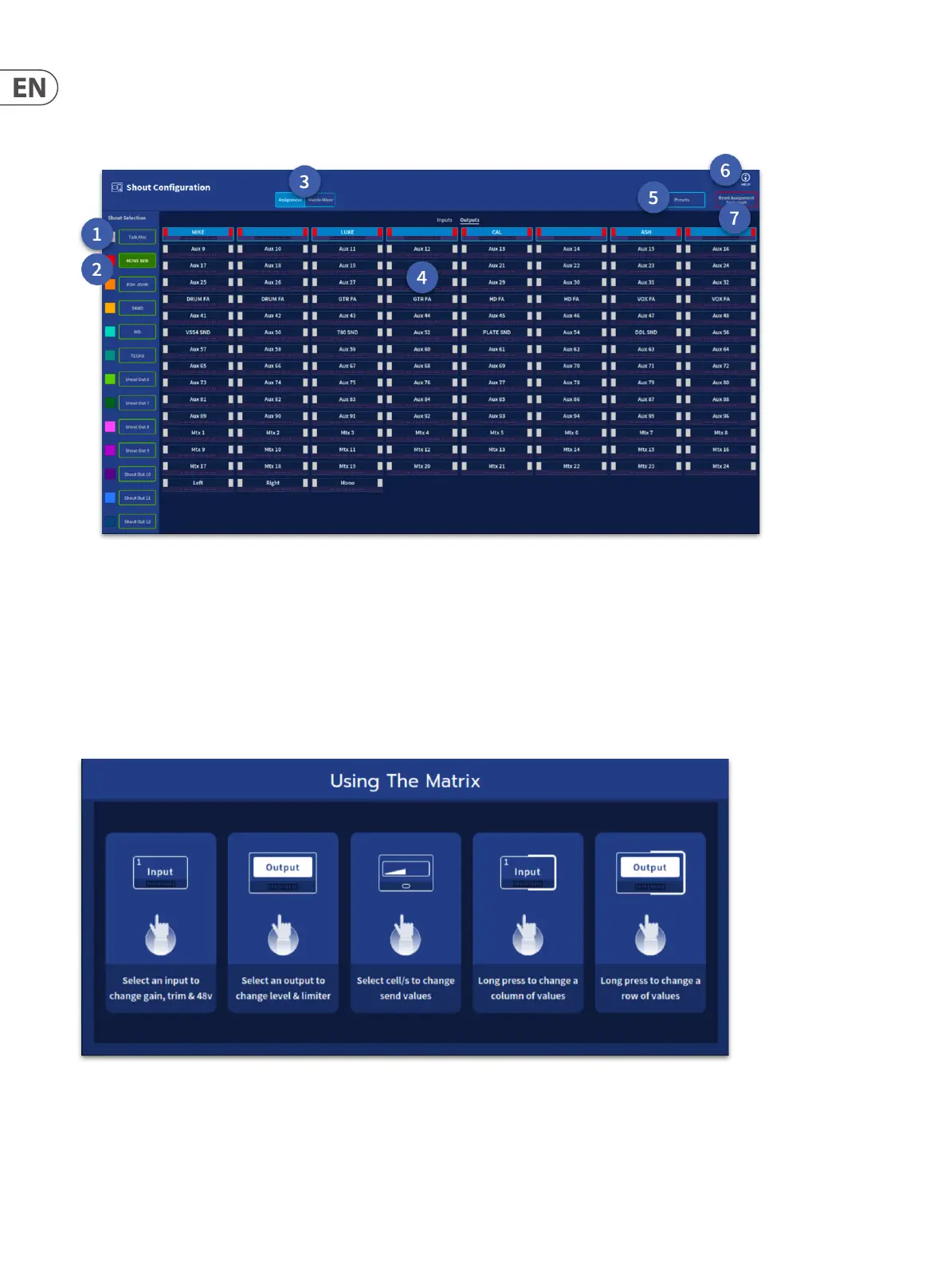
In the diagram below the 4 stereo in ear monitor outputs are assigned to Shout Out 1 which allows the monitor engineer to hear the output of that shout group in the
monitor bus (when Shout out 1 is patched to PFL in).
1. Talk/Osc – By default all inputs and outputs are assigned to the Talk/Osc bus.
2. Shout Out 1-12 – Any combination of inputs and outputs can be assigned to one of the 12 shout out paths.
3. Assignment/Matrix Mixer – Changes the view between Assignment Page and the Matrix Mixer.
4. Inputs/Outputs – All inputs or outputs can be seen at once via the Inputs/Output selection button.
5. Presets – Opens the preset manager window (see following section).
6. Help – Opens the helpful information window shown below.
7. Reset Assignment to Defaults – This resets the Assignment page to all inputs and outputs assigned to the Talk/Osc if required.


 To Next Page
 Loading...