297 HD96-24-CC-TP User Manual
I/O Box & Device Updater
I/O Box & Device Update
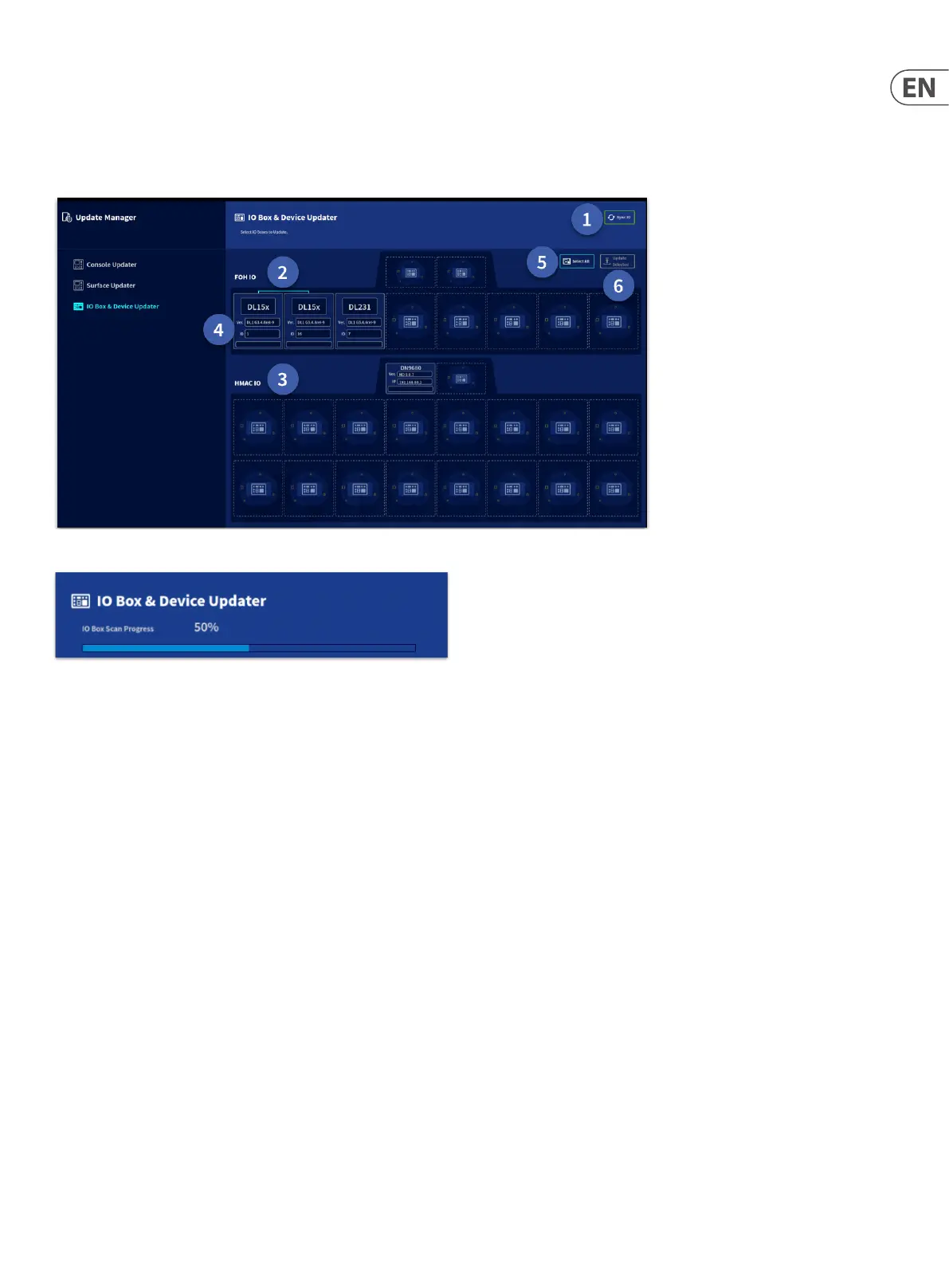
Note: I/O boxes will need to be updated in order to work with the HD96-24 system. The I/O Box and Device updater page can be found in the Update Manager tab (side
bar menu). With all your I/O connected with the console as master clock, press Sync I/O and follow the instructions. Updated I/O boxes will still work and are fully
compatible with Pro Series consoles.
1. Press Sync I/O. Any I/O racks will appear after the I/O scan.
2. FOH I/O connections will be displayed in this section.
3. HMAC I/O connections will be displayed in this section.
4. Each device will display its family type (DL15x, DL231), its current software version and the ID number for the I/O device. In this example the I/O are on Pro Series
software and would require updating.
5. Select all currently Sync’d I/O devices ready for update. If you prefer individual racks can be updated.
6. Update Selected updates all selected I/O to the latest version of HD software.


 To Next Page
 Loading...