44 HD96-24-CC-TP User Manual
Side Bar Menu
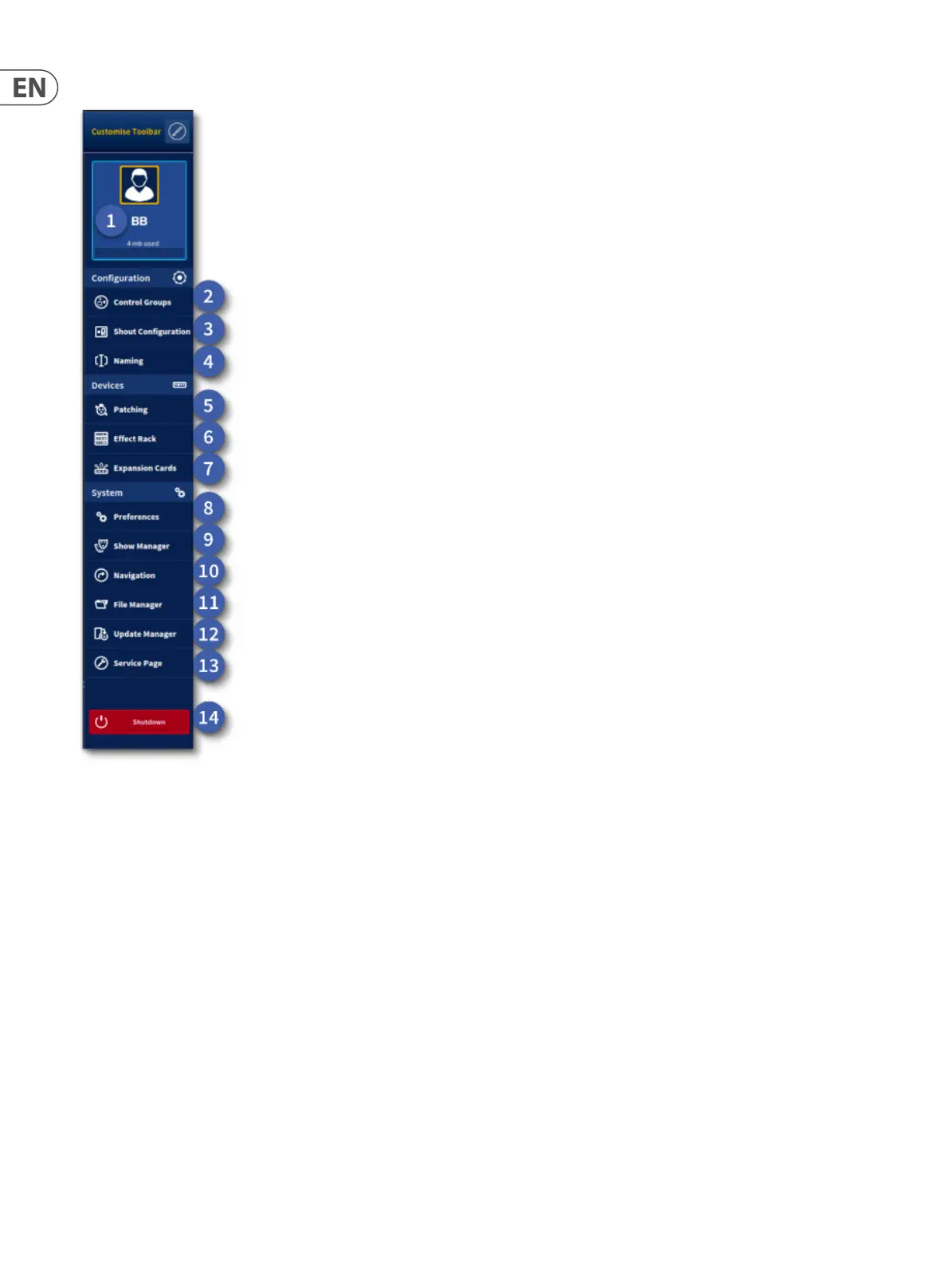
To the right-hand side is the side bar console Menu icon. When selected it opens the side console menu with various options. This is a xed list. At the top is the
Customise Toolbar where the late out of the Menu Bar can be changed explained in Chapter 31.
1. Current User Prole – Press to go to the User Prole Login Page.
2. Groups – Set POP, VCA, Mute and Talk Groups.
3. Shout Conguration - Set up for the 16 x 12 shout mixer.
4. Naming – All channels types can be named in this workow.
5. Patching – Set your I/O and other patching.
6. Eects Rack – Overview of all the eects currently used in the system.
7. Expansion Cards – Settings for the 2 x CM 1 slots and 2 Ultranet ports.
8. Preferences – Settings for the console can be found here.
9. Show Manger – Load a new show or change the playlist. The Show editor is also in this page.
10. Navigation – Surface set up for Fader Banks and Assignables.
11. File Manager – Import/export of les plus spreadsheet import of settings.
12. Update Manager – All system and I/O updater pages.
13. Service Page – For Midas use only.
14. Shutdown – Long press to turn the system o.


 To Next Page
 Loading...