229 HD96-24-CC-TP User Manual
Hardware Conguration
Brightness page
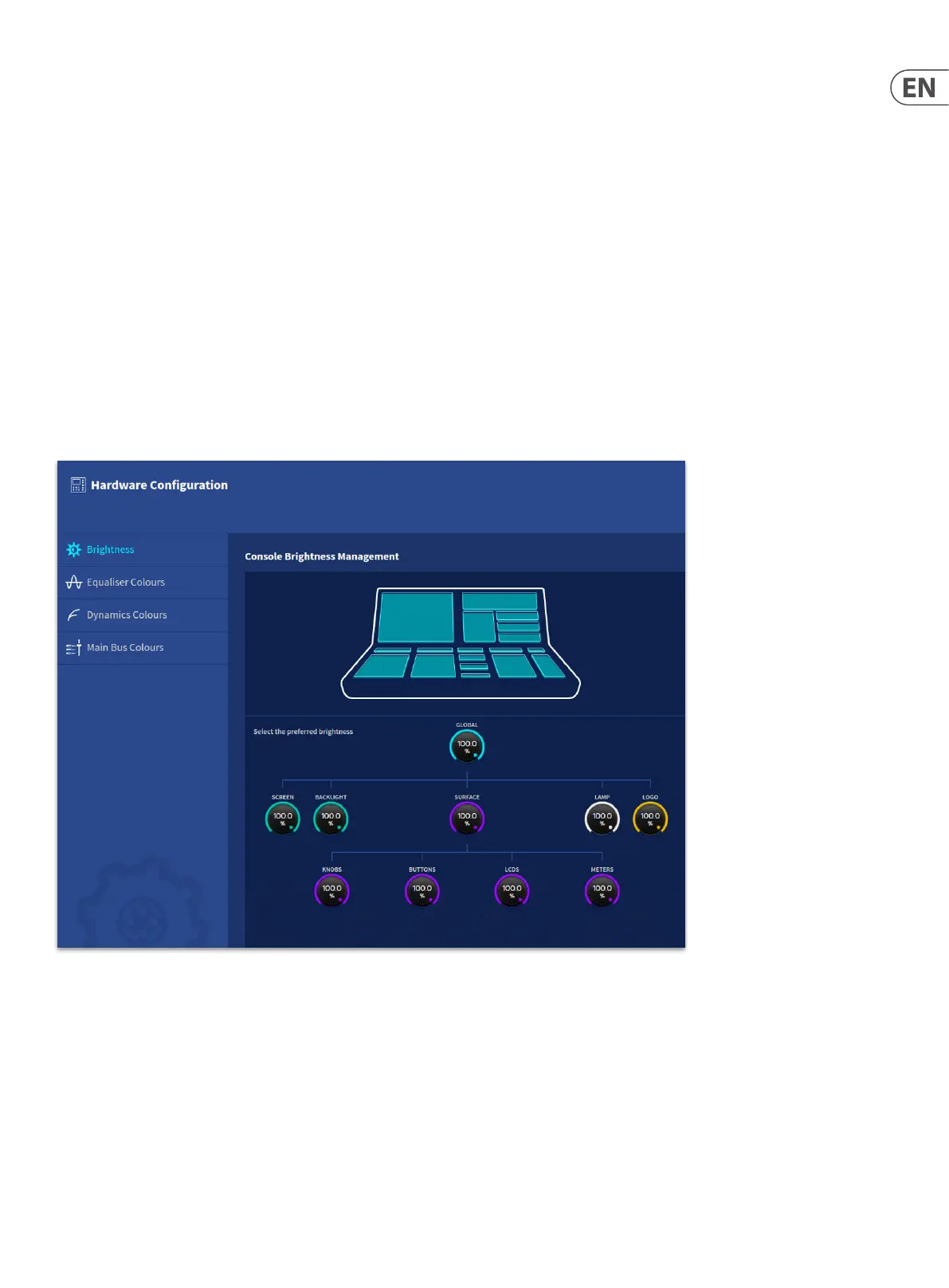
In the Hardware conguration pages, you will nd controls to adjust many aspects of the system’s appearance. In the Brightness page there are controls to adjust
brightness of individual elements or globally between 0 and 100% (0.5% – 100% for the Screen).
• • Global – Adjusts the whole system’s luminosity at once.
• • Screen – Adjust the brightness of the GUI Screen.
• • Backlight – Adjust the backlight level of the GUI Screen.
• • Surface – Adjusts the Surface controls light levels as a whole.
• • Knobs - Adjusts the brightness of the rotary controls.
• • Buttons – Adjusts the brightness of the buttons.
• • LCDs – Adjust the brightness of the LCD screens.
• • Meters- Adjust the brightness of the meters.
• • Logo – Adjusts the luminosity of the Midas logo on the rear of surface from 0-100%.
• • Lamp – Adjusts the luminosity of the lamps.


 To Next Page
 Loading...