178 HD96-24-CC-TP User Manual
Chorus
The chorus eect makes one sound source (such as a voice) sound like many such sources singing (or playing) in unison. Since performance in unison is never precise,
chorus eects simulate this by making independently adjusted duplicates of the input signal and mixing them back in with the original sound.
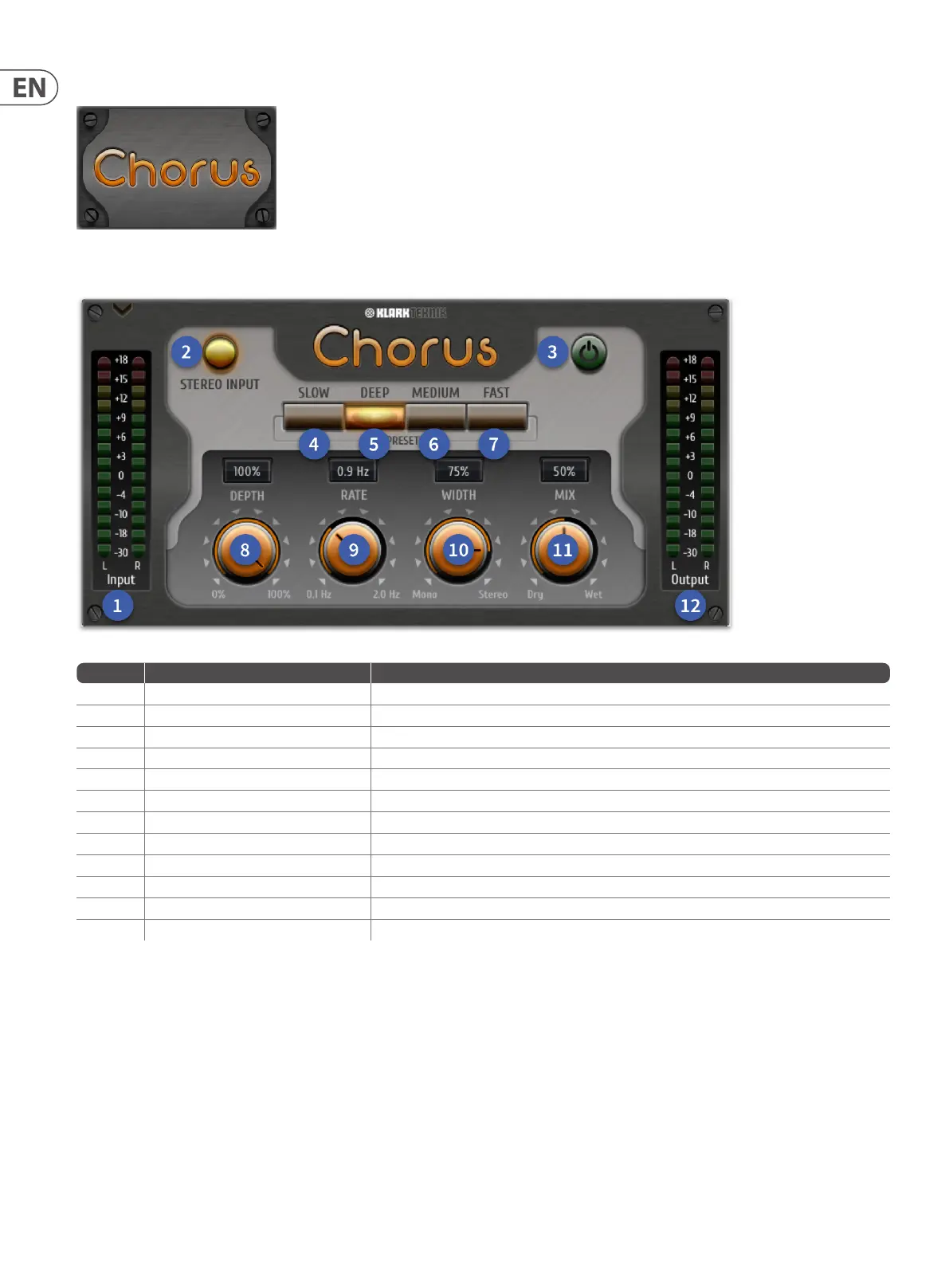
Item Control Function
1 Input meters Two rows of 14 LEDs, which show input metering.
2 Stereo Input button Activate for use on stereo sources
3 On/O button Eect bypass button
4 Slow (Presets) button A Slow modulation eect preset
5 Deep (Presets) button a Deep shift eect preset
6 Medium (Presets) button Standard setting for creating a rich chorus
7 Fast (Presets) button Fast eect preset for quick accentuation of sounds.
8 Depth control Aects the depth of the chorus from 0% to 100%.
9 Rate control Controls the rate of modulation in Hz. Range is from 0.1 Hz to 2.0 Hz.
10 Width control Fully CCW mono's the eect, fully CW makes the stereo eect more pronounced.
11 Mix control Adjusts the wet/dry balance. Turn fully right for a completely wet signal.
12 Out meters Two rows of 14 LEDs, which show output metering.


 To Next Page
 Loading...