137 HD96-24-CC-TP User Manual
TC Electronic VSS4 Reverb
VSS4 is a genuine Stereo Reverb that radically departs from blurry sustain concepts of the past. Based on source-related reections from multiple angles, the precision
of VSS4 is comparable to real-world mono or stereo sources positioned in an authentic space.
VSS4 is your rst choice for spot and close microphone pick-ups as well as synthetic sources. It is not only capable of adding spaciousness, but also distinctive character,
localization and depth to the source. If the reection patterns are too immense for a particular situation, you can tailor it to precisely complement the
material processed.
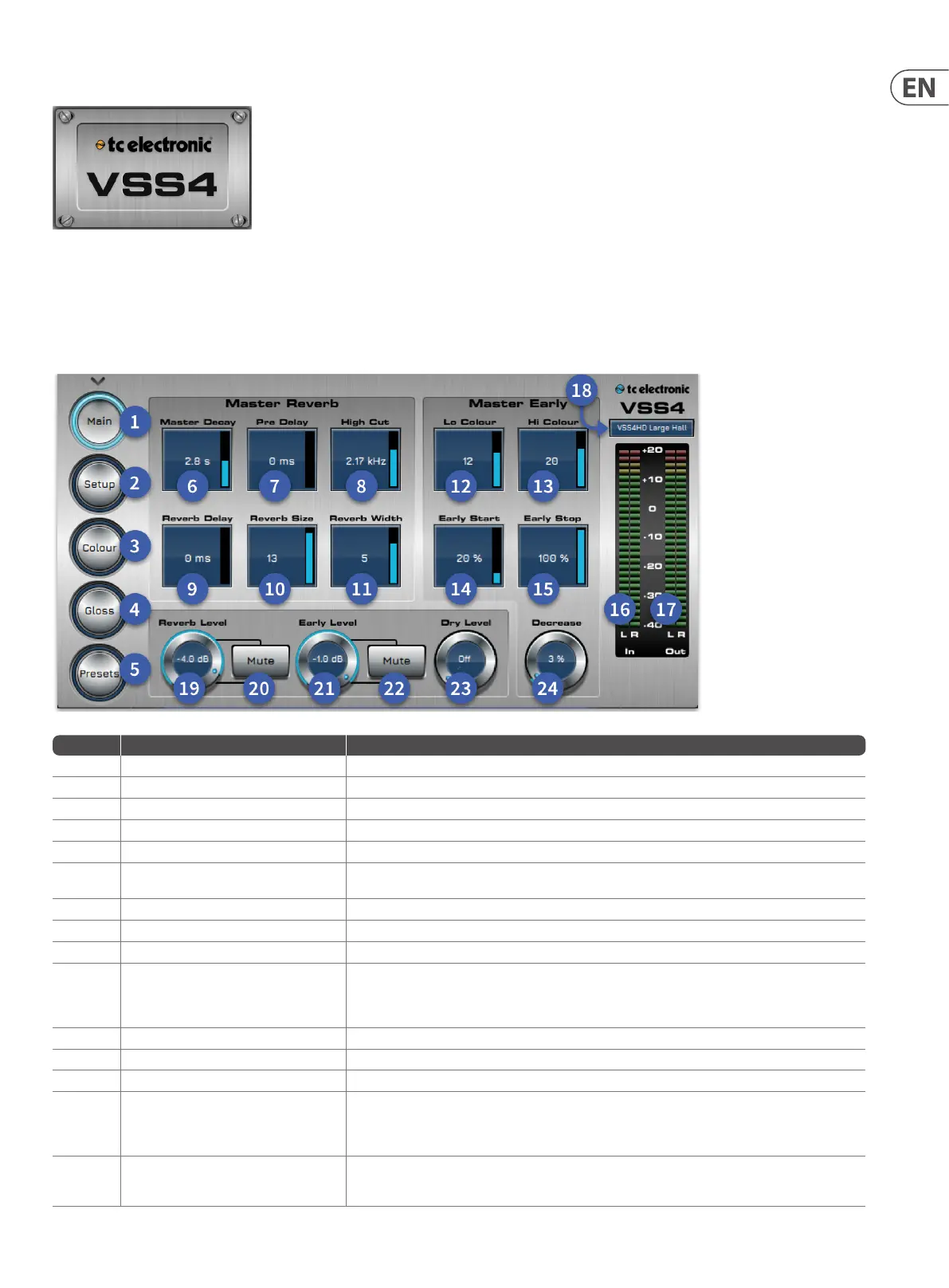
Item Control Function
1 Main button Main settings page of the VSS4 reverb
2 Set-up button Set-up page.
3 Colour button Colour page
4 Gloss button Gloss page
5 Presets Presets page recall, select desired preset and press load.
6 Master Decay (Master Reverb)
Range: 0.1 to 20 sec Adjusts the Master Reverb Decay time. Decay time can be further adjusted using
the multiplier for the following bands: Lo, LoMid, HiMid and Hi.
7 Pre Delay (Master Reverb) Range: 0 to 300ms, Pre-Delay on the complete wet signal including Early Reections.
8 Hi Cut (Master Reverb) Determines the Hi Cut frequency for the Diuse Field part of the Reverb.
9 Reverb Delay (Master Reverb) Determines the delay before the reverb eect begins
10 Reverb Size (Master Reverb)
Adjusts the overall perceived size of the Diuse Field part of the algorithm. Generally, you would
attempt to dene the perceived room size by altering the Decay time. However, with the Size
parameter you can achieve a perceived alteration of the room size thus keeping the Decay time.
The default value is meant as the size that the specic Location Type is intended to have.
11 Reverb Width (Master Reverb) Adjusts the stereo width of the reverb
12 Lo Colour (Master early) Lo Colour adjustment of the Early Reections
13 Hi Colour (Master early) Hi Colour adjustment of the Early Reections
14 Early Start (Master early)
Adjusting the Start time is an ecient way of getting rid of the rst reections that normally colour
the source the most. By adjusting the Start time, the rst reections are discarded but the timing
of the later reections remain unchanged. Therefore, this adjustment is typically more acoustically
precise and useful than a normal Pre-delay control.
15 Early Stop (Master early)
The Early Stop parameter can reduce the later reections in the Early Reections pattern.
When using large location types this can be a useful parameter to smooth the overall perception of
the room.


 To Next Page
 Loading...