123 HD96-24-CC-TP User Manual
Controls
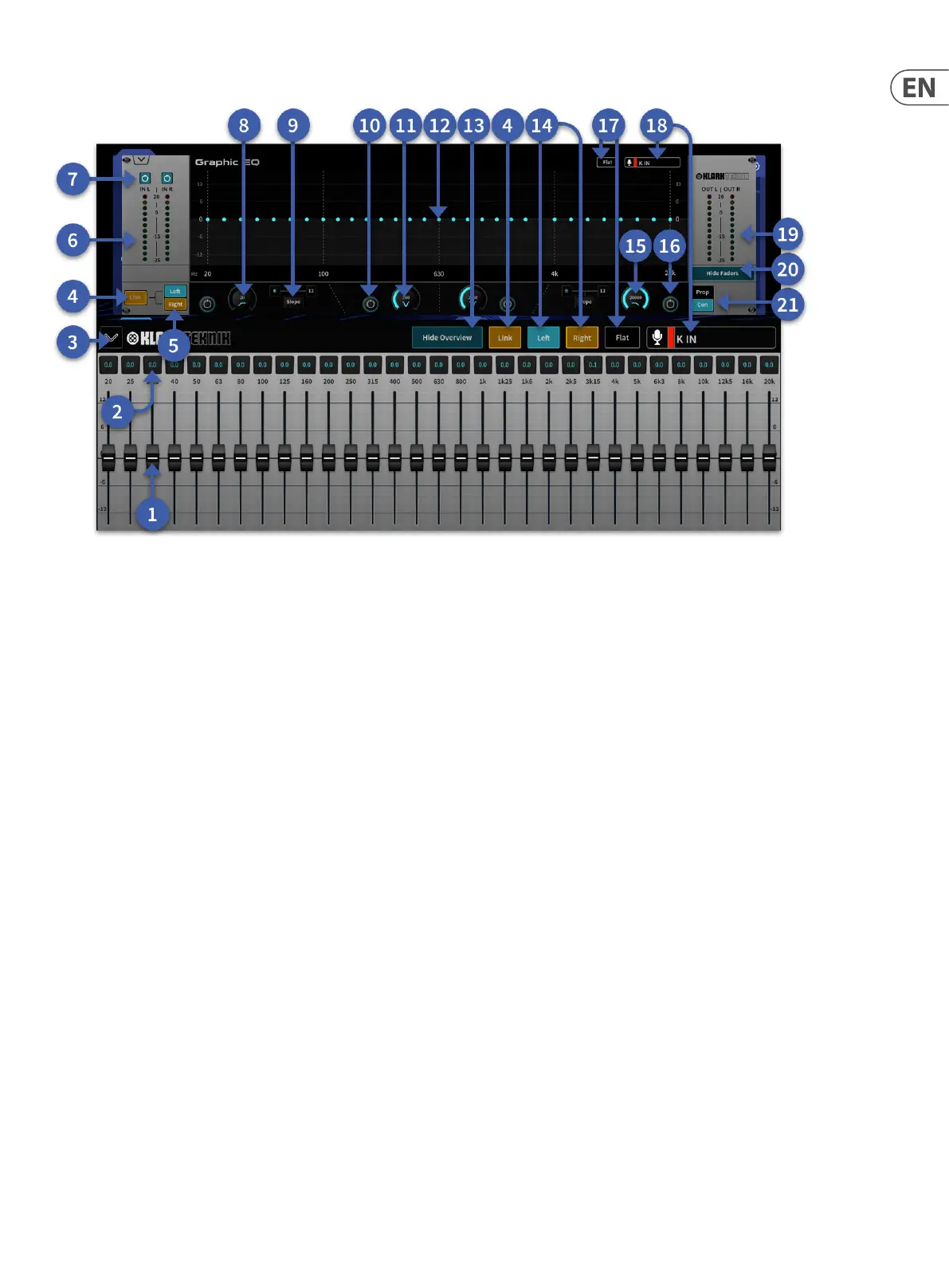
1. Fader (31) – Adjusts the signal by +-12 dB. Touch fader cap to select.
2. Band Gain Display – Displays the amount of level change.
3. Hide Faders – Close the fader window.
4. Link – The option to link left and right GEQ controls.
5. Left/Right selection – In mono mode select which side is displayed.
6. 12-segment input meter – Shows the incoming signal level.
7. GEQ Power Buttons – Buttons are linked together in link mode or can be used indvidually if GEQ is in dual mono mode.
8. High Pass Filter – Adjusts the cut o frequency, which is continuously variable from 20 Hz to 500 Hz.
9. Slope Button – Switches the high or low pass lter between 6dB and 12dB.
10. Power Button – Switches the respective notch lter in/out.
11. Notch Filter Adjusts the position of each notch lter within the range 20 Hz to 2 kHz or 200 Hz to 20 kHz.
12. GEQ Display – Shows each bands level in a graphical format when the faders are hidden.
13. Hide Overview – Removes the upper overview of the GEQ leaving the faders on view.
14. Left/Right – In dual mono mode (un-linked) lets you select the left or right side of the GEQ.
15. Low Pass Filter – Adjusts the cut o frequency, which is continuously variable from 2 kHz to 20 kHz.
16. Power Button – Switches the respective high pass/low pass in/out.
17. Flat – Resets all 31 bands of the GEQ to 0 dB.
18. Channel – Displays the path the GEQ is inserted on.
19. 12-Segment LED Output meter. Shows the outgoing signal level and is post-EQ.
20. Hide Faders – Removes GUI GEQ faders leaving the overview above.
21. Prop/Con Selects proportional Q (Prop) or constant Q (Con) modes.


 To Next Page
 Loading...