2 - L - 3
PAPER FEED UNIT
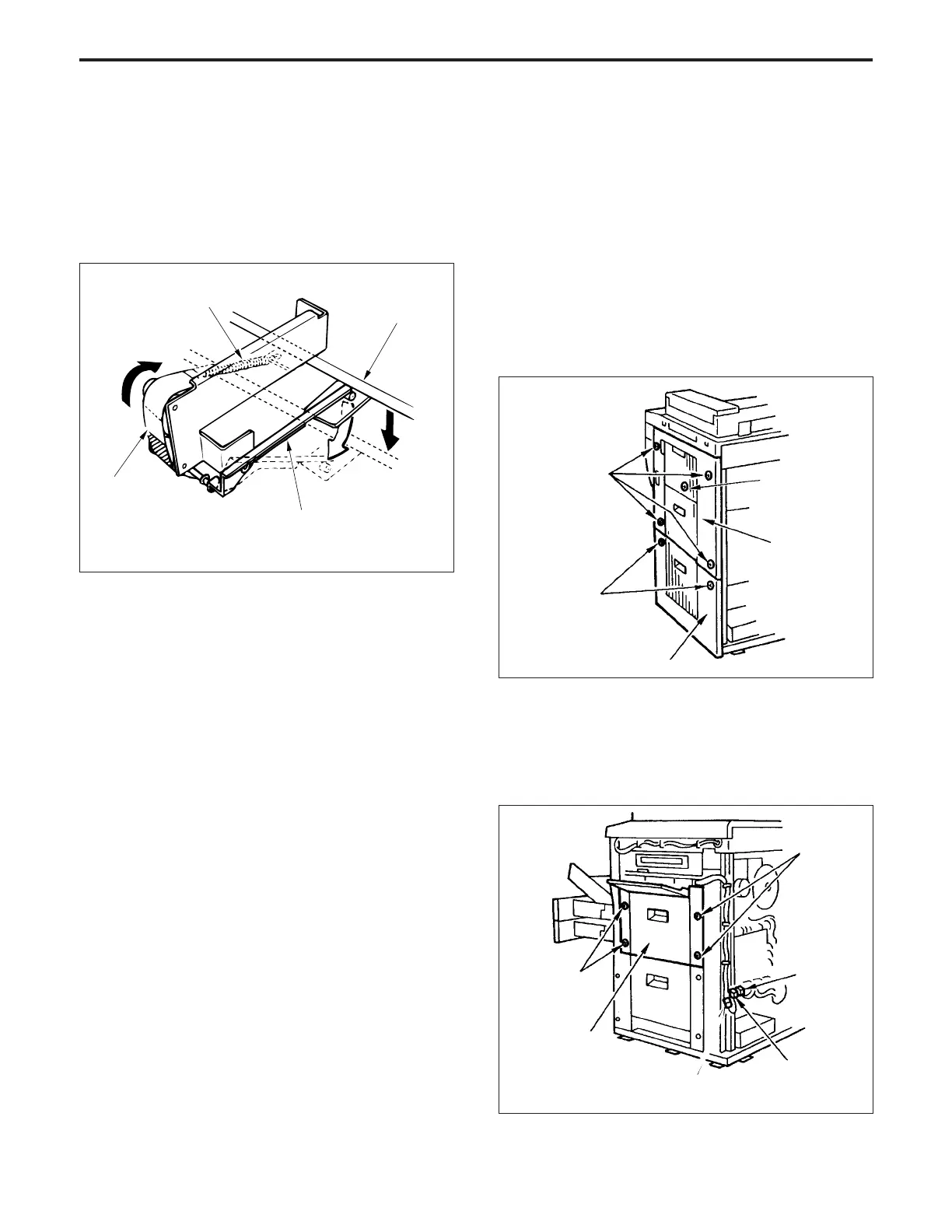
*5: Remaining paper indication
The amount of paper remaining in the tray can be checked
roughly by looking through the remaining paper indicator
window.
The remaining paper detection lever moves along with the
up-down motion of the tray, and the index sheet is caused
to slide by a tension spring.
[3] Disassembly and Re-assembly
1. Removing and Re-installing the Paper Feed
Unit
Caution: Be sure that the power cord has been unplugged
from the power outlet.
a. Procedure
(1) Open the front door, then pull out the upper/lower tray
in the forward direction.
(2) Slacken the five set screws, then remove the right side
upper cover.(You must open the by-pass feed plate in
order to remove one of these screws.)
(3) Slacken the two screws, then remove the right side
lower cover.
Index sheet
Tension spring
Tray
Remaining paper
detection lever
Set screws
Set screws
Right side
upper cover
Set screws
Connector
(CN7)
Set screws
Connector
(CN144)
Paper feed and
conveyance door
(6) Re-install the paper feed unit in the opposite sequence
to removal.
Right side lower cover
Set screw
(behind by-pass
feed)
(4) Disconnect the two connectors (CN7 and CN144) from
the control board, then remove the paper feed cable
from the cord clamp.
(5) Remove the four set screws, then remove the paper
feed unit.
PAPER FEED UNIT-1



 To Next Page