2 - F - 4
WRITE UNIT
2. Removing and Re-installing the Electronic RDH
Board
Caution: Be sure that the power cord has been unplugged
from the power outlet.
a. Procedure
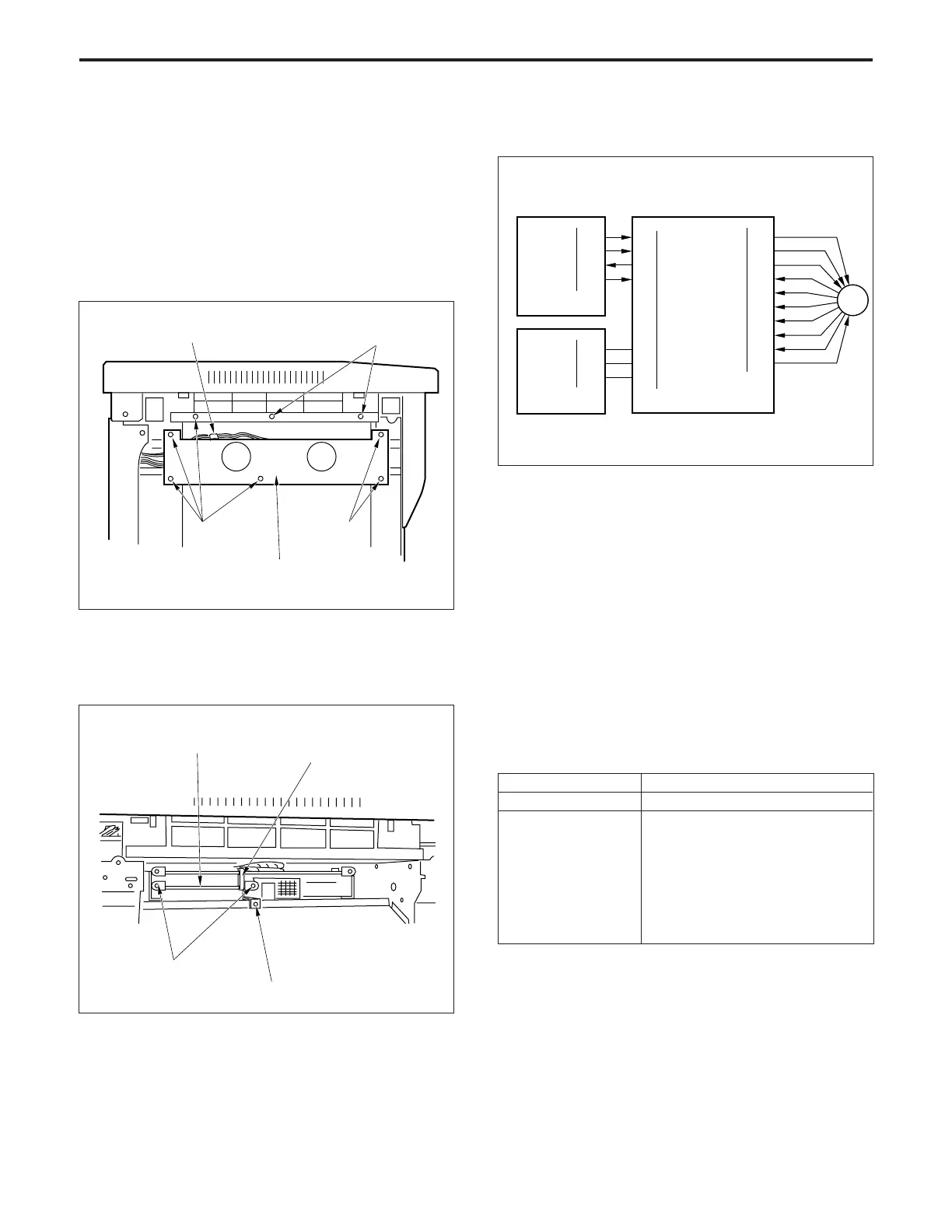
(1) Remove the top cover on the left side. (four screws)
(2) Disconnect the connector (CN49).
(3) Remove the eight set screws, then remove the fan
mounting plate.
Connector (CN49)
Set screws
Fan mounting plate
Set screws
Set screws
(4) Remove the set screw, then remove the board support
piece 1.
(5) Remove the two set screws, then pull out and remove
the electronic RDH board.
Board support piece 1
Set screw
Set screws
(6) Re-install the electronic RDH in the opposite sequence
to removal.
Electronic RDH board
[4] M5 (polygon) Control
M5 (polygon) is driven by the PMDB (polygon driver board),
and is controlled by the CB (control board).
1. Operation
a. M5 is a 3-phase brushless DC motor which is driven
using a 3-phase bipolar method. The current flowing
through the windings is switched according to the
position of the rotor which is detected by a sensor
(magnetic sensor) inside the motor.
This motor rotates the polygon mirror, causing the laser
beams from LDB1 and 2 (laser diode boards 1 and 2) to
be scanned in the axial direction of the drum. The speed
of the motor is maintained constant by PLL control.
b. M5 is powered by 40 V DC. The rotational speed is as
follows.
Rotational speed
High speed (21,850rpm)
One of the following four speeds can
be selected using the "25" mode.
• 21,850 rpm *
• 14,000 rpm *
• 11,024 rpm *
• 8,000 rpm *
• Stop *
State of the machine
During copy
During idling
M5 CONT
M5 CLK
M5 BREAK
322-2
322-3
322-4
322-6
320-2
320-3
320-4
320-5
320-6
320-7
320-8
M5 RDY
M5 DRIVE A
M5 DRIVE B
M5 DRIVE C
M5 MAG A'
M5 MAG A
M5 MAG B'
M5 MAG B
M5 MAG C'
M5 MAG C
V MAG -
321-1
321-2
321-3
321-5
321-6
321-7
321-8
321-9
321-10
321-11
PMDB
M5
CB
PGND
40VDC
24VDC
88-3
88-5
99-2
DCPS
* If the item marked * is selected, the rotational speed of
M5 switches over after the lapse of the specified time
from the end of the copy process. The specified time can
be selected using the "25" mode among below.
(15 sec, 30 sec, 60 sec, 120 sec)



 To Next Page