2 - I - 2
DEVELOPING UNIT
[3] Disassembly/Assembly
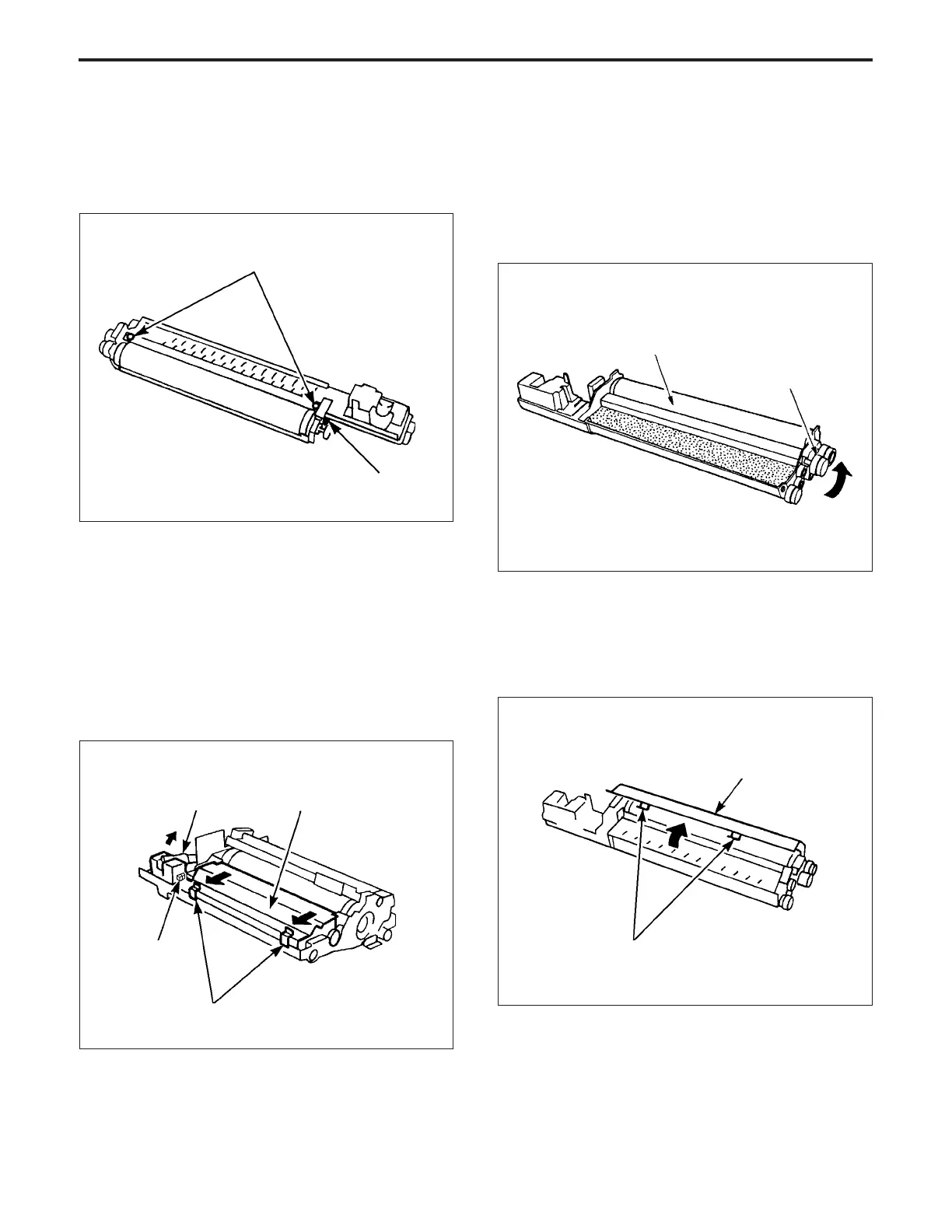
1. Screws that must not be removed
(1) The two set screws of the developer regulation plate
(2) The set screw for adjusting the magnet angle
2. Removing and Re-installing the Developing
Unit
a. Procedure
(1) Remove the drum unit from the main body.
(2) Release the developing push pressure levers (front
and rear). Then, disconnect the density sensor con-
nector.
(3) Disconnect connector CN50, then raise the toner recy-
cle pipe.
(4) Remove the developing unit from the drum unit.
(5) Re-install the developing unit in the opposite sequence
to removal.
3. Replacing the developer
Caution:
1. When replacing the developer, take care that dirt does
not become mixed with it.
2. If the developing sleeve is rotated, the developing gear
rotates in the counterclockwise direction. NEVER
rotate the developing gear in the clockwise direction.
Screws that must not be removed
Screws that must not be removed
a. Procedure
(1) Remove the drum unit from the main body.
(2) Remove the developing unit from the drum unit.
(3) Release the hooks on the developing unit cover, then
lift up and remove the cover.
Developing gear
Developing sleeve
Hooks
Developing push pressure lever
Developing unit
CN50
toner recycle pipe
Developing unit cover



 To Next Page