151
M
ANAGING CALLS DIRECTORY
NOTE: Depending on how your Administrator has configured the search functionality, you may need to
press a Search softkey in order to execute the search function.
Use the following procedure on the phone’s UI to perform a search.
1. Press the key or softkey configured with Directory functionality to enter the Directory.
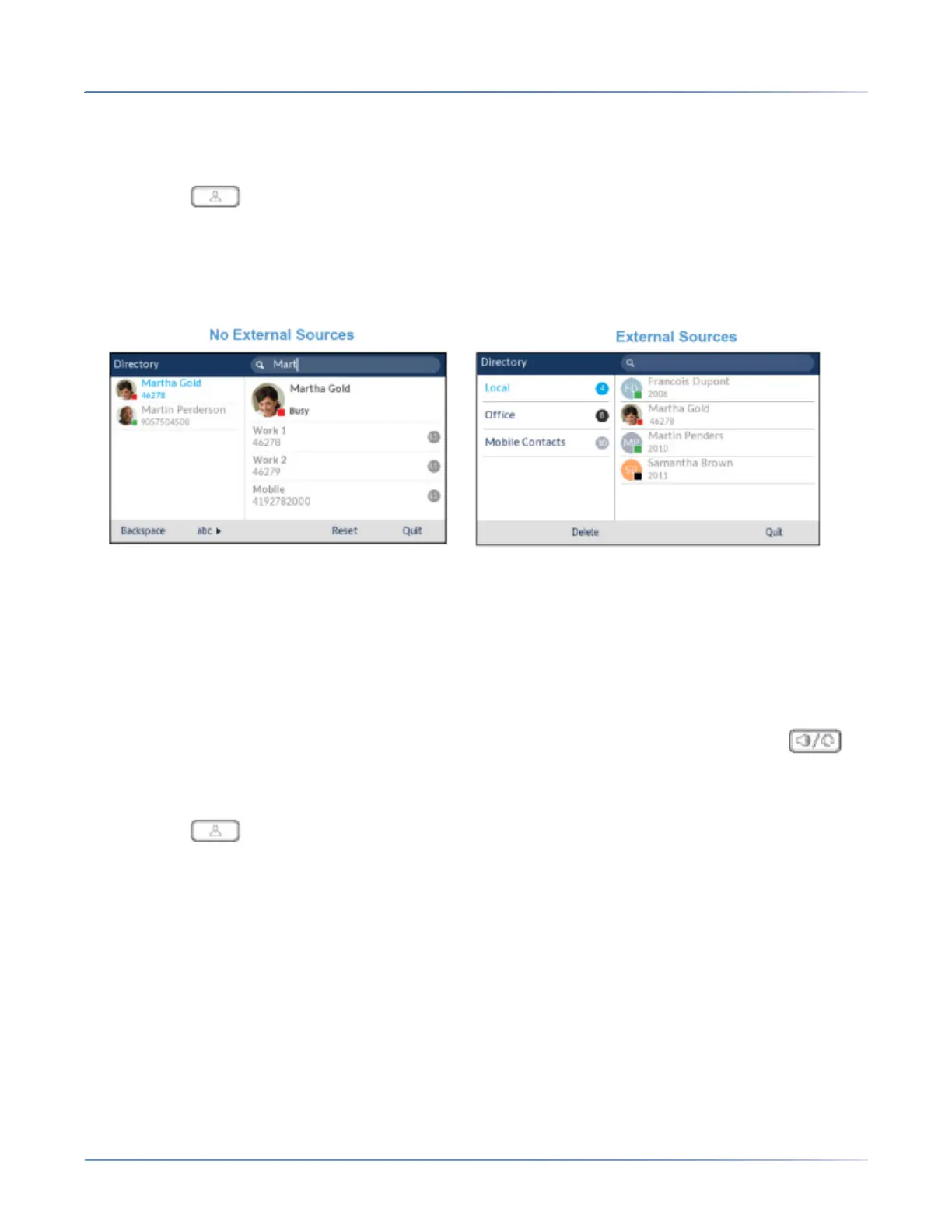
2. Using the dialpad keys enter in the letters of the desired contacts’ first name, last name, or company
name.If no external Directory sources are configured or enabled, search matches will be displayed on
the left column with any additional numbers for the respective contact displayed on the right.If external
Directory sources are configured and enabled and the search finds multiple matches, the entry will be
displayed in the All folder.
When matches are found, navigate to the contact entry and perform your desired action.
NOTE:
a. If there is only one match, the contact will be displayed in the respective directory folder.
b. Press the Reset softkey at any time clear the search field.
Dialing from the Directory
Dialing can be performed by manually navigating to the Directory contact, selecting a phone number (if
the contact has more than one) and then pressing the Dial softkey, selectbutton, Line button,
button, or by simply pick up the handset.
Use the following procedure on the phone’s UI to dial a contact’s phone number.
1. Press the key or softkey configured with Directory functionality to enter the Directory.
2. (Optional) Using the dialpad keys input the first letters of the contact’s name to initialize the search
function.





 To Next Page