97
C
ONFIGURING SOFTKEYS BLF/LIST KEY
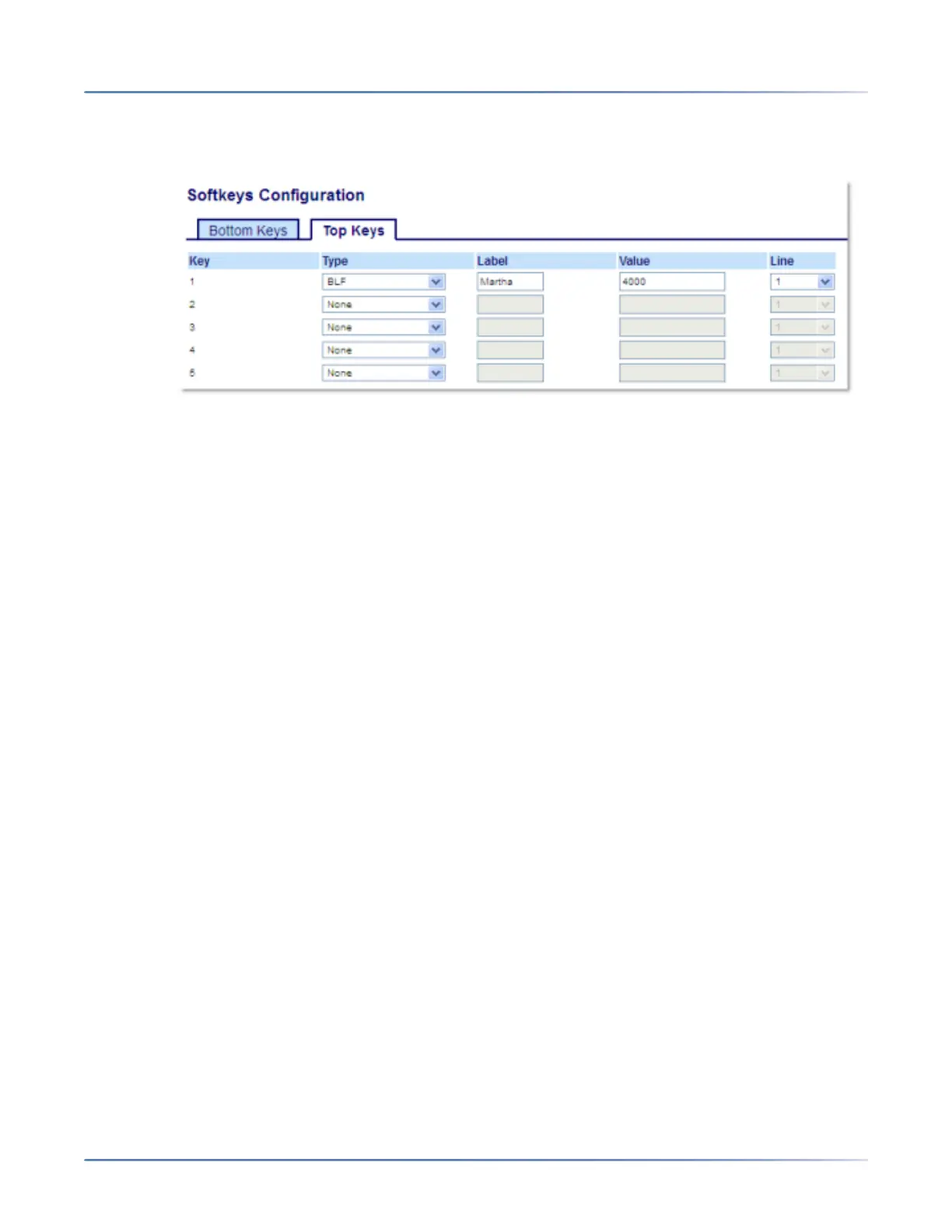
Configuring a BLF Key Using the Mitel Web UI
1. Click on Operation > Softkeys and XML.orClick on Operation > Expansion Module <N>.
Softkeys
2. Select from Key 1through Key 44 on the Top keys.
3. In the Typefield, select BLFto apply to the key.
4. In the Label field, enter a label to apply to this key.
5. In the Value field, enter the phone number or extension you want to monitor.
6. In the Line field, select a line for which to apply this key. Valid values are:
– global
– 1 through 24
Expansion Module Keys
7. Select from Key 1through Key 16(M680i)or Key 84(M685i).
8. In the Value field, enter the phone number or extension you want to monitor.
9. In the Line field, select a line for which to apply this key. Valid values are:
– global
– 1 through 24
10. Click Save Settings.
BLF/List Key
BLF/List KeyNotes: 1.BLF/List functionality can only be programmed on the top softkeys.2.BLF/List in
NOTE:
1. BLF/List functionality can only be programmed on the top softkeys.
2. BLF/List indicators can also be viewed through the Directory, Received Callers, and Outgoing Redial
Lists.
This feature allows the IP phone to subscribe to a list of monitored users defined through the call server
web portal.





 To Next Page