16
G
ETTING STARTED UI OVERVIEW
• XML-related text
• Network status
Softkeys
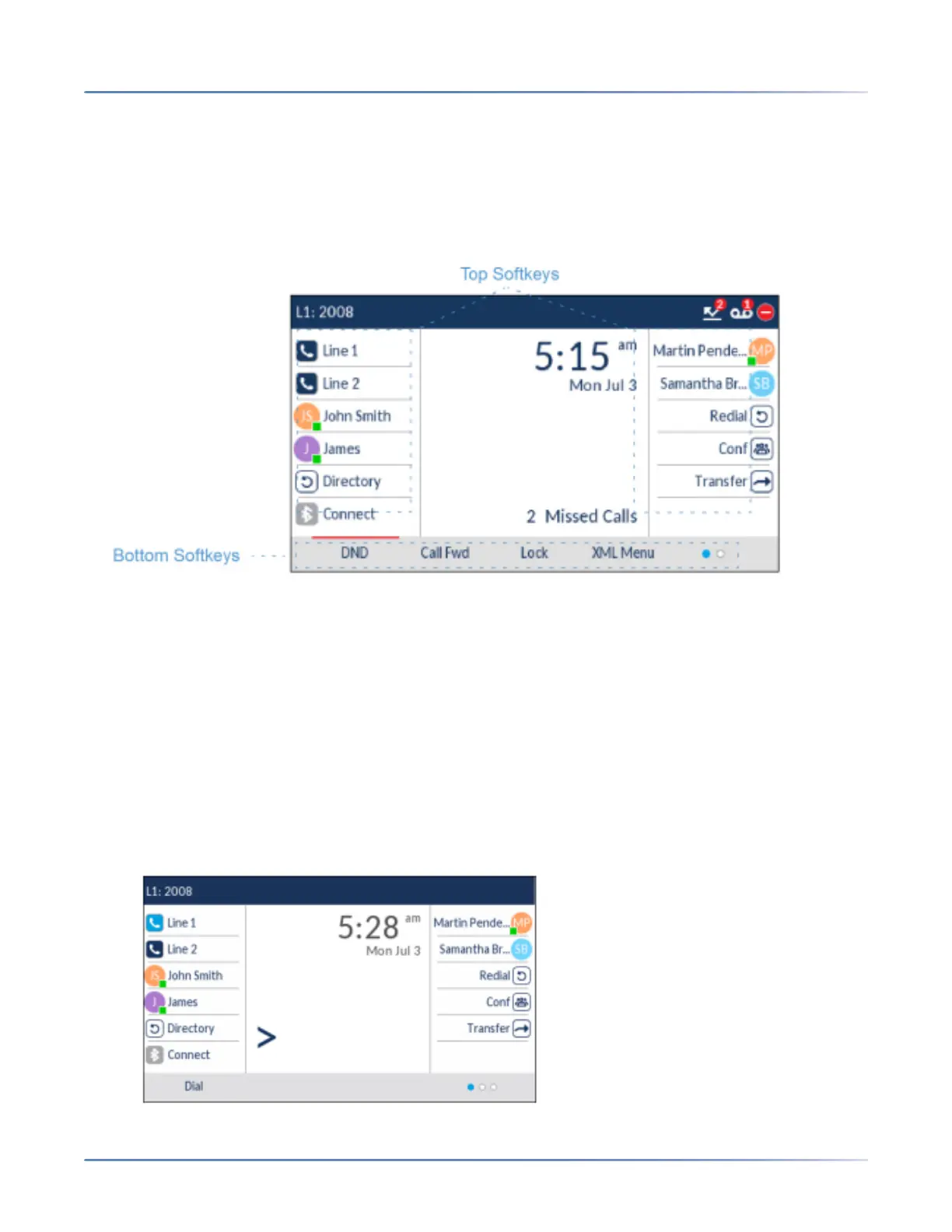
12 top softkeys and 5 bottom softkeys are always displayed on the Home screen. You can configure the
top softkeys with up to 44 functions and configure the bottom softkeys with up to 24 functions as
required.
NOTE: For more information about configuring the top and bottom softkeys, see > “Configuring Softkeys”>
on page 73.
If you or your Administrator have configured softkey functions on your phone, the labels for those func-
tions display on the screen. For example, in the illustration above Directory was configured as a Directory
key, Confwas configured as a Conference key, Redial was configured as a Redial keyand the remaining
top softkeys were configured as Busy Lamp Field (BLF) keys. The bottom set of softkeys were config-
ured as DND (Do Not Disturb), Call FWD (Call Forward), and Lock/Unlock,and XML respectively.
A More softkey as indicated by dots is also displayed at the bottom right of the screen if you have config-
ured more softkeys than can be displayed at one time. These dots indicate the number of softkey pages
and its relative position.
Off-Hook and Dialing Screen
When you pickup the handset on the Home screen, the screen displays as
follows:





 To Next Page