B
SDV — Switched Digital Video Controls • Session Controlled Mode
APEX1000 All-Purpose Edge QAM Software Version 2.4.x • Installation and Operation Manual
157
573408-001-a
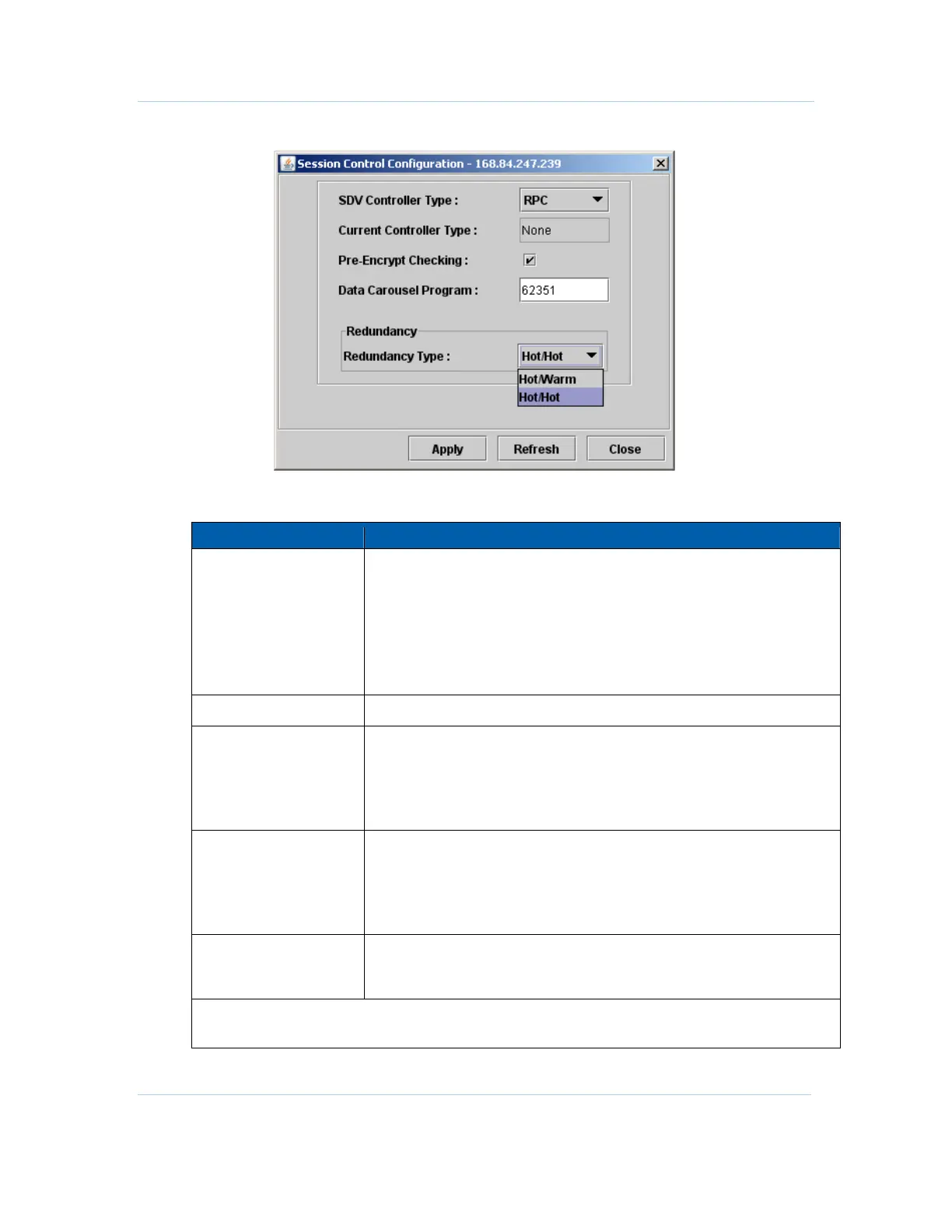
Figure 8-1 — Session Control Configuration
Session Control Configuration window field definitions
Item Definition/Range
SDV Controller Type
Provides four selections to set the SDV controller type of the APEX1000:
• None
• RPC
• RTSP
• MHA
Note: Any changes to the controller type require a system reboot before
taking effect.
Current Controller Type
Read-only. Displays the current controller type.
Pre-Encrypt Checking
Select this checkbox to enable the APEX1000 to check if the incoming
service is pre-encrypted.
This check box should normally be checked (enabled). Typically, SDV input
streams may already be encrypted and this setting allows the APEX to
check if the input is a pre-encrypted input stream.
Data Carousel Program
Displays the carousel program number, used to indicate a special program
that cannot be remapped (component PID cannot be changed) or
encrypted.
Caution: The Data Carousel program default is the well-known program
# 62351, and should not be changed.
Redundancy Type
Use to select between
Hot/Hot and Hot/Warm redundancy. These modes
determine the type of transport stream redundancy that is applied to all
SDV sessions.
Note: After you make your selections, click Apply in the Session Control Configuration window for the
changes to take effect.



 To Next Page
 Loading...





