TRANSMISSION
Ch 2 page 26 Ch 2 page 27
TRANSMISSION
SHOP MANUAL MT26/31 - 08.2006 SHOP MANUAL MT26/31 - 08.2006
TRANSMISSION
Ch 2 page 26 Ch 2 page 27
TRANSMISSION
SHOP MANUAL MT26/31 - 08.2006 SHOP MANUAL MT26/31 - 08.2006
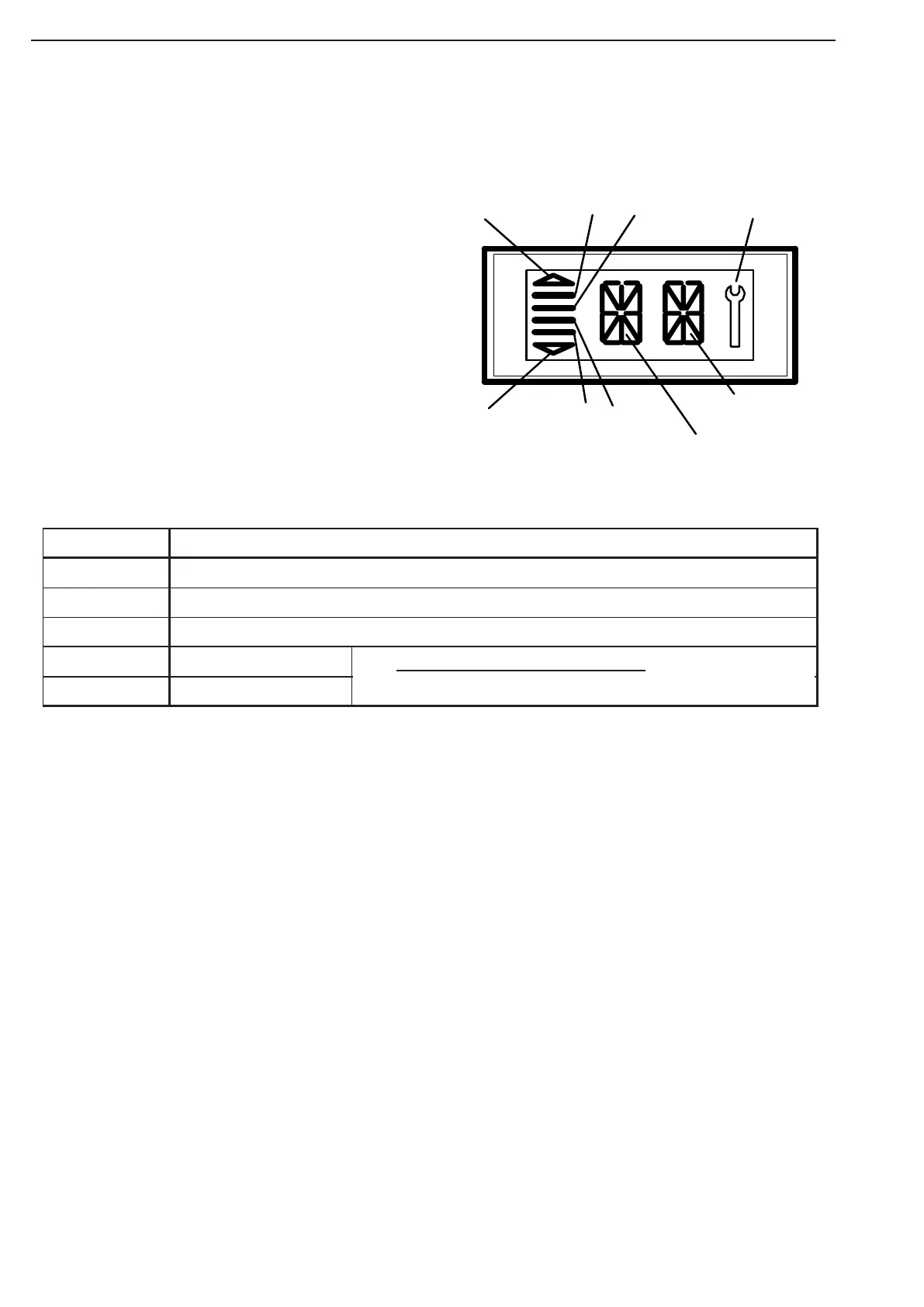
Possible Indications on the Display
Display
f
a
d
Left side
Right side
g
b
c
e
Display of the Driving direction: V or F: Vorwärts / Forward
(right Side) N: Neutral
R: Reverse
Display of the engaged gear: Display 1, 2, ... 6
Left side
Waiting for Controller-Neutral: Indication on the Display:
NN (left and right Side).
In this condition, Neutral is pending on transmission.
To engage a gear, at first Neutral must be shifted on
the Controller before the electronics allows to engage a
gear again.
Preselected Driving range:
The number of the lines indicates the
driving range, (Special characters b, c, d, e)
resp. the gear preselection:
1 Bar b: Driving range 1
2 Barc b,c: Driving range 2
3 Bars b,c,d: Driving range 3
4 Bars b,c,d,e: Driving range 4, 5 or 6
Display Manual / Automatic:
If the two Symbols a , f (Arrows) and the bars
b, c, d, e (Special characters a, f) are indicated,
the system is in the Automatic mode
(automatic up- and downshiftings).
Spec. charact. Display
a, f Automatic range (up- and downshifting)
b, c, d, e Preselec ted gear
g EST-37 has recognized an error, is flas hing
Left side
Shows engaged gear
Right side
Shows driving direction
Also, when the gear-selector is in neutral
, a two-di
it error c ode
will be shown via these two se



 To Next Page