Page 26 of 48
User Manual
Operation Instructions
Subject to modifications
2.1A-30008-A04
LINCOLN GmbH & Co. KG • Postfach 1263 • D-69183 Walldorf • Tel +49 (6227) 33-0 • Fax +49 (6227) 33-259
Setting and Operation, continuation
Programming Mode
Display press
4215a99
4222a99
4214a99
> 4 sec.
4281a00
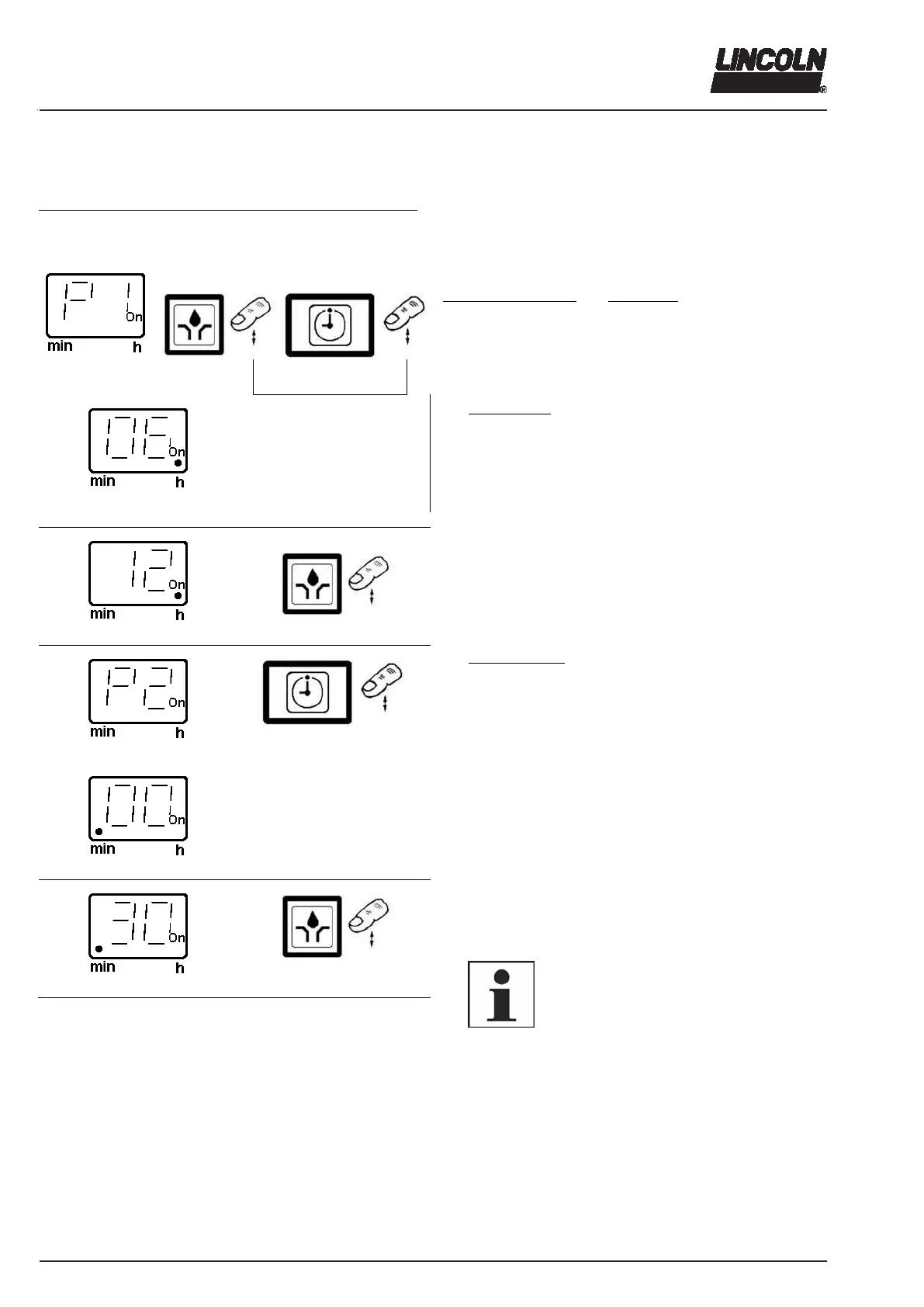
Setting Pause Time P1 and P2
To access to the programming mode, press both but-
tons at the same time > 4 seconds, so that “P1” appears
in the display.
Programming options
: Pause time:
P1 0 - 59 hours
P2 0 - 59 minutes
Min. pause time DC 4 minutes
Max. pause time DC/AC 59 hours 59 minutes
P1: Setting hours
When releasing the two buttons, the currently set value ap-
pears (here the factory-set value: 6 hours).
The field “hour“ is indicated by a decimal point on the right-
hand side.
4220a99
4222a99
4217a99
4214a99
6270b04
4220a99
4222a99
Fig. 42 Programming mode (continuation next page)
Press button.
Settings are made in one direction: 0, 1, 2, 3,....59 h
Button pressed once …............. increases by 1 hour
Button pressed continuously ........... quick sequence
P2: Setting minutes
Press button, so that “P2“ appears in the display.
When releasin
the button, the currentl
set value appears
(here the factory-set value: 0 minutes).
The field “minute“ is indicated by a decimal point on the left-
hand side.
Press button.
Settings are made in one direction: 0, 1, 2, 3, 4, .... 59 min
Button pressed once ….......... increases by 1 minute
Button pressed continuously ........... quick sequence
6001a02
NOTE
The minimum pause time is 4 respectively
20 minutes. For settings < 4 respectively
< 20 minutes (without input of hours) there
automatically appears “. 04“ respectively “
20“ in the display provided the program-
ming sequence has been carried out
completely.



 To Next Page