57
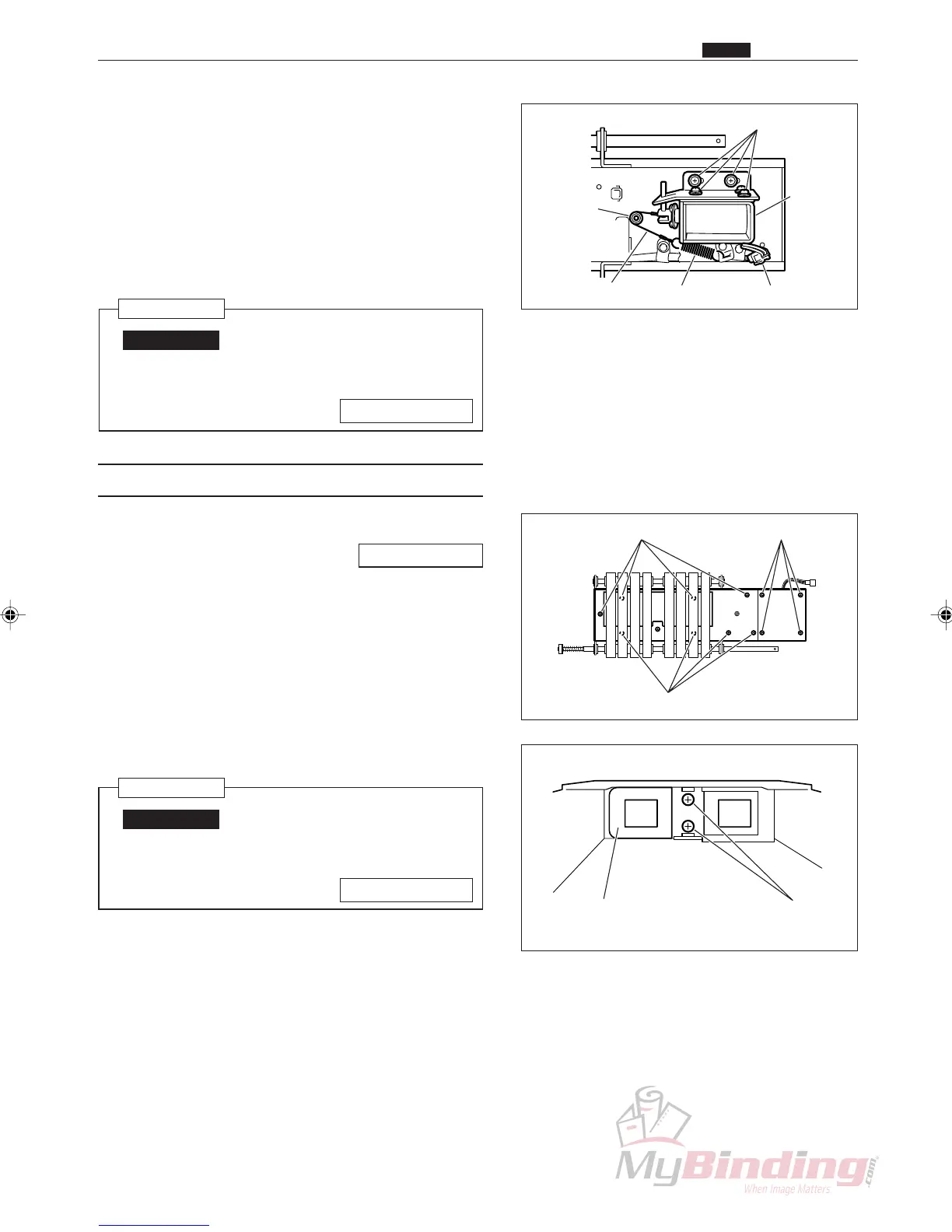
Shaft &
Set Screw
Screws
Shutter
Solenoid
ConnectorSpringWire Unit
e Remove the connector for the solenoid. (1 position)
r Remove the wire unit from the spring.
t Loosen the set screws on the shaft, and remove the
wire unit.
y Take out the 2 screws, and remove the shutter
solenoid.
Reinstallation
IMPORTANT:
• Adjust the shutter position when install
the shutter solenoid.
\See page 113
(12) Removing the Shutter
q Remove the Shutter Solenoid.
\See page 56
w Take out the 4 screws, and remove the plate.
e Take out the 8 screws, and remove the lid.
r Take out the 2 screws, and remove the shutter.
Reinstallation
IMPORTANT:
• Adjust the shutter position when install
the shutter solenoid.
\See page 113
Lid & Screws
Lid & Screws Plate & Screws
Screws
Shutter
x Feed Section
Chap.3



 To Next Page