Network and System Management
334
NETGEAR ProSAFE VPN Firewall FVS318G v2
3. To enable access from the WAN, specify a new SNMP configuration, or enable SNMP trap
events, enter the settings as described in the following table:
4. Click the Ad
d button to add the new SNMP configuration to the SNMP Configuration table.
To edit an SNMP configuration:
1. Log in to the unit:
a. In the address field of any of the qualified web browsers, enter
https://192.168.1.1.
The NETGEAR Configuration Manager Login screen displays.
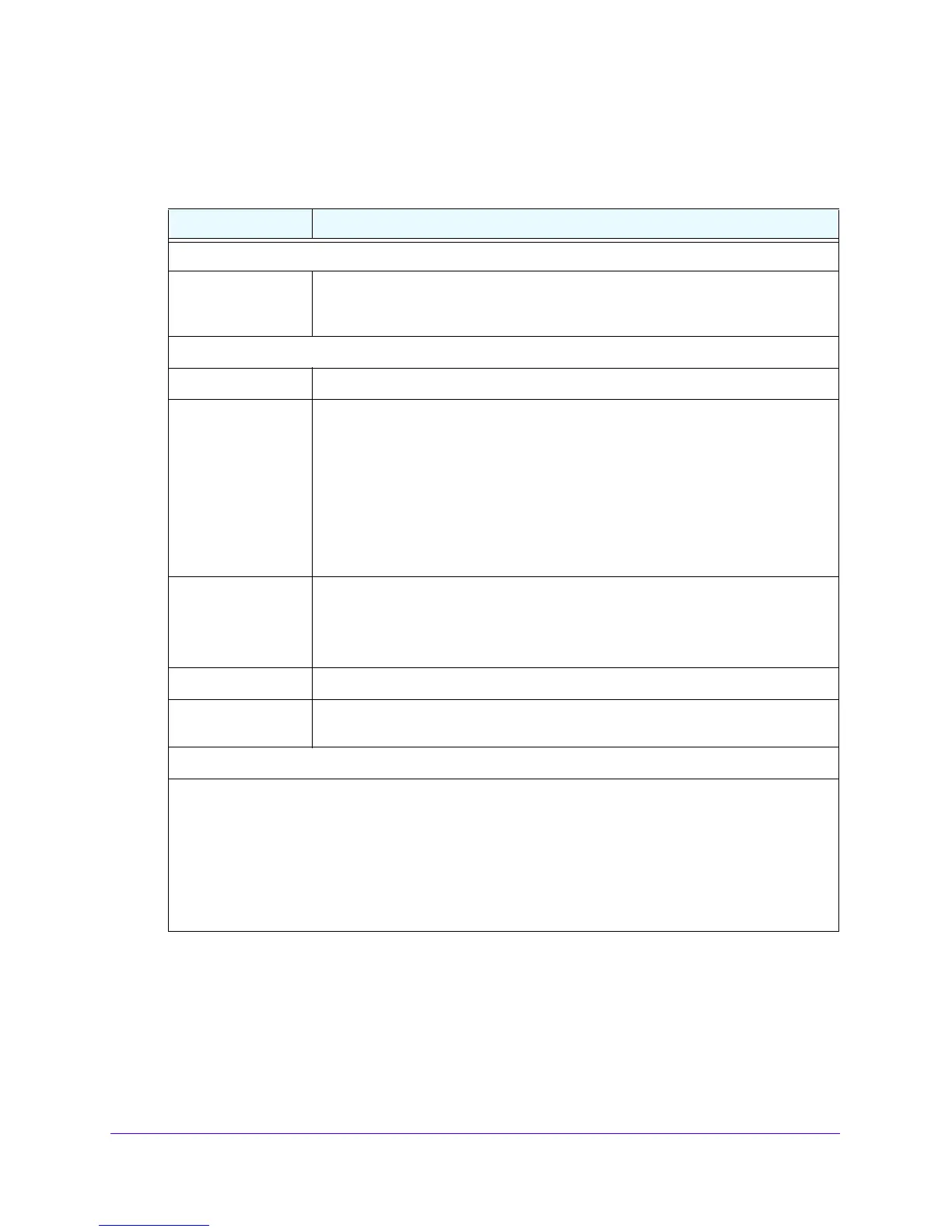
Table 74. SNMP screen settings
Setting Description
Access From WAN
Enable access from
WAN
T
o enable SNMP access by an SNMP manager through the WAN interface, select
the Enable access from WAN check box. By default, this check box is cleared and
access is disabled.
Create New SNMP Configuratio
n Entry
IP Address Enter the IP address of the n
ew SNMP manager.
Subnet Mask Enter the subnet mask of the new SNMP manager.
Note the following:
• If you want to narrow down the number of devices that can access
the VPN
firewall through the host IP address and receive traps, enter an IP address with
a subnet mask of 255.255.255.252.
• If
you want to allow a subnet to access the VPN firewall through
the host IP
address and receive traps, enter an IP address with a subnet mask of
255.0.0.0. The traps are received at the IP address, but almost the entire
subnet is allowed access through the community string.
SNMP Version From the list, select the SNMP version:
• v1.
SNMPv1.
• v2c. SNMPv2c.
• v3
. SNMPv3.
Port Enter the port n
umber of the new SNMP manager. The default port number is 162.
Community Enter the community string that allows the SNMP manager access to the MIB
objects of the VPN firewall for the purpose of reading only.
SNMP Trap Events
Select the check boxes to specify which SNMP trap
events are sent to an SNMP manager:
• WAN Connection Failure.
Sent when the WAN connection fails.
• Firewall.
Sent when a new connection is initiated through addition of a custom firewall rule.
• IPSec VPN. Sent when an IPSec VPN tunnel is established or disconnected.
• Configuration Change.
Sent when the configuration of the VPN firewall changes.
• User Login.
Sent when a user logs in to the VPN firewall.
• User Login Fail.
Sent when a user attempts to log in to the VPN firewall but fails to do so.







 To Next Page