Chapter 3: Getting to Know the EP10
Audio Indicators
Psion EP10 Hand-Held Computer User Manual
26
3.6 Audio Indicators
The audio speaker provides a variety of sounds when a key is pressed, a keyboard character is rejected,
scan input is accepted or rejected, an operator’s entry does not match in a match field or the battery is low.
To specify how you want your EP10 to respond under various conditions, refer to“Sounds Tab” on page 104.
3.6.1 Vibration Settings
You can set the EP10 to Vibrate or Vibrate and Ring when you receive an incoming phone call. Refer to “No-
tifications Tab” on page 104 for details about choosing Events and Ring types.
3.6.2 Adjusting Speaker Volume
The Volume button is located on the left side of the EP10, just above the Scan button. It is a rocker button;
pressing the top half of the button increases volume while pressing the bottom half of the button
decreases it.
3.7 Inserting the microSD and SIM Card
There are two card holders available in the battery compartment of the EP10 – the lower holder is provided
for a microSD (micro Secure Digital) card and the upper holder is for a SIM (Subscriber Identity Module)
card. The microSD cards provide additional non-volatile memory to your EP10. SIM cards provide access to
the voice option, the Internet, and so on.
3.7.1 Inserting the Cards
• Press and release the [Power] button to turn the unit off.
• To access the card slots, slide the battery latch to the right to unlock the battery, and remove it.
EP10 Equipped with a CDMA Radio
Keep in mind that only a microSD slot is available if a CDMA radio is installed in the unit.
• Slide the card door up to unlock it. Flip it open.
• Slide the microSD card onto the guides on the SD door - position the card with the connector pads at
the bottom so that when the door is closed, they make contact with the connectors on the unit.
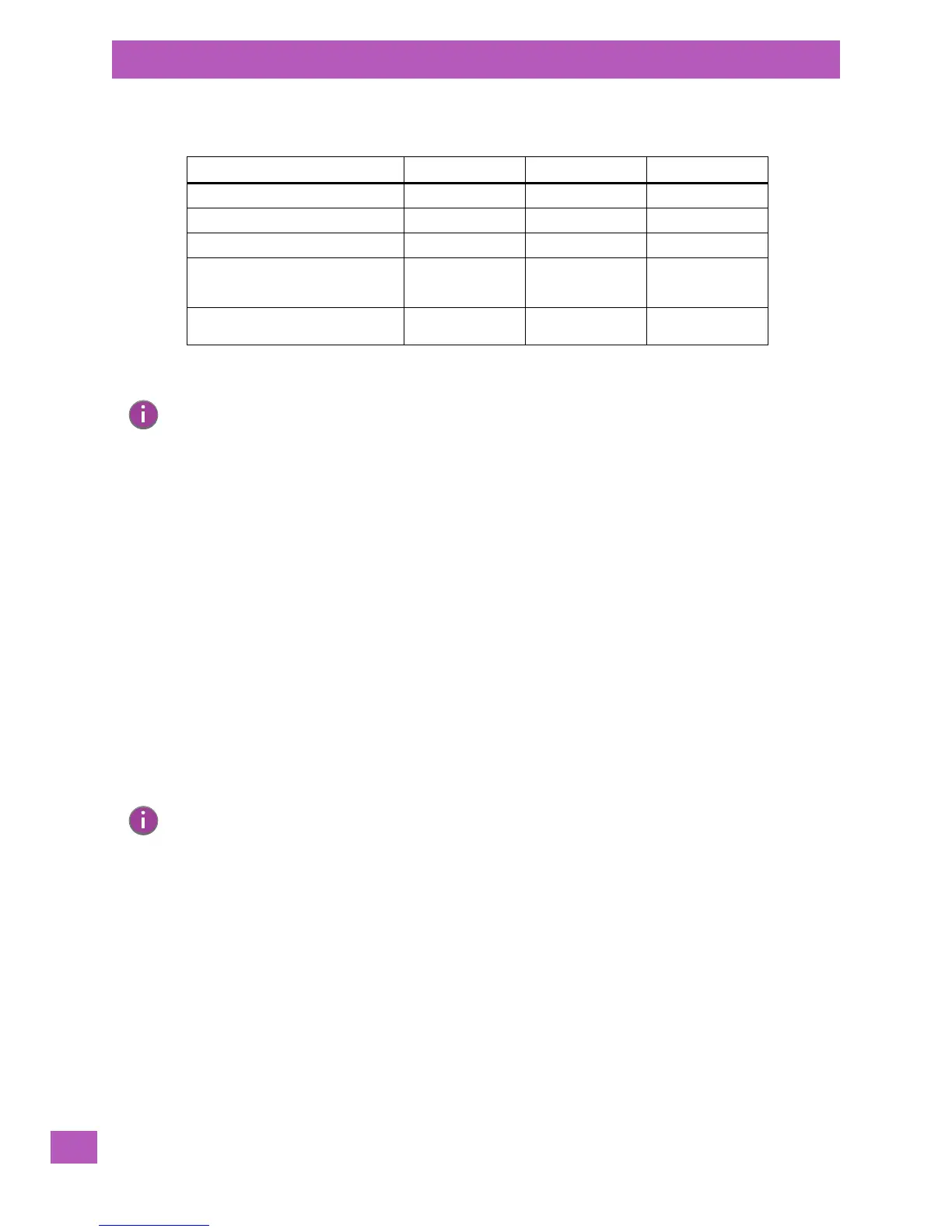
Table 3.2 EP10 Charge LED Behaviour
Charging Status LED Colour LED Flash Rate Duty Cycle
No external power detected. Not applicable OFF Not applicable
Battery charge complete. GREEN Solid ON Continuous
Battery charging normally. GREEN Slow Regular
Battery not charging because battery
temperature is outside the allowable
range: 0° C to 40° C, 32° to 104° F.
YELLOW Normal Regular
Battery charge failure. Unable to read
battery or non Psion battery.
RED Solid ON Continuous
Note: When the [Power] button is pressed, the yellow LED will flash to let you know that the
hand-held is powered up. At this point, you can go ahead and release the [Power] button.
Note: If the EP10 is equipped with a CDMA radio, only a microSD slot is available. A SIM card slot is
not present.



 To Next Page