Getting Started
R&S
®
FSPN
42User Manual 1179.4363.02 ─ 01
1 2 3 7 9
4 5
8
6
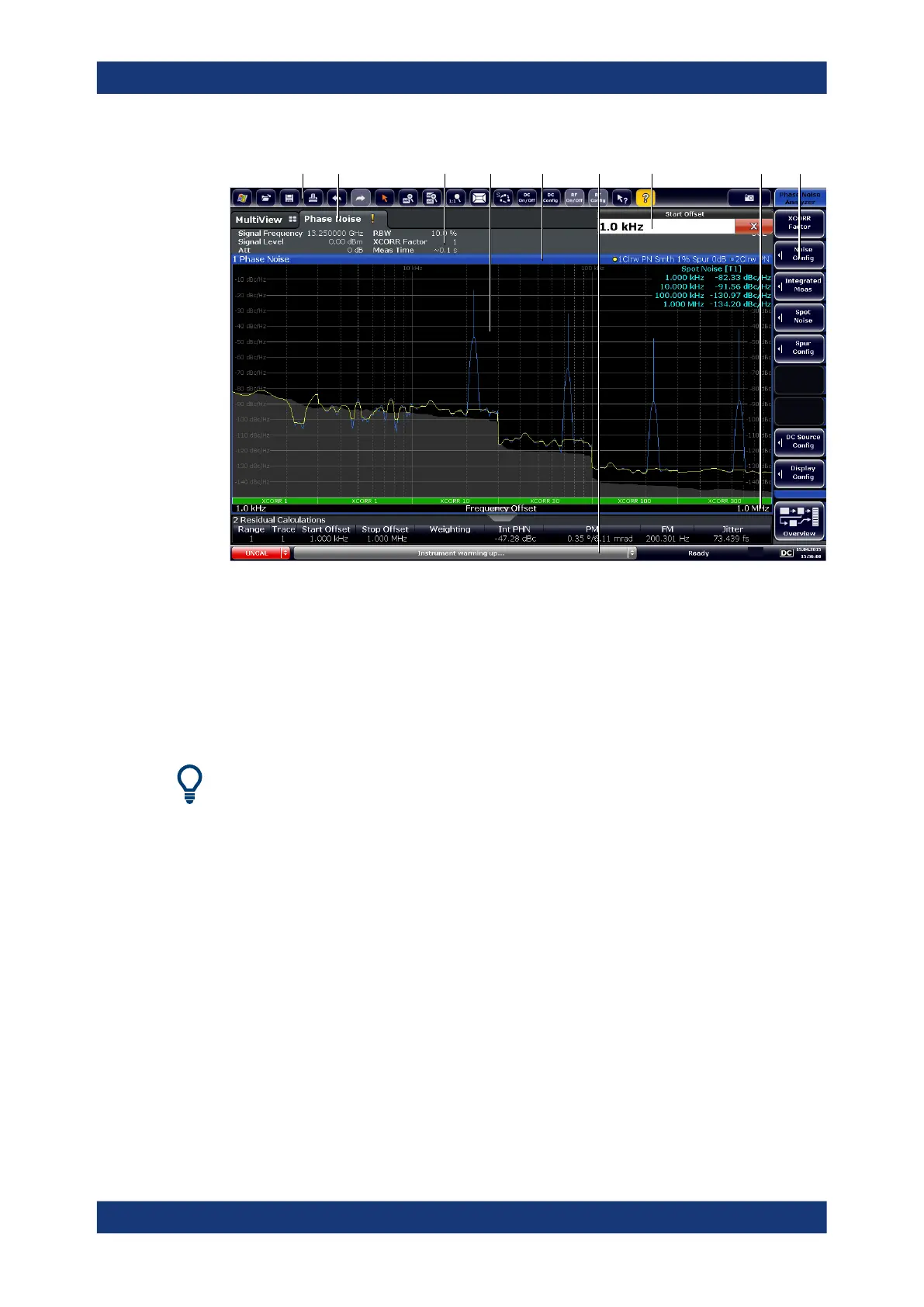
1 = Toolbar: contains general functionality of the firmware.
2 = Channel tab: contains measurement channel.
3 = Channel bar: shows measurement settings.
4 = Result display: contains measurement results.
5 = Window title bar: contains diagram-specific (trace) information.
6 = Status bar: contains system messages, progress bar and date and time.
7 = Input field.
8 = Diagram footer: contains diagram-specific information.
9 = Softkeys: provide access to measurement functions.
Hiding elements in the display
You can hide some of the elements in the display, for example the status bar or chan-
nel bar, in order to enlarge the display area for the measurement results ("Setup > Dis-
play > Displayed Items").
For details see the R&S FSPN User Manual.
● Channel Bar............................................................................................................ 43
● Window Title Bar..................................................................................................... 44
● Marker Information..................................................................................................45
● Spot Noise Information............................................................................................46
● Measurement Progress Information........................................................................46
● Frequency Information in Diagram Footer.............................................................. 47
● Instrument and Status Information..........................................................................47
● Error Information..................................................................................................... 48
Operating the Instrument



 To Next Page