Common Measurement Settings
R&S
®
FSPN
120User Manual 1179.4363.02 ─ 01
You can define any offset frequency that is part of the measurement range as a new
spot noise position. To exclude an offset frequency, uncheck the checkbox of the cur-
rent offset.
The results for the user defined spot noise positions are displayed in the spot noise
table in addition to the decade edge spot noise results.
When you turn off the "Decade Edges" spot noise positions, the spot noise table con-
tains only the user defined spot noise positions.
Remote command:
See Chapter 11.6.6.3, "Spot Noise Configuration", on page 371.
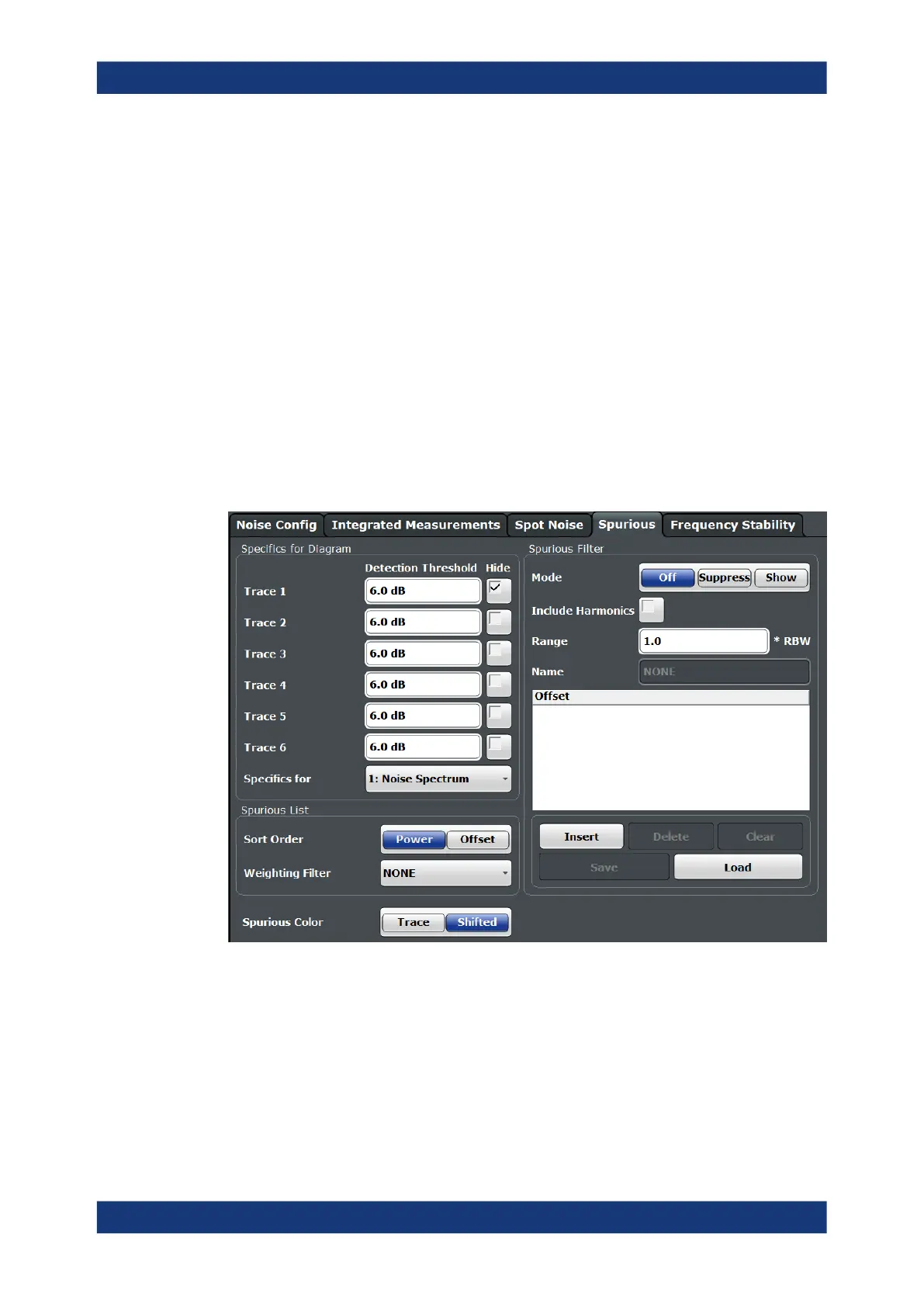
6.5.6 Spur Display
Access: "Overview" > "Noise Config" > "Spurious"
Spurs are (usually undesired) peak levels that can occur in the measured frequency
range. They are represented by unusually tall spikes on the trace.
The remote commands required to configure the spur display are described in Chap-
ter 11.6.6.4, "Spur Display", on page 375.
Hiding spurs
Hiding spurs is a method to remove displayed peak levels visually.
You can apply spur removal to all active traces individually (spurious removal "Hide In
Diagram"), and define a threshold (in dB) that defines when a peak level is recognized
as a spur (spurious removal "Detection Threshold").
Noise Measurement Configuration


 To Next Page