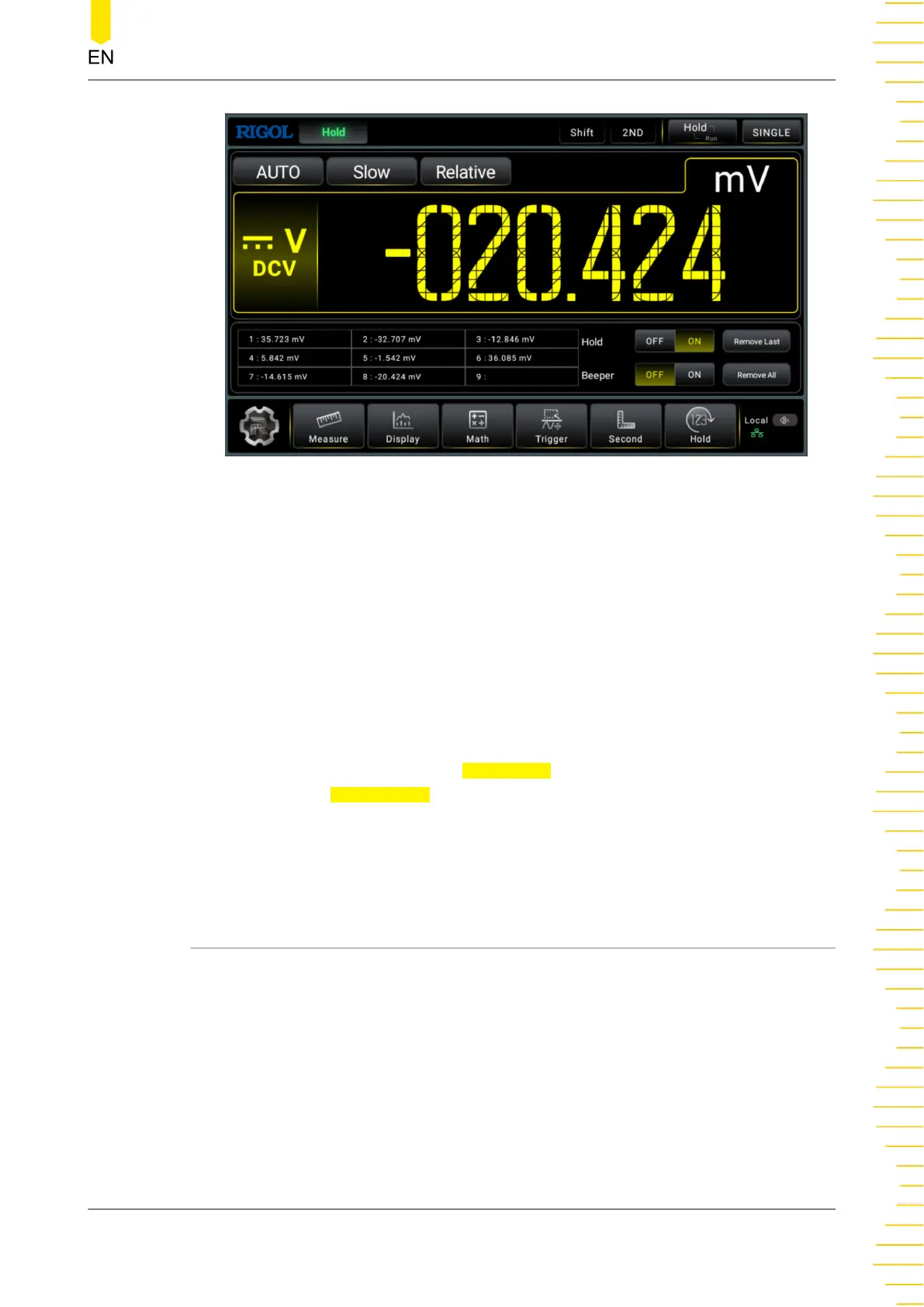
Figure 5.63 Enable the Hold function
When you enable the readout hold function, you can set the sensitivity. Adjust the
range of the sensitivity to ensure that the readout is stable and properly displayed. It
is expressed in %. If the readout is outside of the range of the selected sensitivity, the
multimeter will capture the new readout and display it. The available sensitivity value
can be set to 0.01%, 0.1%, 1%, or 10%. By default, it is 0.01%. For example, set the
sensitivity to 0.01% and input a 5V signal, if the readout is beyond the range of
4.99975V-5.00025V, a new readout is displayed.
As shown in the figure above, the value shown in the main display area is the current
measurement hold value. The table below the main display area records the latest
nine updated readouts. Click or tap
Remove All to remove all the readouts from the
table. Click or tap Remove Last to remove the last displayed readout.
When the Hold function is enabled, you can set the beeper. When the beeper is
enabled, if the readout is outside of the set sensitivity range, the instrument sounds
an alarm and records the data in the table.
5.8.2 Single
In Single trigger, you need to set the parameter "Sample".
Front Panel Operation
Copyright ©RIGOL TECHNOLOGIES CO., LTD. All rights reserved. DM858 Series User Guide
95



 To Next Page