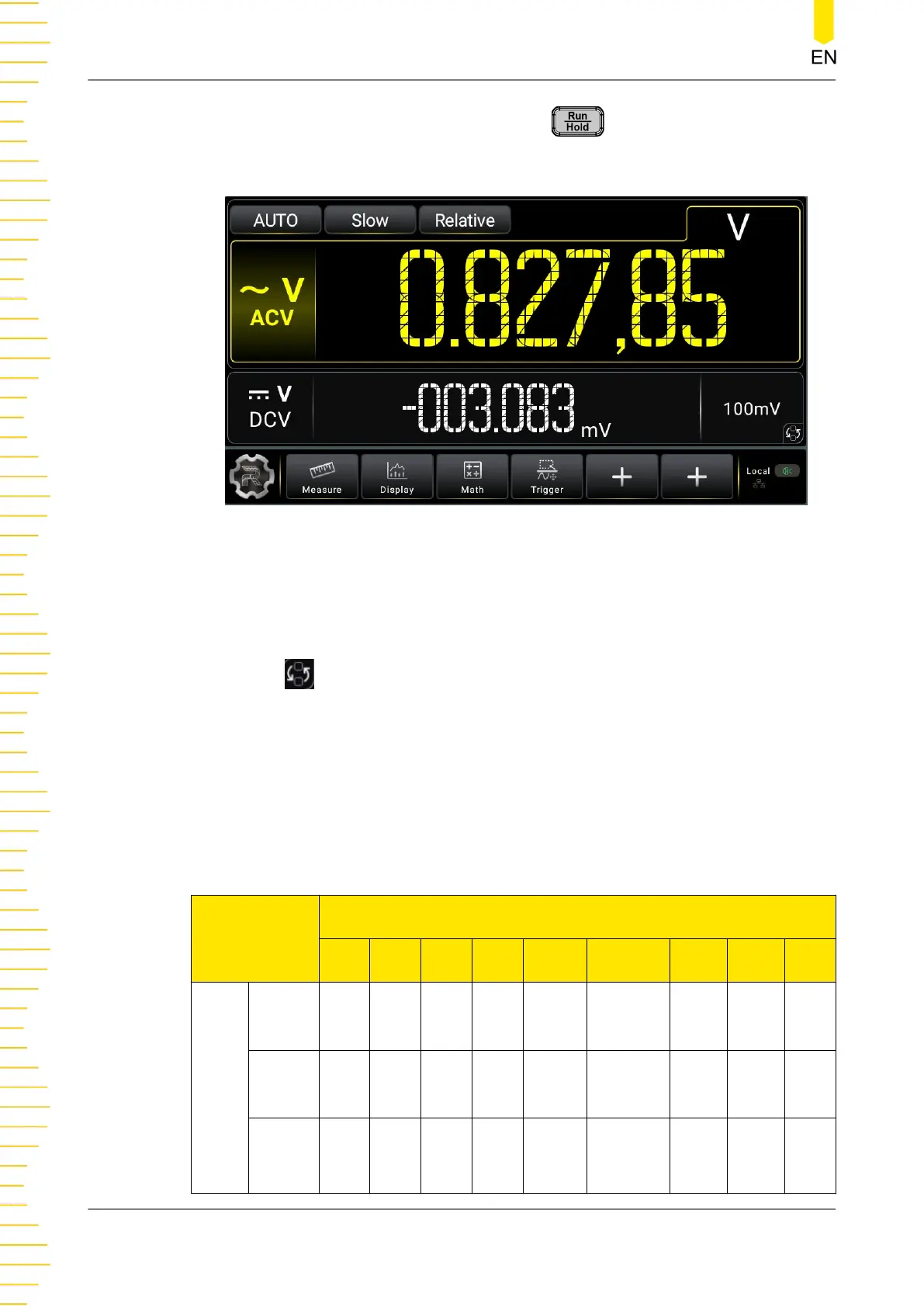
When you enable the 2ND measurement, press , the results of the 2ND
measurement is displayed in the secondary display area of the screen, as shown in the
following figure.
Figure 5.37 Main and Secondary Display Areas
As shown in the figure above, the section where the measured item and values are
displayed in yellow is considered as the main display area, and the section below the
main display area is considered as the secondary display area.
Click or tap
in the secondary display area to switch the position of the basic
measurement item and the secondary measurement item. For details, refer to
User
Interface Overview
.
The basic measurement types displayed in the main display area are all supported by
the 2ND measurement. In some specific conditions, some of the basic measurement
types are disabled for 2ND measurement. For details, see the table below.
Table 5.14 Basic Measurement Types and 2ND Measurement Types
Basic Measurement Function
DCV DCI ACV ACI FREQ PERIOD 2WR 4WR Cap
2ND
Meas.
Types
DCV
Avail
able
DCI
Avail
able
ACV
Avail
able
Availa
ble
Available
Front Panel Operation
DM858 Series User Guide
68
Copyright ©RIGOL TECHNOLOGIES CO., LTD. All rights reserved.



 To Next Page