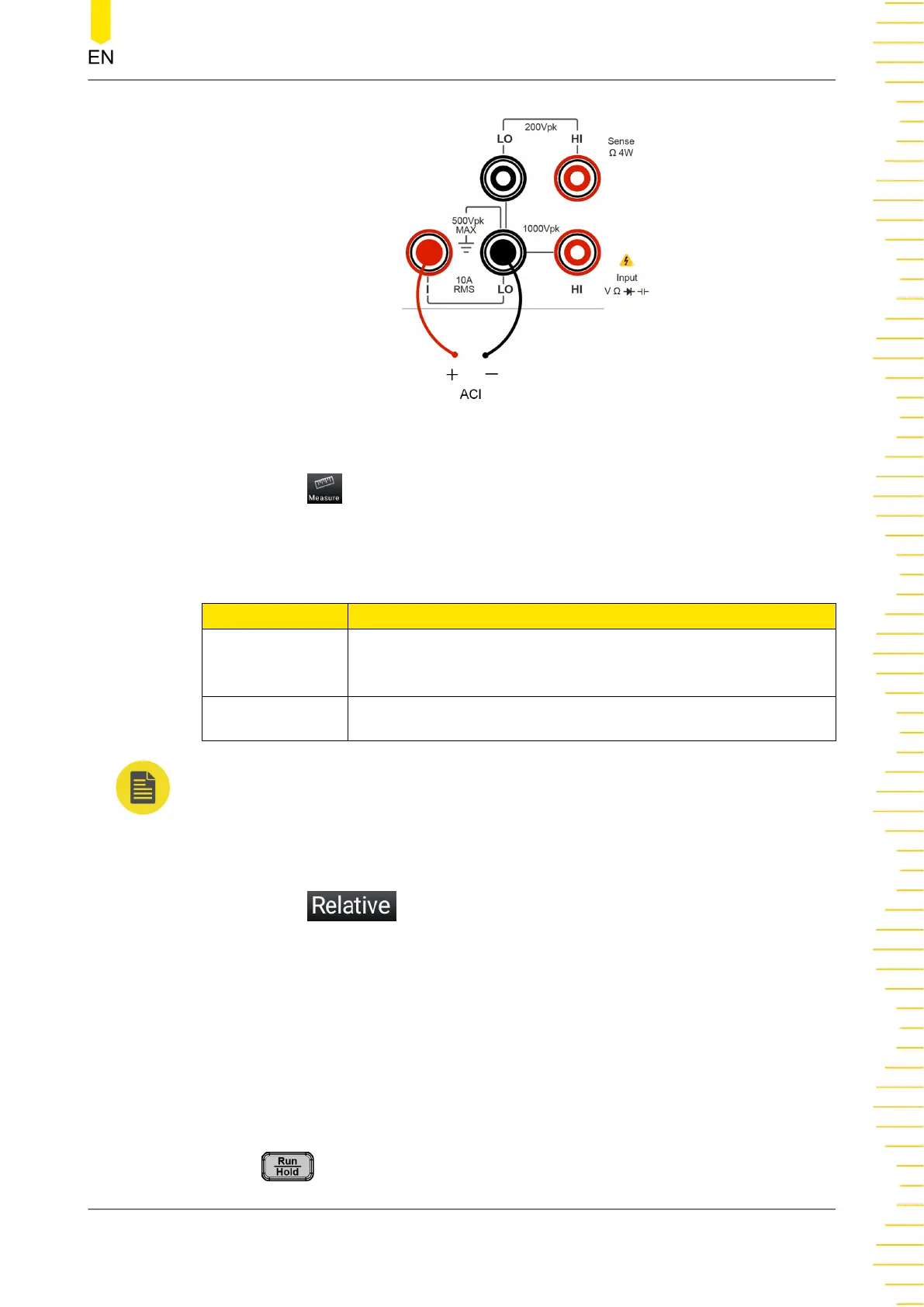
Figure 5.10 AC Current Measurement Connection Diagram
3. Click or tap to set the measurement parameters of AC current: Range and
Rate
Table 5.5 AC Current Measurement Parameter Setting
Parameter Remarks
Range*
Auto, 100 μA, 1 mA, 10 mA, 100 mA, 1 A, 10 A(DM858)/3
A(DM858E)
Rate Fast, Medium, Slow
NOTE
20% over range on all ranges except 10 A range. The range can be set to Auto or the given
specified values.
4. Click or tap to enable or disable the relative operation function. When
enabled, the displayed reading value is the result obtained by subtracting the set
relative value from the actual measurement value. For the relative value setting
methods, refer to descriptions in "
Math Operation
".
5. Read the measured value
When reading the measurement results, you can use the arrow keys to switch the
reading rate.
6. Hold the reading data
Press
to run and hold the reading data displayed on the screen.
Front Panel Operation
Copyright ©RIGOL TECHNOLOGIES CO., LTD. All rights reserved. DM858 Series User Guide
41



 To Next Page