You can also copy, delete, or rename the specified type of file from the internal
memory or external USB storage device via the disk management menu.
The instrument provides one USB HOST interface on the front panel which can
connect the USB storage device for external storage.
TIP
It only supports the flash memory USB storage device of FAT32 format.
To enter the Storage interface, perform the following operation.
• Press
on the front panel;
• Click or tap the function navigation icon to enter the function navigation menu.
Then click or tap Storage.
5.12.1 To Save a File
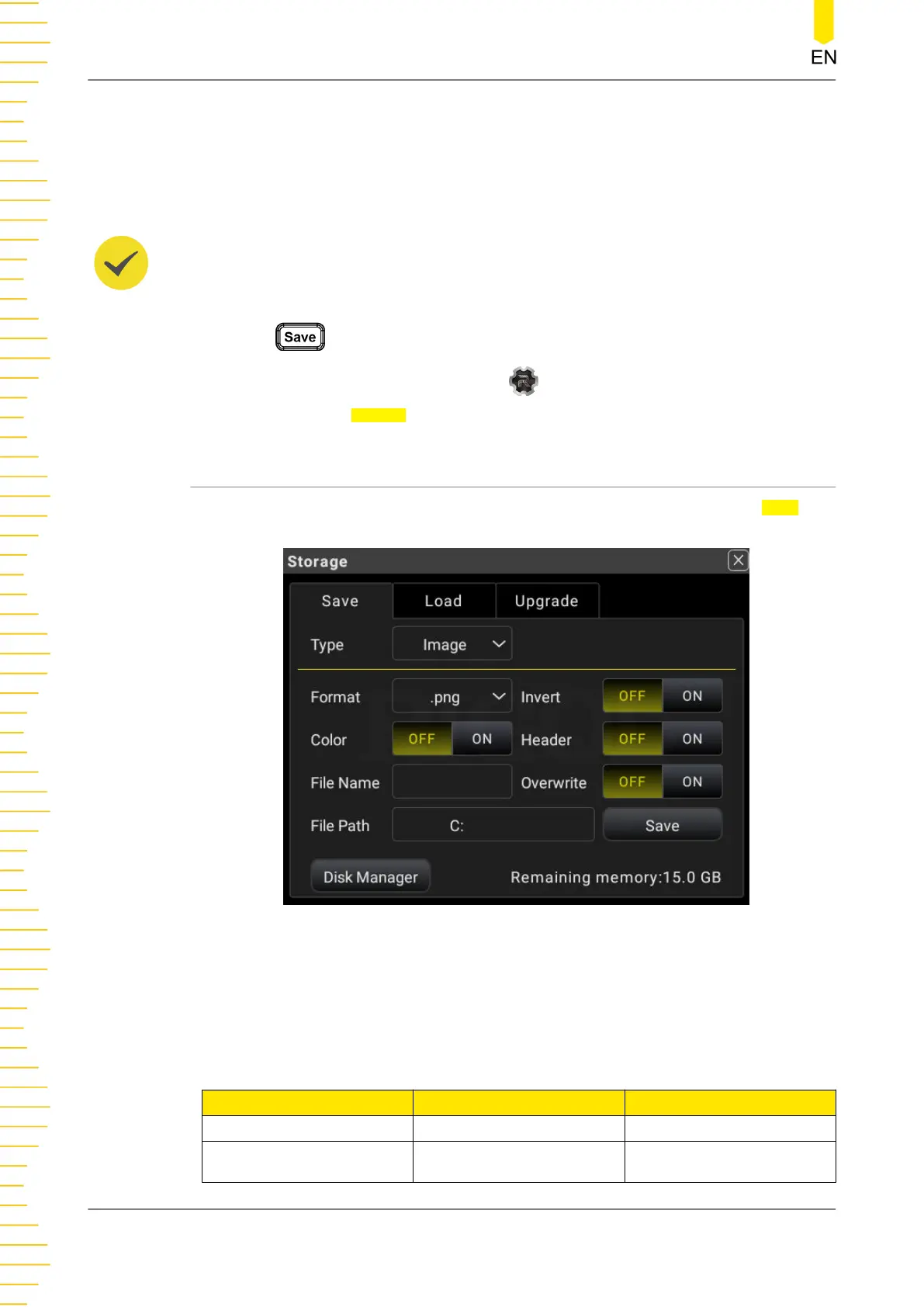
Press Save on the front panel to enter the Storage interface. Click or tap the Save tab
to set the parameters.
Figure 5.77 Storage Interface
Save Type: Image, Data, and Setup. The following table lists all the file types
supported.
Table 5.29 Types of Files to be Saved
File Type Description Suffix Name
Image File Saves the image. *.bmp; *.jpg; and *.png
State File
A file that saves the
current function
*.sta
Front Panel Operation
DM858 Series User Guide
110
Copyright ©RIGOL TECHNOLOGIES CO., LTD. All rights reserved.



 To Next Page