NOTE
Access to the settings menu is only available if
the truck is at a standstill and the parking
brake is applied. If the parking brake is re-
leased prematurely, the settings menu will
close.
– Stop the truck.
– Apply the parking brake.
– Press the
button.
The first menu level appears.
– Press the "Settings" softkey
.
– Press the
Truck settings
softkey .
– Press the
Drive programmes
softkey.
The "drive programme" menu appears.
– Press the associated softkey for
drive
programme A
or
drive programme
B
.
Configuring the drive programs using the
"drive programme A" is explained here.
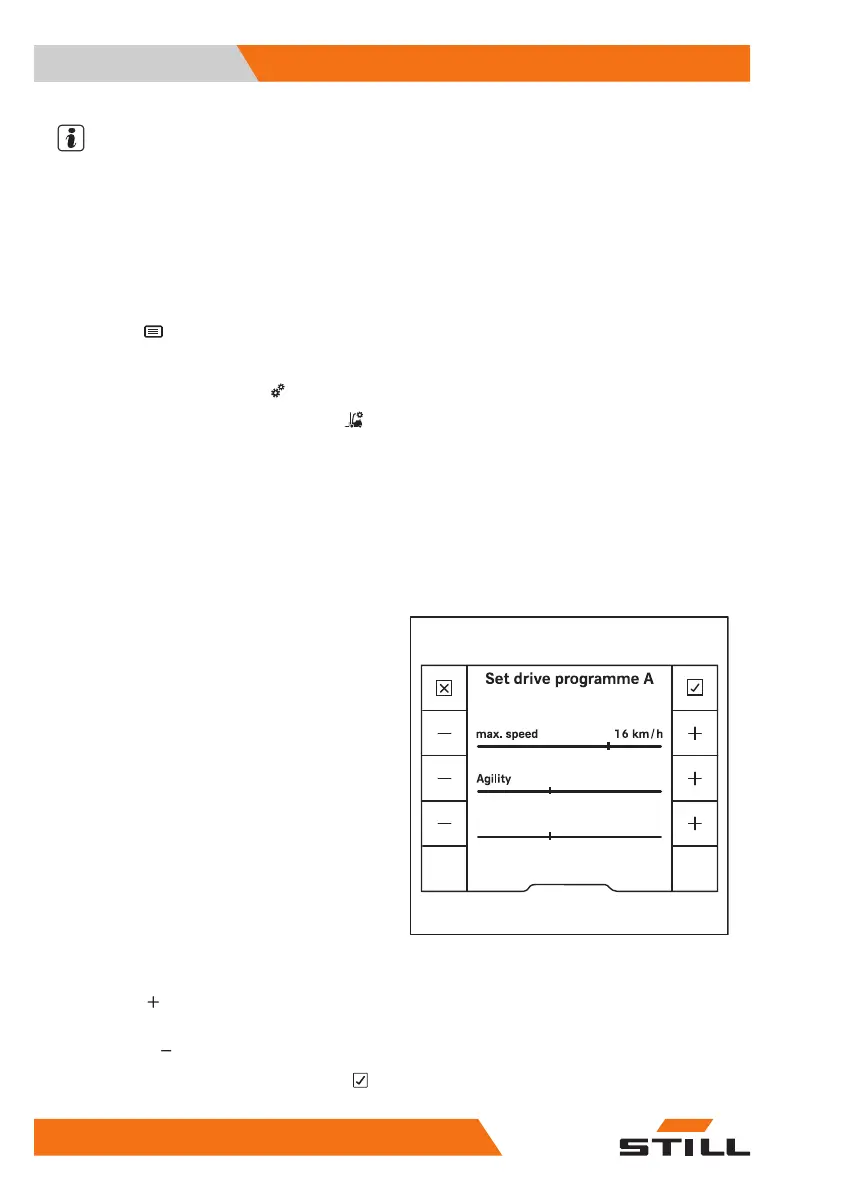
The menu
Set drive programme A
appears.
The following parameters can be set:
●
max. speed
Determines the maximum speed (max. 20
km/h).
●
Agility
Determines the acceleration behaviour and
the reversing behaviour using five levels.
"1" indicates the lowest agility and "5" indi-
cates the greatest agility.
●
Deceleration
Determines the electrical brake retardation
when the accelerator pedal is released in
five stages.
"1" indicates the lowest deceleration and "5"
indicates the greatest deceleration.
– To select a higher level, press the appropri-
ate "plus"
softkey.
– To select a lower level, press the appropri-
ate "minus"
softkey.
– To save the setting, press the "Confirm"
softkey.
3
2
6219_003-187_V5_en
Deceleration
Operation
4
Driving
194 56368011531 EN - 01/2021 - 05



 To Next Page