Controlling attachments using the
triple mini-lever and the 5th function
NOTE
For technical reasons, clamping attachments
must not
be controlled via the "5th function".
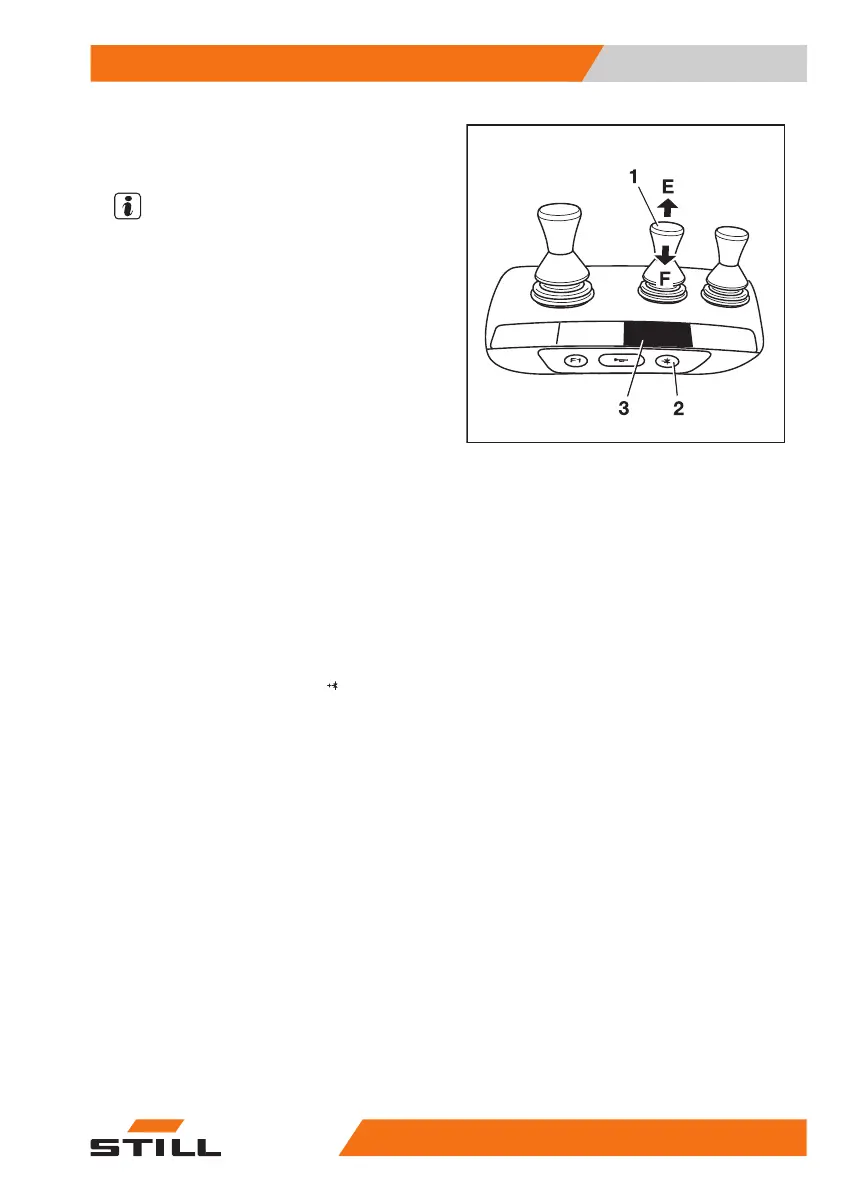
The function key for the "5th function" (2) and
the operating lever (1) are used to control the
"5th function".
The adhesive label bearing the pictograms for
the hydraulic functions (3) is affixed at the
designated point.
– If the adhesive label becomes illegible or is
missing, please contact your authorised
service centre.
– Observe the pictograms for the attachment
functions on the adhesive label (3).
The pictograms on the operating lever show
the respective functions that are activated by
this lever.
The following applies:
– Actuate the function key for the "5th func-
tion" (2).
The LED for the "5th function"
lights up.
– Move the operating lever (1) in the direc-
tion (E) or (F).
The attachment moves accordingly in the di-
rections (E) or (F) as shown in the pictogram.
6219_003-050_V3
Operation
4
Attachments
31956368011531 EN - 01/2021 - 05


 To Next Page