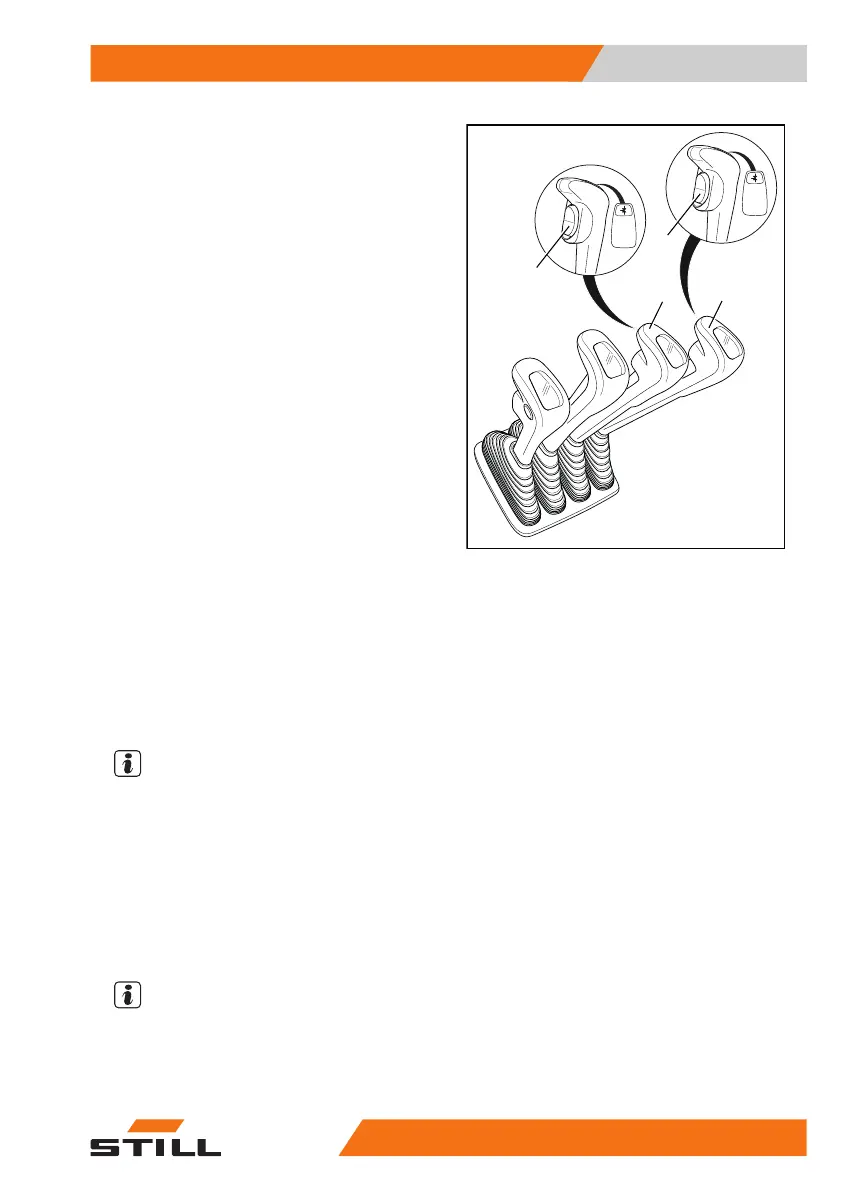
Controlling attachments using multi-
lever operation and the 5th and
6th function
The function keys for the "5th and 6th func-
tion" (1, 2) and the operating levers (3, 4) are
used to control the "5th function" or the
"6th function".
The central and bottom parts of the picto-
grams on each operating lever show the func-
tion that is activated by that lever. The top part
of the pictogram shows that the attachment is
equipped with the "5th function" or the
"6th function".
The following applies:
– Move the operating lever (3, 4) forwards.
The attachment moves in the direction of
movement shown in the central part of the pic-
togram.
– Move the operating lever (3, 4) backwards.
The attachment moves in the direction of
movement shown in the lower part of the pic-
togram.
– Press and hold the switch (1).
The additional function of the attachment is
activated and can be controlled as the
"5th function" with the operating lever (4).
NOTE
The movement/action of the "5th function" can
be found in the operating instructions of the at-
tachment that is fitted.
– Press and hold the switch (2).
The additional function of the attachment is
activated and can be controlled as the
"5th function" or "6th function" with the operat-
ing lever (3).
NOTE
The movement/action of the "5th function" or
"6th function" can be found in the operating in-
structions of the attachment that is fitted.
43
1
2
6219_003-118_V3
Operation
4
Attachments
31156368011531 EN - 01/2021 - 05



 To Next Page