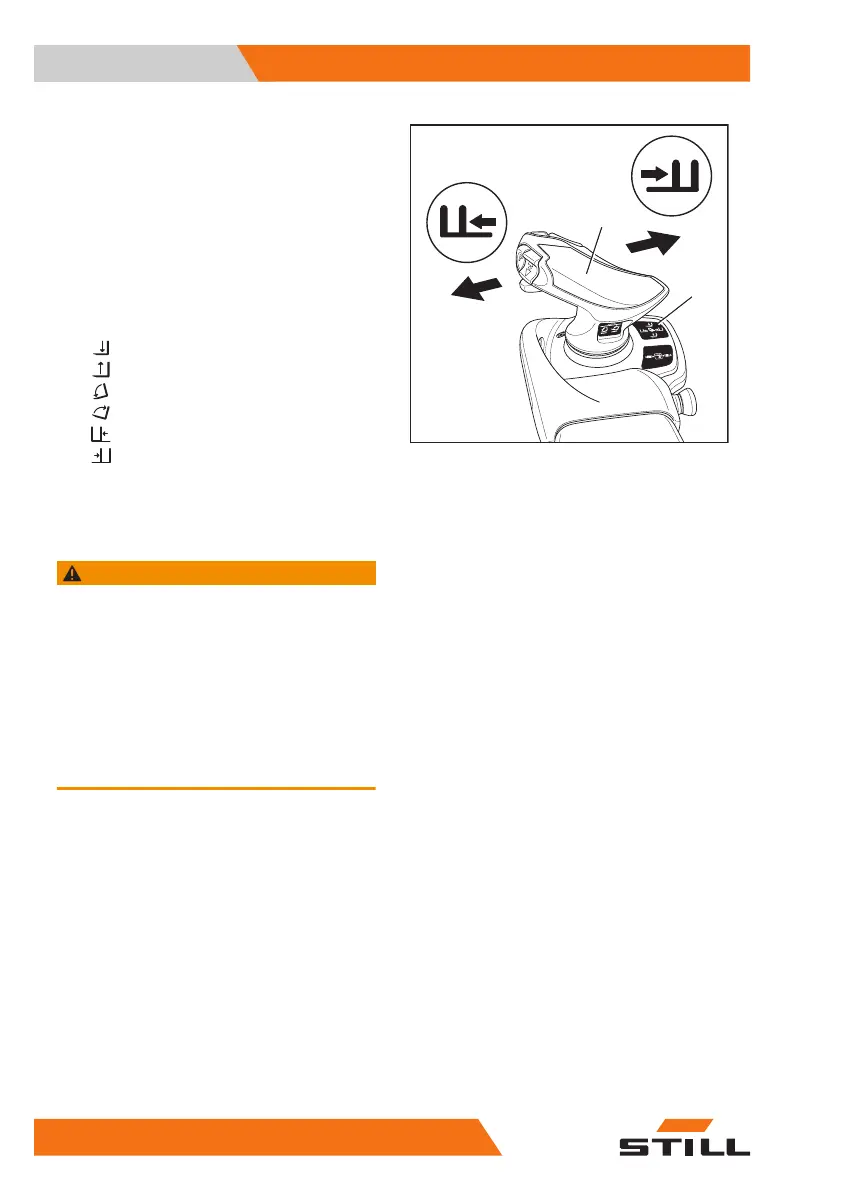
Fork carriage sideshift
To move the fork carriage to the left:
– Push the Joystick 4Plus (1) to the left (E).
To move the fork carriage to the right:
– Push the Joystick 4Plus (1) to the right (F).
Movements of the lifting system and
meanings of the pictograms
A Lowering
B
Lifting
C
Tilting forwards
D
Tilting backwards
E
Side shift left
F
Side shift right
Dynamics of the hydraulic move-
ments
WARNING
Risk of injury due to delayed response from the
truck!
If the lifting movements are configured to use low dy-
namics, the lifting system responds after a delay
when the operating device is released, even in an
emergency. The fork carriage does not stop immedi-
ately upon release. It only stops after approximately
one second. This behaviour may also occur when
specific settings are configured for the Dynamic Load
Control 1 & 2 assistance systems.
– Work with particular attention and care.
The authorised service centre can reduce the
dynamics of the hydraulic movements to adapt
the hydraulic movements to the application re-
quirements. The hydraulic system movement
will then respond more slowly to the actuation
of the operating device.
Maximum dynamics are suitable for applica-
tions that require the load pick up system to
respond quickly and directly. Minimum dynam-
ics are suitable for applications that involve,
for example, the movement of fragile goods
during which impacts must be avoided.
+
F
6219_003-166_V2
1
2
E
F
Operation
4
Lifting
244 56368011531 EN - 01/2021 - 05


 To Next Page