Controlling attachments using the
Joystick 4Plus and the 5th function
NOTE
For technical reasons, clamping attachments
must not
be controlled via the 5th function.
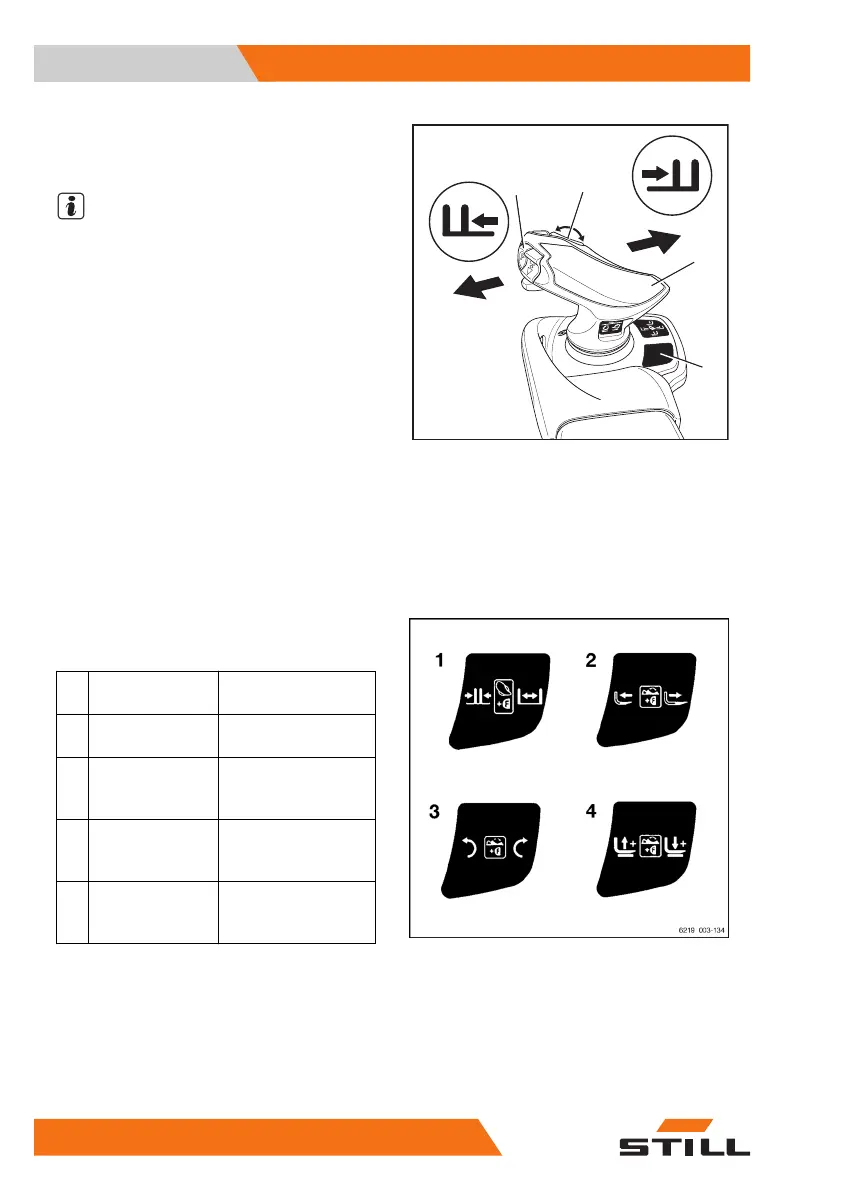
Use shift key "F" (4) and the Joystick 4Plus (2)
and the horizontal rocker button (1) to control
the "5th function".
The adhesive label bearing the pictograms for
the hydraulic functions (3) for the Joy-
stick 4Plus (2) and for the horizontal rocker
button (1) is affixed at the designated point.
– If the adhesive label becomes illegible or is
missing, please contact your authorised
service centre.
The pictograms on the adhesive label regard-
ing operation of the Joystick 4Plus show the
respective functions that are activated by the
individual operating devices of the Joy-
stick 4Plus.
– Note the following attachment functions and
pictograms.
Operating device
Function of the at-
tachment
1
Shift key "F" and
Joystick 4Plus
Adjust fork arms:
close/open
2
Shift key "F" and
horizontal rocker
button
Adjust fork: back-
wards/forwards
3
Shift key "F" and
horizontal rocker
button
Swivel lift mast or
fork: left/right
4
Shift key "F" and
horizontal rocker
button
Additional fork car-
riage: lift/lower
The following applies:
– Press and hold shift key "F" (4).
– Move the Joystick 4Plus (2) in the direc-
tion (E) or (F).
6219_003-166_V2
3
E
G
H
F
1
4
2
Operation
4
Attachments
330 56368011531 EN - 01/2021 - 05



 To Next Page