– Activate the "Access authorisation for the
fleet manager".
The "Settings menu" opens on the display.
– Press the
Truck settings
softkey .
– Press the
Speed limitation
softkey.
The menu that opens offers the following func-
tions:
●
Permanent
Enabling this function limits the speed until
the fleet manager disables this function.
●
By pressing a button
If this function is activated, the driver may
switch the speed limitation on and off by
pressing the
softkey.
●
Entering the maximum speed
This menu can be used to set the maximum
truck speed when speed limitation is active.
– To adjust the maximum speed, press the
Enter max. speed
softkey.
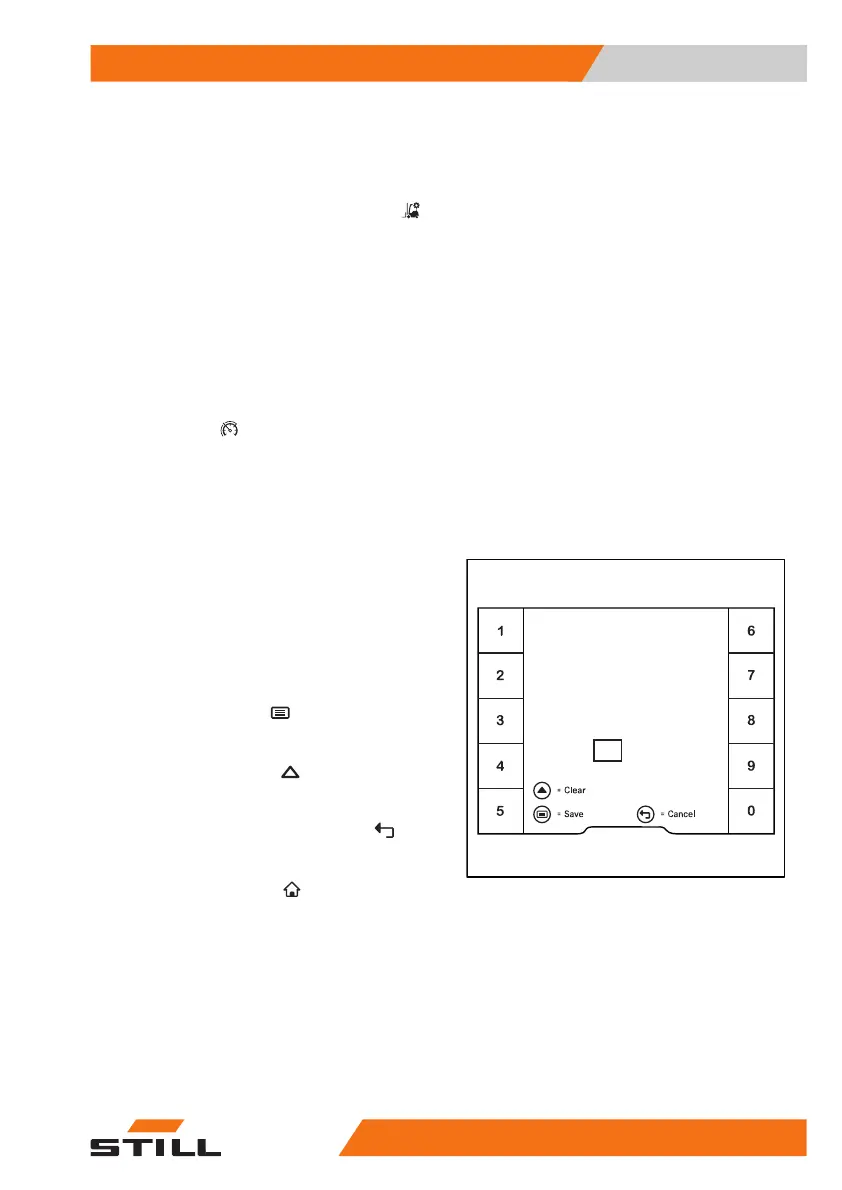
The
Speed restriction
menu opens.
– Using the softkeys, set a maximum speed
between 2 km/h and 20 km/h.
The maximum speed is dependent on the
truck equipment and may be restricted by a
factory setting.
– To
save
, press the button.
The maximum speed is entered.
– To
clear
, press the scroll button.
The entry is deleted.
– To
cancel
, press the back button .
The display reverts to the previous menu.
The main display button
takes you to the
main display.
Enter maximum
speed (2...20km / h)
km / h
10
Speed restriction
6219_003-193_en
Operation
4
Driving
21956368011531 EN - 01/2021 - 05


 To Next Page