Chapter 9 - Performing Medical Procedures Performing a Biopsy
Terason t3000 / Echo Ultrasound System User Guide 223
Biopsy Warning
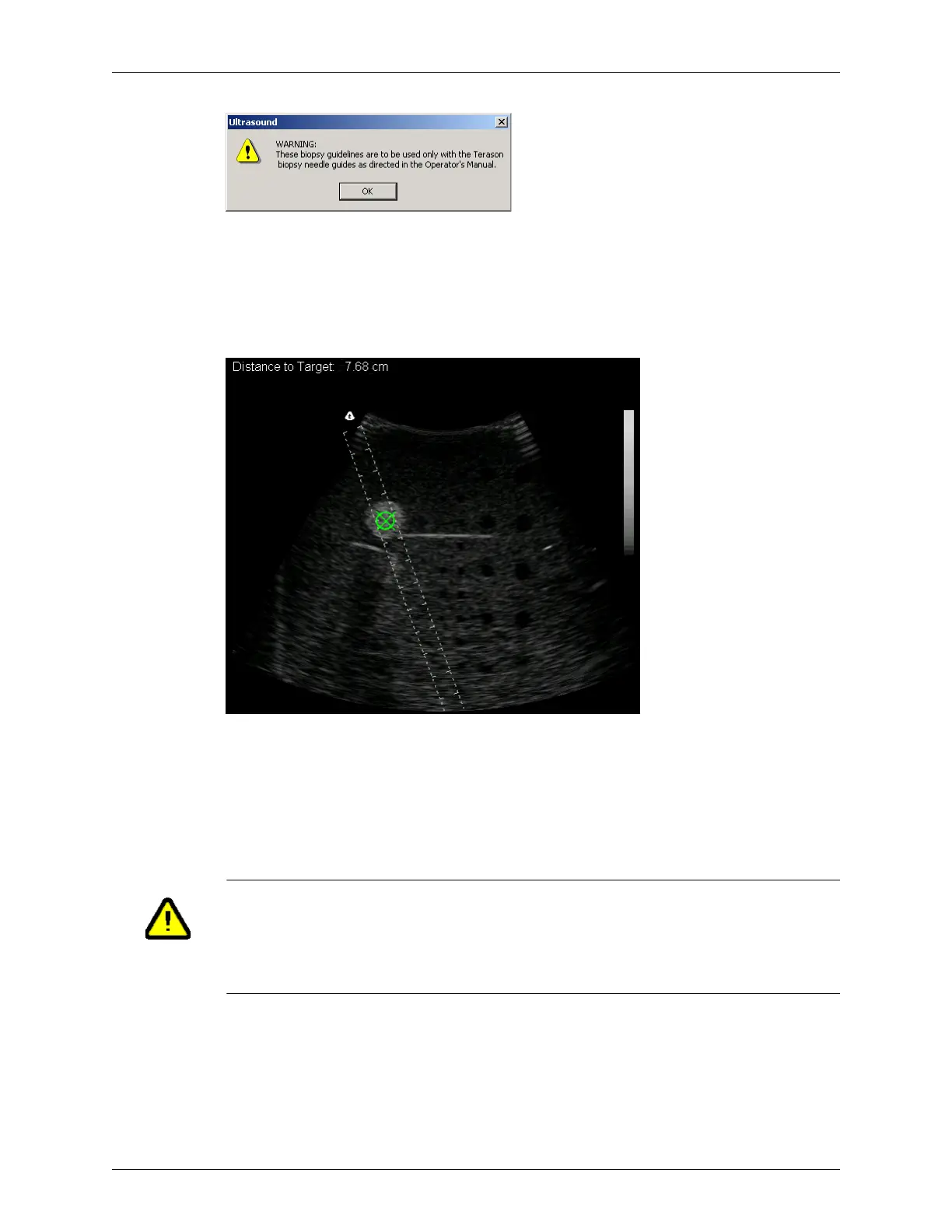
3. Click OK. The warning closes and the Terason software displays the needle guides and
target indicator. The guide lines show you where the needle should be inserted into the
patient. The target indicator (green circle with an X) can be moved within the
guidelines to the exact location of the biopsy target. The Distance to Target value then
shows exactly how deep the needle must be inserted to reach that target.
Needle Guides and Target Indicator
The large ticks on the guide lines are at 1 cm intervals, and the distance between the
guide lines is fixed at 1 cm.
4. If the Target Indicator (green circle with an X) does not show within the guides, select
View > Needle Guide Display > Needle Guide Target Indicator.
The Terason software adds the “Distance to Target” value at the top of the image.
5. Move the Windows pointer within the lines to highlight the target of the biopsy or
other procedure and determine the depth of that target. You cannot move the target
outside of the guide lines.
6. Follow the proper medical protocol to complete the biopsy.
Warning: If the message “Uncalibrated” displays next to the “Distance to
Target” text, the transducer may be uncalibrated, or your
calibration file may be missing or corrupted. Uncalibrated
transducers can apply harmful levels of energy to the patient.
Contact your Terason representative.



 To Next Page