Chapter 7 - Working With Measurements Measuring in the 2D Window
Terason t3000 / Echo Ultrasound System User Guide 151
Measuring in the 2D Window
The Measure function in the 2D window allows:
• Measuring Distances; see page 151
• Measuring Volume; see page 153
• Measuring Elliptical Circumference and Area; see page 154
• Tracing Areas on the Image; see page 155
• Calculating Percent Stenosis; see page 157
• Working with Measurements on an Obstetrical Exam; see page 158
• Making Gynecological Measurements; see page 164
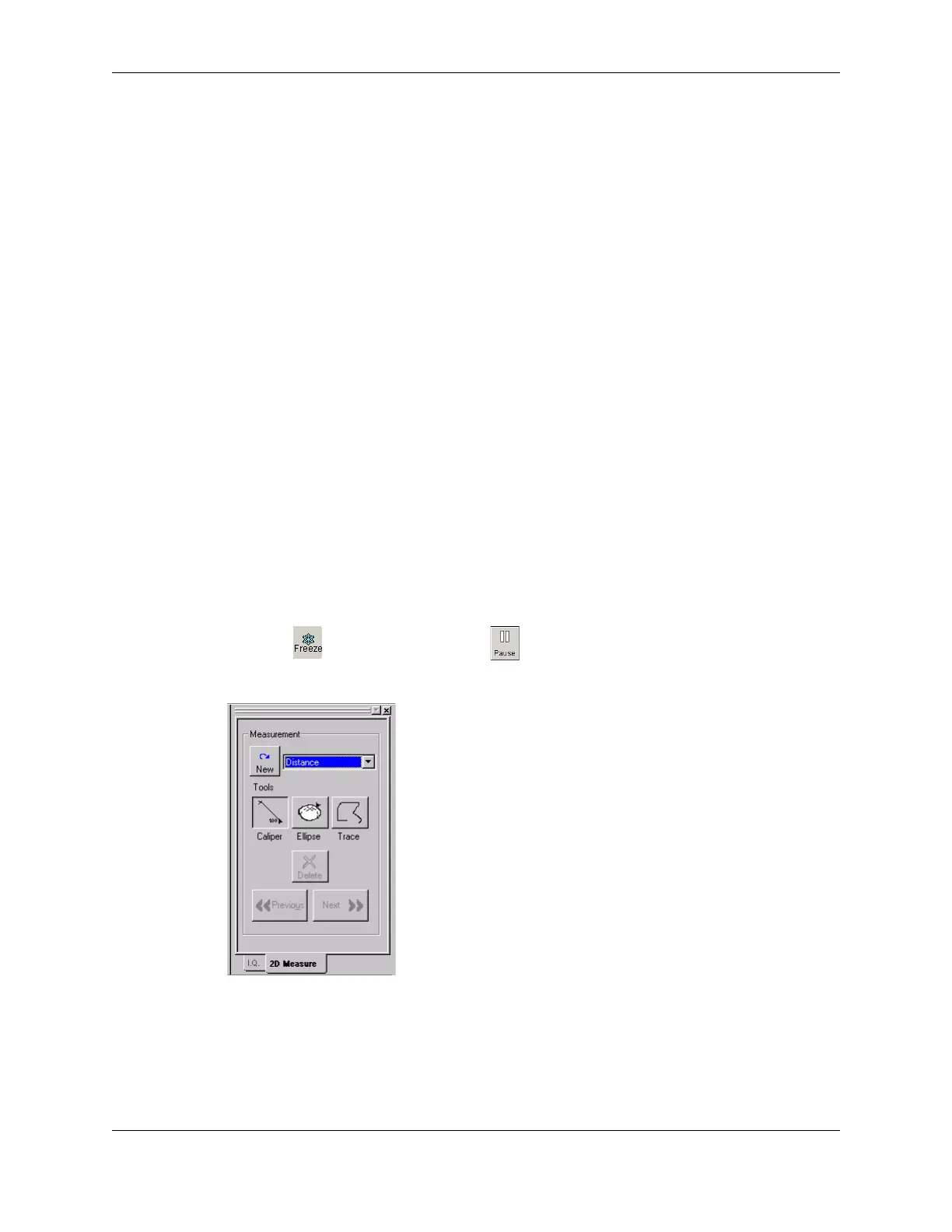
In general, select what you want to measure from the menu of Measurements. If you select
a specific measurement, such as
FL, only the button that works with that measurement is
available. If you select a default measurement, such as
Distance, you can click any button
to choose a different default measurement.
You can also make a measurement by right-clicking and selecting
New Measurement from
the pop-up menu. This starts a measurement of the type currently selected in the 2D
Measure tab.
•
•
Measuring Distances
To measure a distance in the 2D window, complete the following steps:
1. Click . If playing a loop, click .
The measure tabs for the selected scan mode are added to the Image Control window.
2D Measure Tab
2. If necessary, click the 2D Measure tab or click in the 2D window.
3. To measure a detailed area with precision, use the Zoom function (see Enlarging an
Area of the Image on page 73) to enlarge an area of the 2D scan.



 To Next Page