Chapter 10 - Working With DICOM Using DICOM Worklist
Terason t3000 / Echo Ultrasound System User Guide 231
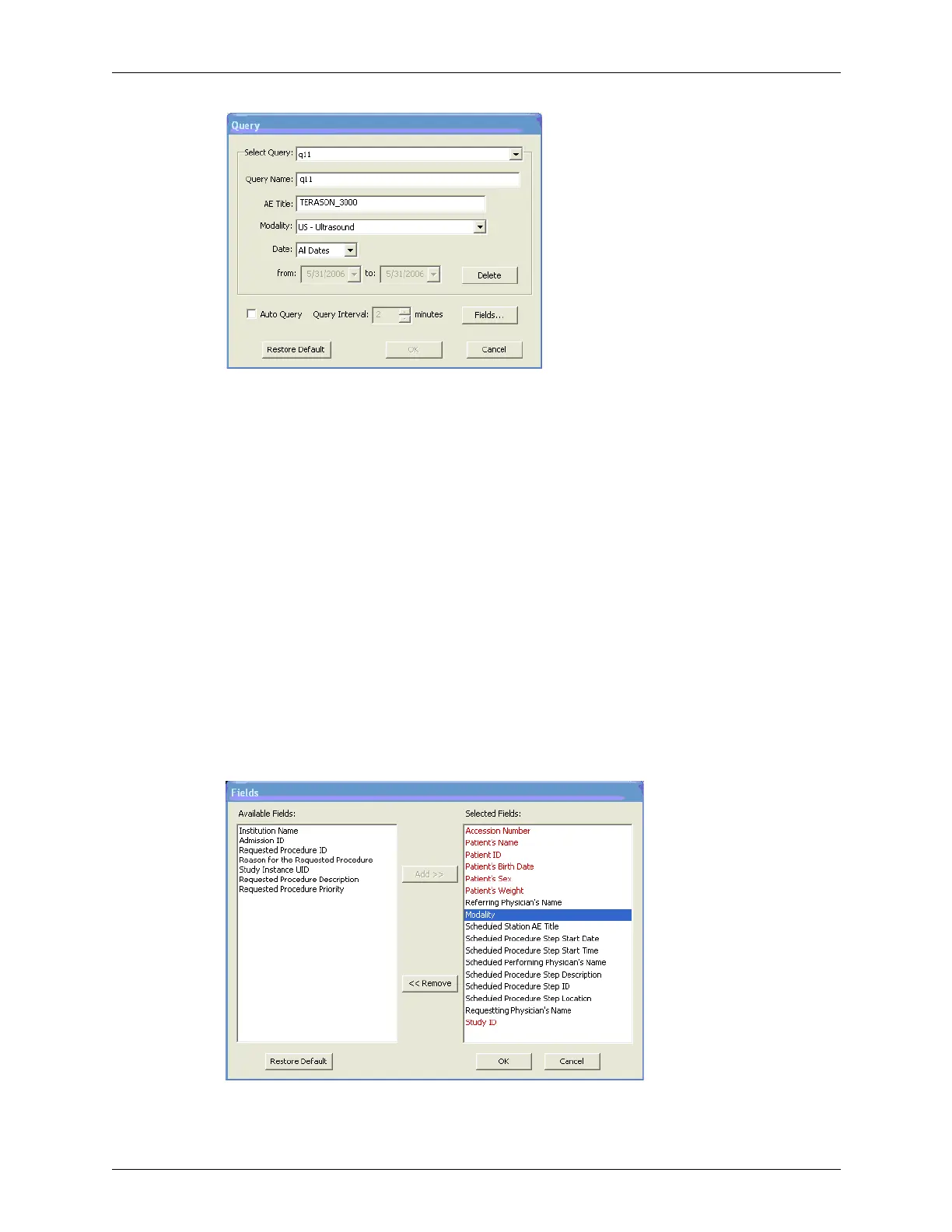
Query Window
2. To create a new query, enter a descriptive name for the query in the Query Name:
field.
The name must be unique.
3. To modify an existing query, pull down the Select Query: menu and select the query
name.
4. Enter the AE title of the Terason ultrasound computer in the AE Title: field.
5. To search for info sets of patients who have not had an ultrasound exam before, pull
down the Modality: menu and choose a different exam type.
6. In the Date: menu, choose
All Dates, Today, or a range of dates to search.
7. To make the query repeat at intervals, click
Auto Query so the box is checked, and
select a
Query Interval: using the up and down arrows.
8. To change the parameters that are selectable for queries:
a. Click
Fields....
The Fields window opens.
Fields Window



 To Next Page