3.2 Basic Operation Procedure
37
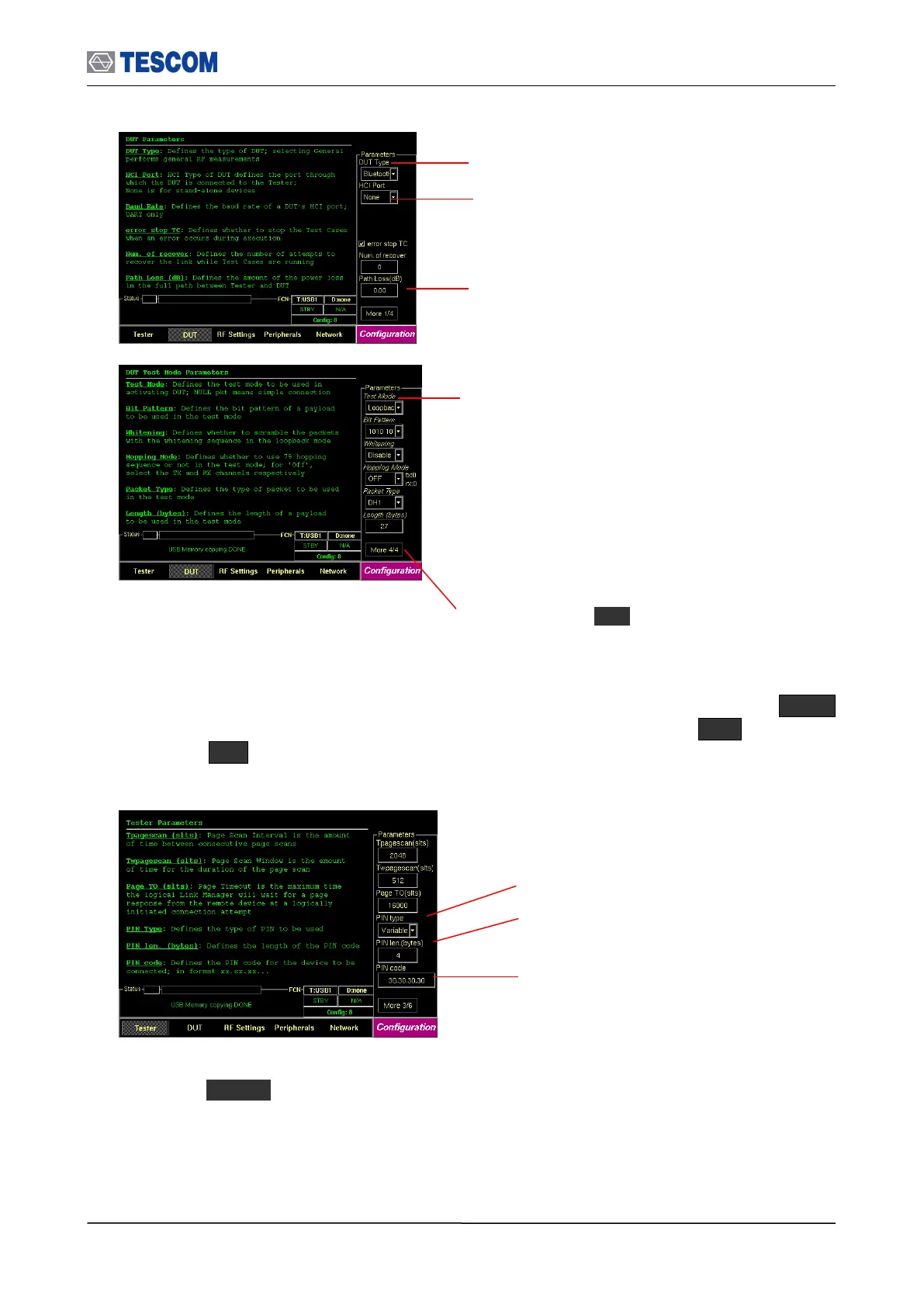
10 Input the PIN code: In case DUT requires authentication to connect, press Menu
Select “Configuration” from the pop-up menu on the screen M1 (Tester)
Press F8 two times for “More 3/5” menu. Configure PIN type, PIN length, and PIN
code.
11 If you want to configure the TC-3000C, the DUT, and RF conditions more in detail,
press Menu Select “Configuration” from the pop-up menu on the screen.
HCI Port: The HCI port on the rear
panel of the TC-3000C, which the
DUT is connected.
Path Loss: The path loss between
the TC-3000C and the DUT.
More 4/5: Press F8 in sequence to
access “More 4/5” screen.
Test Mode: You can choose Loopback or Transmitter or
Null Packet. Null Packet mode is used to test DUT that
has no test mode support. In this mode, the TC-3000C
uses the packets without payloads and measurements are
not performed in accordance with the Bluetooth Test
specification and some test cases can’t be carried out. A
NULL packet has no payload but can be used for power,
initial frequency, and spectrum without having to activate
test mode.
PIN Type: Fixed or Variable
PIN len. (Byte): Length of PIN
code in bytes
DUT Type: Select DUT Type from
General, BT and BT LE



 To Next Page