3.3 Operation Procedure (Link Analyzer)
43
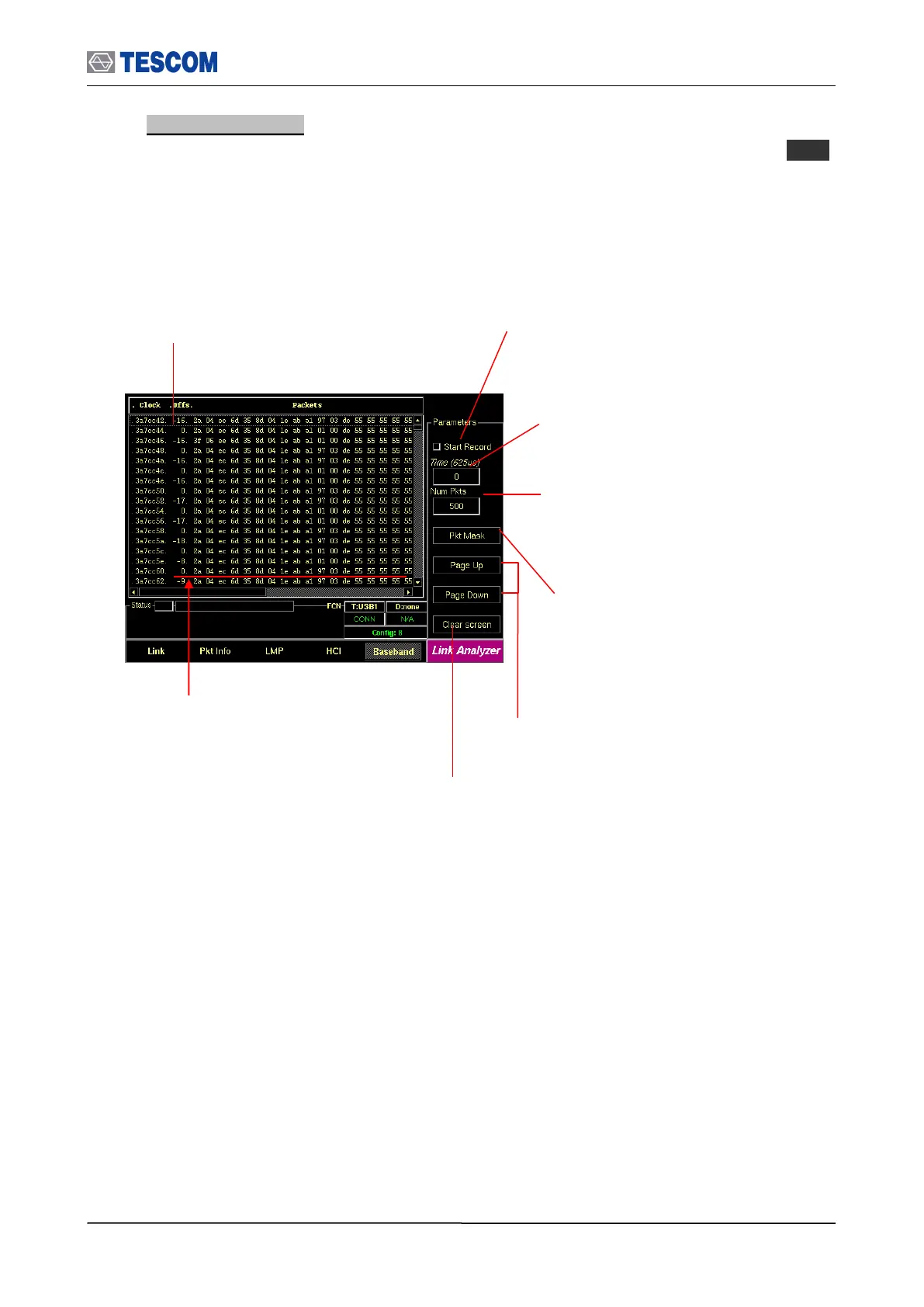
4. Baseband Packets: This screen shows the Baseband Packets transmitted between
the TC-3000C and the DUT in hexadecimal. To access Baseband screen, press M5
soft key.
Start Record: When this menu is checked the
TC-3000C begins to record the Baseband
packets during the record time or until getting
as many packets as specified in the Num Pkts
menu. When the recording is finished this
menu is set to unchecked.
Clear Screen: Clear all packet information
Cursor movement functions: For
easy scrolling the messages
Baseband Packets: This window displays the
master clock, time offset from start of Rx slot in
hundreds nano-seconds, and the Baseband
Packets transmitted between the TC-3000C and
the DUT in hexadecimal.
Record time: The TC-3000C records
the Baseband packets during this time.
“0” mean unlimited time.
Number of packets: The TC-3000C
records the Baseband packets until
getting as many packets as specified in
the menu.
Packet Mask: This menu lets you select
the packet categories for triggering.
Access code / Header / Payload
First 9 bytes represent an Access code, next
3 bytes represent a Header after FEC (only
18 bytes are meaningful. Payload starts from
13
th
byte.



 To Next Page