3.5 Operation Procedure (Measurement/Measurement2)
55
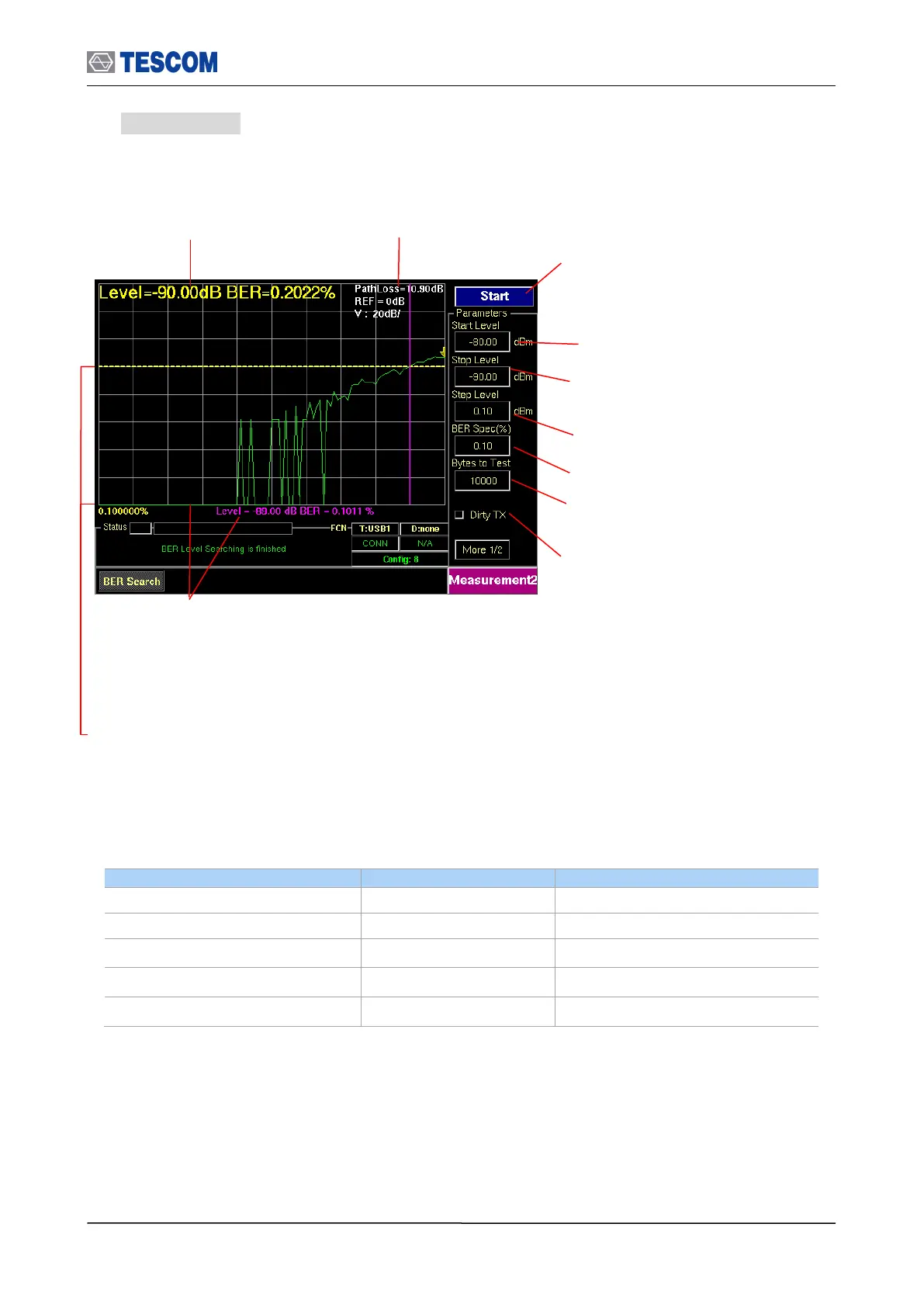
6. BER Search : This function will automatically find the sensitivity level for BER Spec (ex
0.1%). To execute BER Level Search function, the DUT must support loopback test mode.
Display currently executing
RF level and BER
Start Level: Set start power for BER Level
Search
Dirty TX: Enables “Dirty Transmission
mode” TC-3000C transmits the dirty
transmitter signal in accordance to the
Bluetooth Test Specification.
Line marker, Level and BER: When the start key is
pressed to run BER search function, the TC3000C will fine
sensitivity level and the Line marker will be placed that
sensitivity level position. Press the marker key to make it
active and display BER value of marker line.
Step Level: Set step Power of BER Search
Stop Level: Set last power for BER Level
Search
Bytes to Test: Specifies the length of data
to measure
Line marker and BER Spec(%) value: When the start key
is pressed, it will display target BER spec value. If the
marker is activated, it will display the BER value of marker
line.
The most top line means 100% and next
lines mean 1/10 of above line (Log scale)
Start/Stop: When this menu is pressed the
tests will run once. When the menu is
pressed again while the tests are running,
the tests will stop.



 To Next Page